Teleoperation Interfaces Compared: Leader-Follower, VR, Handheld

Leela Yanamaddi
September 24, 2026
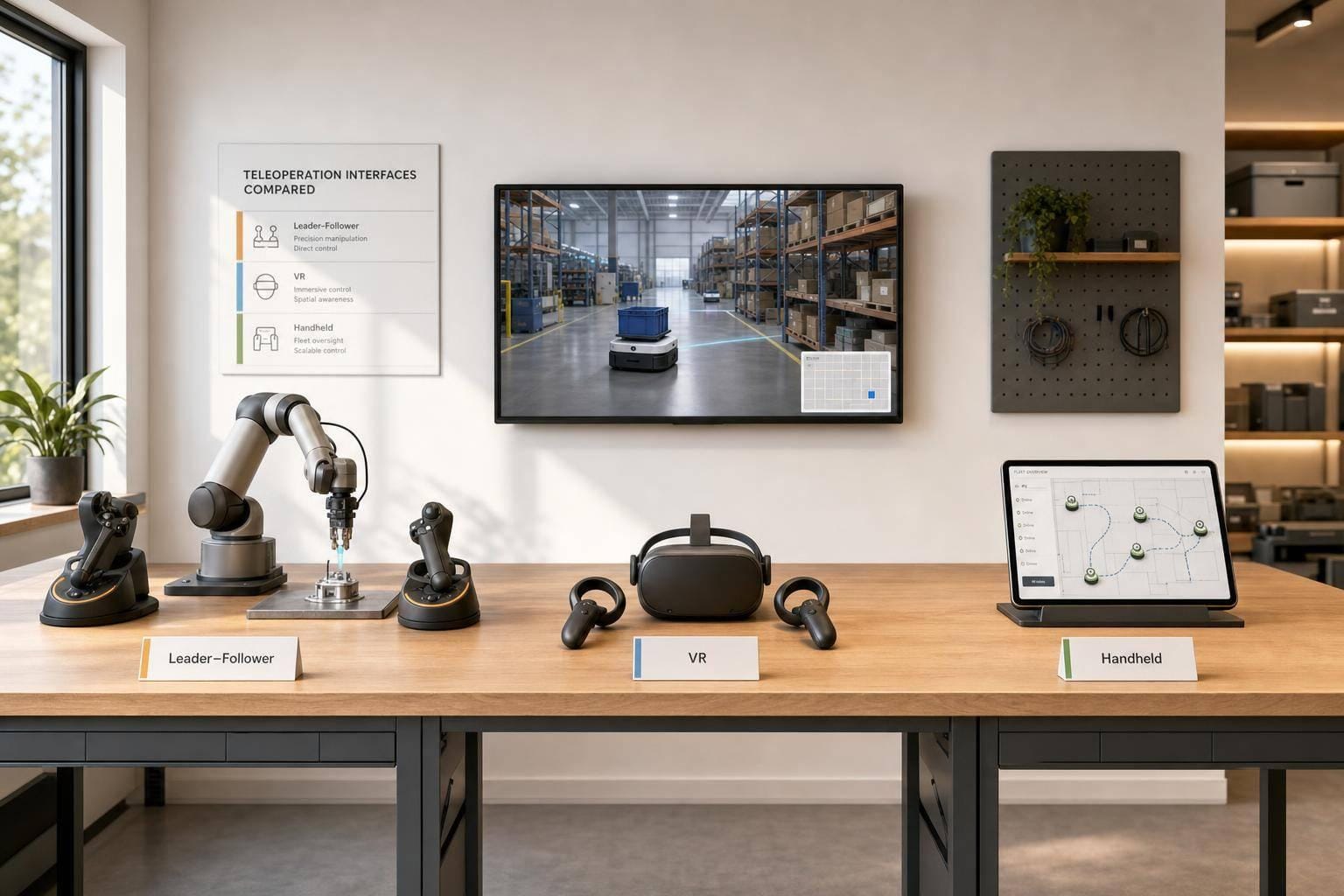
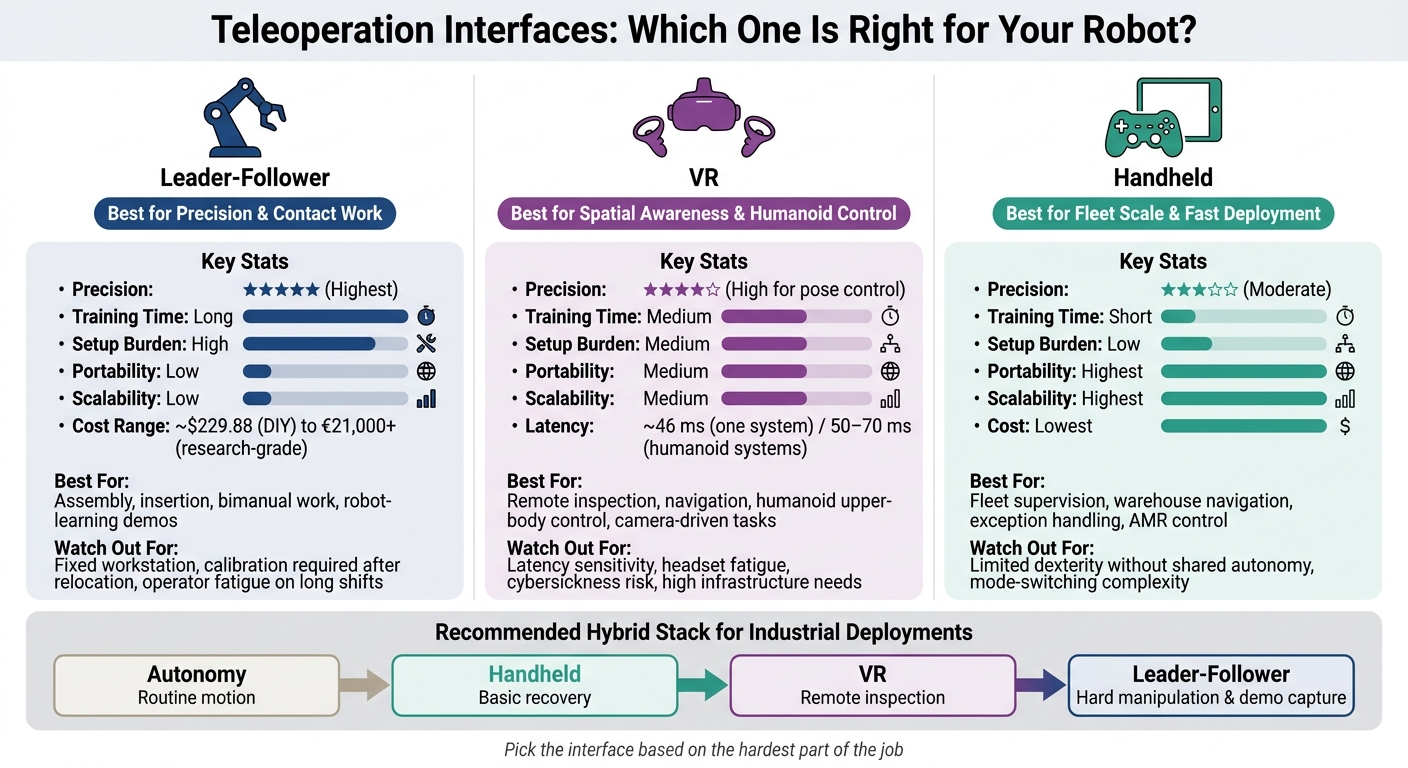
If I had to boil this down to one line, it’s this: pick the interface based on the hardest part of the job. For fine contact work, I’d start with leader-follower. For spatial awareness and humanoid control, I’d look at VR. For fleet support, resets, and mobile inspection, I’d use handheld control.
Here’s the short version:
- Leader-follower gives the highest precision and the best fit for contact-heavy work, but it has the highest setup burden, the most training, and the lowest portability.
- VR gives strong viewpoint control and works well for inspection, navigation, and humanoid upper-body control, but delay matters a lot. Published systems in the article report about 46 ms and 50–70 ms end-to-end delay.
- Handheld controllers are the lowest-cost and easiest to roll out. They fit warehouse navigation, fleet supervision, and short human takeovers, but they are weaker for direct dexterity.
I also see a clear pattern in cost and scale:
- A simple leader-follower build can start around $229.88
- A bimanual research setup can be around €21,000+
- Handheld tools sit at the low end on cost and are the easiest to scale across many robots
- VR sits in the middle, with headset, tracking, cameras, and low-delay compute adding to total spend
Teleoperation Interfaces Compared: Leader-Follower vs VR vs Handheld
BEAVR: Open VR Teleoperation for Robots
Quick Comparison
| Criteria | Leader-Follower | VR | Handheld |
|---|---|---|---|
| Control mapping | Physical arm-to-arm mapping | Tracked poses retargeted in software | Joysticks, buttons, touch input |
| Precision | Highest | High for pose control | Moderate |
| Contact handling | Best, especially with force feedback | Weaker than physical leader rigs | Limited without shared autonomy |
| Latency tolerance | Very low | Low | Medium |
| Training time | Long | Medium | Short |
| Ergonomics | Fixed station; arm and wrist fatigue can build | Headset and arm fatigue can build | Easiest for long use |
| Setup burden | High | Medium | Low |
| Best-fit tasks | Assembly, insertion, bimanual work, robot-learning demos | Inspection, navigation, humanoids, camera-driven tasks | Fleet support, AMR control, exception handling |
| Scalability | Low | Medium | Highest |
| Cost | Highest range overall | Middle | Lowest |
My take: you should not treat these as interchangeable tools. They solve different problems. If your team cares most about contact precision, use leader-follower. If it cares most about seeing and moving through space, use VR. If it cares most about speed to deploy and fleet coverage, use handheld.
And in many U.S. warehouse or industrial setups, the best answer is not one interface. It’s a mix: autonomy for routine motion, handheld for basic recovery, VR for remote viewing, and leader-follower for the hard manipulation cases.
2. Leader-follower rigs: built for precise, contact-rich manipulation
How leader-follower control works
In a leader-follower setup, the operator physically moves a leader arm, and the robot follower copies that motion with low latency. Sensors on the leader track joint angles, velocities, or the end-effector pose, then pass that data to the follower's controller. The most basic version uses direct joint-to-joint mapping, often called joint-space replication. More advanced systems add inverse kinematics, workspace scaling, and collision constraints.
This physical mapping cuts down on translation overhead. Put simply, the operator doesn't have to do as much mental conversion between hand motion and robot motion. GELLO-style systems use a small leader arm with matching kinematics so each joint lines up more naturally with the follower. They have been shown on Panda, UR5, and xArm7 arms in 6- and 7-DOF setups. Franka's force-feedback teleoperation setup pairs one FR3 as the leader with another as the follower, and sends contact forces back to the operator in real time. That matters when camera views don't fully reveal contact state. It's where this setup shines: the operator can both feel and repeat contact-heavy actions.
Where leader-follower rigs perform best
Leader-follower rigs work best in contact-rich tasks like grasping odd-shaped parts, inserting connectors, turning tools, routing cables, or coordinating two arms around one object. The physical leader gives the operator joint-level control and proprioceptive feedback that handheld devices don't provide.
They're also a strong fit for collecting robot learning demonstrations. Because the leader records synchronized joint states, gripper actions, and camera data in one pass, the data tends to work well for imitation learning and policy initialization. GELLO-style teleoperation has been used to improve access to human demonstration collection and to improve data quality for robot learning. Even so, good data still depends on accurate timestamps, task-boundary labels, and steady operator technique. And because performance depends on a fixed workstation, calibration has to be done carefully.
The downside is heavier hardware and less portability. Cost varies a lot by build. A SO-101 leader-plus-follower pair can be assembled from parts for about $229.88 in the U.S., which makes it a practical option for prototyping. At the other end, a full ALOHA-style bimanual research system is closer to €21,000. Those numbers are directional, not exact apples-to-apples comparisons, because they depend on parts, assembly, and support.
Day to day, the main operating costs show up in fatigue, fixed-workstation setup, and calibration time. Repeated arm elevation, wrist deviation, and sustained gripping can wear operators down over long shifts. Adjustable arm supports, counterbalancing, and scheduled breaks can help. If the system is moved, joint zeros, encoder ranges, and workspace limits need recalibration before operation starts again.
Leader-follower advantages and limits table
| Criterion | Assessment |
|---|---|
| Precision | High - especially for joint-level, fine, and bimanual manipulation |
| Contact handling | High with force/tactile feedback; moderate with vision-only control |
| Demonstration quality | High - physical motion, robot state, and interaction data can be synchronized |
| Hardware requirements | Leader arm, follower robot, control computer, cameras, and safety systems |
| Portability | Low to moderate - calibration is required after relocation |
| Scalability across morphologies | Moderate - best when leader and follower share compatible kinematics |
| Operator comfort | Moderate - manageable with gravity compensation and ergonomic supports; fatigue accumulates on long shifts |
| Integration complexity | Moderate to high - especially for bimanual control, grippers, force feedback, and safety constraints |
| Cost range | ~$229.88 (SO-101 parts BOM) to €21,000+ (ALOHA-style bimanual) |
When the task shifts from contact-rich manipulation to viewpoint-driven control, VR becomes the better comparison.
3. VR interfaces: best for immersion, viewpoint control, and humanoid operation
VR teleoperation uses a head-mounted display, or HMD, plus tracked inputs to control a robot’s viewpoint and motion through software retargeting. The operator wears a headset that shows a live camera feed, a simulation, or both. Inputs can come from handheld controllers, optical hand tracking, body trackers, or a mix of these.
From there, the headset can do different jobs depending on the robot. It might map poses, run inverse kinematics, support motion planning, or send locomotion commands. That’s why VR works best when viewpoint control matters more than direct force feedback.
How VR teleoperation differs from physical leader devices
A leader-follower rig gives the operator a physical link to the robot’s joints. VR does not. Instead, it uses tracked digital poses and software-based retargeting.
In plain terms, the position and orientation of a controller become the target pose for a robot gripper. On the Berkeley PR2 system, researchers used consumer VR hardware - HTC Vive controllers with six-degree-of-freedom pose tracking at 90 Hz - to control a PR2 robot inside a room-scale tracking space.
For humanoids, this setup is a natural fit. Head and hand tracking map cleanly to upper-body targets, while balance and walking can be handled by autonomous lower-body policies. Recent humanoid systems use headset and controller input for upper-body control, with joystick input for locomotion. Consumer VR has kept showing up in humanoid teleoperation for the same reason: it gives operators a lot of freedom without needing a physical leader device for every joint.
Where VR works well and where it breaks down
VR tends to shine in jobs where spatial awareness and viewpoint control do the heavy lifting. That includes remote inspection in cluttered or hazardous spaces, mobile robot navigation, humanoid whole-body coordination, and camera positioning.
A stereoscopic, head-coupled view can make a remote scene feel more natural. It can also help operators avoid mistakes. One mobile-robot study found that stereoscopic VR imagery significantly reduced collisions compared with nonstereoscopic viewing.
But VR can also fall apart fast when system problems stack up. Latency, tracking drift, occlusion, packet loss, and camera misalignment can all chip away at control quality. One published VR architecture measured about 46 milliseconds of total delay across local processing and communication parts. Other humanoid systems report about 50–70 milliseconds from VR input to robot motion.
That delay matters. As it climbs, correction accuracy drops, contact handling gets harder, and motion sickness becomes more likely. In practice, safety layers aren’t optional here. Systems need guardrails like:
- speed scaling
- virtual fixtures
- joint limits
- collision avoidance
- watchdog timeouts
VR comparison table: immersion, precision, and infrastructure demands
| Criterion | VR teleoperation assessment |
|---|---|
| Immersion | High; stereoscopic, head-coupled views make remote spaces feel natural |
| Spatial awareness | High when camera calibration and depth rendering are good; drops with poor stereo, drift, or delayed feedback |
| Manipulation precision | Moderate to high for pose-based positioning; generally weaker than a force-reflecting leader device for delicate contact tasks |
| Latency sensitivity | High; visual and command delays affect correction accuracy, contact handling, balance, and operator comfort |
| Operator fatigue | Moderate to high over long sessions due to headset weight, neck posture, arm elevation, and possible cybersickness |
| Navigation | Strong fit, especially for first-person inspection and obstacle-rich environments |
| Humanoid control | Strong fit when head, hand, and body tracking combine with IK, balance control, and collision avoidance |
| Infrastructure requirements | High; requires HMDs, tracking, calibrated cameras, low-latency networking, rendering and control compute, safety layers, and ongoing maintenance |
If speed of deployment and fleet scale matter more than immersion, handheld controllers are usually the simpler path.
4. Handheld controllers: fastest to deploy and easiest to scale
When immersion and body matching matter less than scale, handheld control is the most straightforward choice. This group includes joysticks, gamepads, teach pendants, tablets, and phones. These tools send motion commands and switch modes, but they don't copy the operator's arm or body movement.
Why handheld control is common in fleets, warehouses, and inspection
Handheld control shows up all over fleets, warehouses, and inspection work for a simple reason: it's easy to roll out, easy to carry, and low-cost. Boston Dynamics Spot, for example, is operated by tablet over Wi‑Fi. Inspection teams use joysticks to drive ground, aerial, or underwater robots and adjust camera views without extra hardware or site changes.
This setup also works well for short human takeovers. An operator can step in, clear an issue, and hand the robot back to autonomous operation. That kind of stop-and-go intervention fits handheld control well.
Teach pendants are more limited in scope. They're mostly used for jogging, point teaching, program edits, and supervised testing on one robot controller.
The downside is simple too: you give up some direct dexterity.
The handheld tradeoff: scalable supervision, lower dexterity
The main weakness is the lack of physical correspondence. Operators have to judge motion from video feeds and on-screen cues, so performance depends a lot on video quality, interface design, and how the controls are mapped. A two-stick gamepad squeezes many degrees of freedom into just a few inputs. Once you move past basic driving, that usually means mode switching or step-by-step control. Research that compared joystick control with leader-follower control for driving and box-moving tasks found that leader-follower did better on performance, task time, and user satisfaction.
Still, software can take handheld control further than you'd expect. One study used a standard Sony DualShock 3 controller and mapped the analog sticks plus shoulder buttons to six-degree-of-freedom end-effector commands. It reported a 100% success rate across pick-and-place, microwave interaction, door-opening, and toolbox tasks, with average completion times from 42.0 seconds for pick-and-place to 83.6 seconds for the toolbox task. So no, gamepads don't equal leader-follower dexterity. But with abstraction and autonomy, they can do a lot more than just drive a robot around.
Handheld control also fits multi-robot supervision better than the other options, as long as routine work stays autonomous and humans only step in for exceptions. A tablet can show health status, battery level, localization, alerts, and camera feeds for several robots at once. The operator only takes direct control when one gets stuck or loses its place. What doesn't scale well is constant manual driving or dexterous manipulation across many robots at the same time. At that point, human attention becomes the limiting factor.
The table below shows where this tradeoff matters most.
Handheld comparison table: setup speed, cost, and task fit
Use handheld control when deployment speed and operator throughput matter more than embodied manipulation.
These are rough estimates, not procurement quotes.
| Criterion | Handheld | Leader-follower | VR |
|---|---|---|---|
| Setup speed | Fastest; standard or compact devices, minimal infrastructure | Slowest; specialized hardware and calibration required | Moderate; headset, tracking, and software integration needed |
| Cost | Lowest | Highest | Moderate |
| Dexterous manipulation | Weak without shared autonomy | Strongest for coordinated or bimanual tasks | Better than a gamepad for 6-DOF motion; generally less direct than a leader device |
| Task fit | Fleet supervision, inspection, exception handling, AMR navigation | Contact-rich assembly, bimanual manipulation, demonstration collection | Humanoid control, spatial inspection, viewpoint-driven tasks |
| Operator training | Short for basic driving; longer for complex mode mappings | Intuitive after calibration, but rig-specific training required | Moderate; users must learn tracking, embodiment, and safety procedures |
| Fleet scalability | Highest for supervisory workflows | Low; typically one operator per robot | Moderate; one operator usually focuses on one embodied robot |
5. Choosing the right interface for your deployment
The right interface is the one that fits the hardest part of the workflow, not the one with the longest feature list. Pick based on the task, how much autonomy the robot has, network conditions, and what data you need to collect.
Task-by-task starting points
Begin with the task’s main control demand. The table below links common robotics jobs to a good starting interface and points out the main catch to watch for.
| Task | Recommended interface | Key caveat |
|---|---|---|
| Fine manipulation and contact-rich assembly | Leader-follower | Needs calibration, workspace, and training. |
| Bimanual manipulation | Leader-follower or tracked VR with two-hand input | Needs reliable retargeting and occlusion handling. |
| Remote inspection | VR | Camera placement and delay dominate. |
| Warehouse navigation | Handheld | Poor fit for continuous dexterity. |
| Warehouse picking | Handheld for exceptions; leader-follower or VR for difficult picks | Match the interface to intervention frequency and cost per intervention. |
| Humanoid whole-body control | VR with full-body tracking or a specialized leader-follower rig | Retargeting, balance control, safety envelopes, and operator fatigue are substantial challenges. |
| Autonomous recovery | Handheld; VR or leader-follower for complex physical recovery | Define when control transfers to the operator. |
| Robot-learning demonstrations | Leader-follower for contact precision; VR for spatial or whole-body tasks | Measure usable demonstrations per hour, not just task success. |
| Multi-robot supervision | Handheld or software dashboard with shared autonomy | Direct continuous control of several robots at once is generally impractical. |
A setup that works well on a single-arm robot can fall apart on a humanoid or a mobile manipulator. That’s where teams often get tripped up.
After task fit, make sure the control stack can handle the latency, autonomy level, and logging the job calls for.
Infrastructure requirements behind every interface choice
The controller is just one piece of the system. On the robot side, you need real-time command handling, state estimation, camera and sensor streaming, time synchronization, workspace limits, watchdogs, and a safe-stop mechanism. On the operator side, you need low-latency video, status alerts, ergonomic controls, and a clear signal showing which system has control authority.
Latency tolerance changes by task. Contact-rich manipulation is very sensitive to delay and jitter because the operator has to react to visual alignment and object motion in real time. Navigation and inspection can often handle more delay if the robot has collision avoidance, speed limits, and waypoint-level commands. Supervisory intervention can also work with spotty connectivity, as long as the robot can pause safely or move into a predefined recovery state when the connection drops.
The data layer also matters when teleoperation sessions need to double as training data. Your teleoperation stack should capture synchronized commands, robot state, sensor streams, task outcome, intervention timing, and autonomy handoffs. It should also log why an intervention happened - perception failure, grasp failure, localization error, or safety concern. That way, the data helps fix the right subsystem instead of just piling up more logs.
Conclusion: simple rules for selecting leader-follower, VR, or handheld
Once task fit and infrastructure are clear, the choice usually comes down to four simple rules:
- Choose leader-follower when precision, contact control, or high-quality manipulation demonstrations matter most.
- Choose VR when immersion, spatial awareness, inspection, navigation, or humanoid whole-body control sits at the center of the task.
- Choose handheld when low cost, fast operator training, portability, and fleet-scale intervention matter most.
- Use a hybrid architecture when different parts of the workflow need different types of control. A common example is autonomous navigation for routine movement, handheld for normal recovery, VR for remote inspection, and a leader-follower station kept for hard manipulation or demonstration capture.
Look at total cost of ownership, not just the controller’s purchase price. That means operator training, calibration, video hardware, networking, software integration, maintenance, and the cost of failed or repeated interventions all count.
A pilot built around representative tasks will tell you far more than a polished demo video if it tracks:
- task success
- recovery time
- intervention rate
- data quality
FAQs
Which interface should I pilot first?
Start with a bounded pilot tied to one measurable process. Pick something where success is easy to track. That gives you a clean way to see what’s working and what isn’t.
Don’t choose based on the interface alone. Choose the layer that fits your technical maturity, your data sovereignty needs, and your repeatability goals. In plain terms: go with the setup your team can support, trust, and run more than once without a fire drill.
It also helps to start in advisory mode first. Let the system guide, recommend, or flag actions before it starts taking them on its own. That’s often the safest way to prove the concept. Once the process is stable and the results look good, you can move toward autonomous execution.
Let the task make the call. Some work depends on fast judgment. Other work depends on hands-on skill. That difference matters. So does your current setup: do you already support data collection, and do you have human-in-the-loop intervention ready when something needs a second look?
How much latency is too much?
Latency becomes a problem when it goes past the operator’s ability to react to changes in the environment or feedback from the robot. Once that happens, control gets weaker and safety takes a hit, which increases the risk of line stoppages or safety incidents.
In teleoperation, that matters a lot. Operators work within normal human reaction time, but safety shutoffs and real-time anomaly detection have to happen much faster at the edge. If decision latency isn’t kept low, exception recovery slows down and throughput drops.
When does a hybrid setup make sense?
A hybrid setup makes sense when you need to close the gap between machine autonomy and human judgment in changing environments.
It tends to work best in high-mix, variable production. Robots can take care of routine work on their own, while remote operators step in for exceptions, more complex situations, or tasks that call for fast, nuanced judgment. That setup helps keep uptime steady, protect operational know-how, and create data that can improve future autonomy.