What Does Robot Teleoperation Actually Cost Per Hour?

Leela Yanamaddi
October 20, 2026
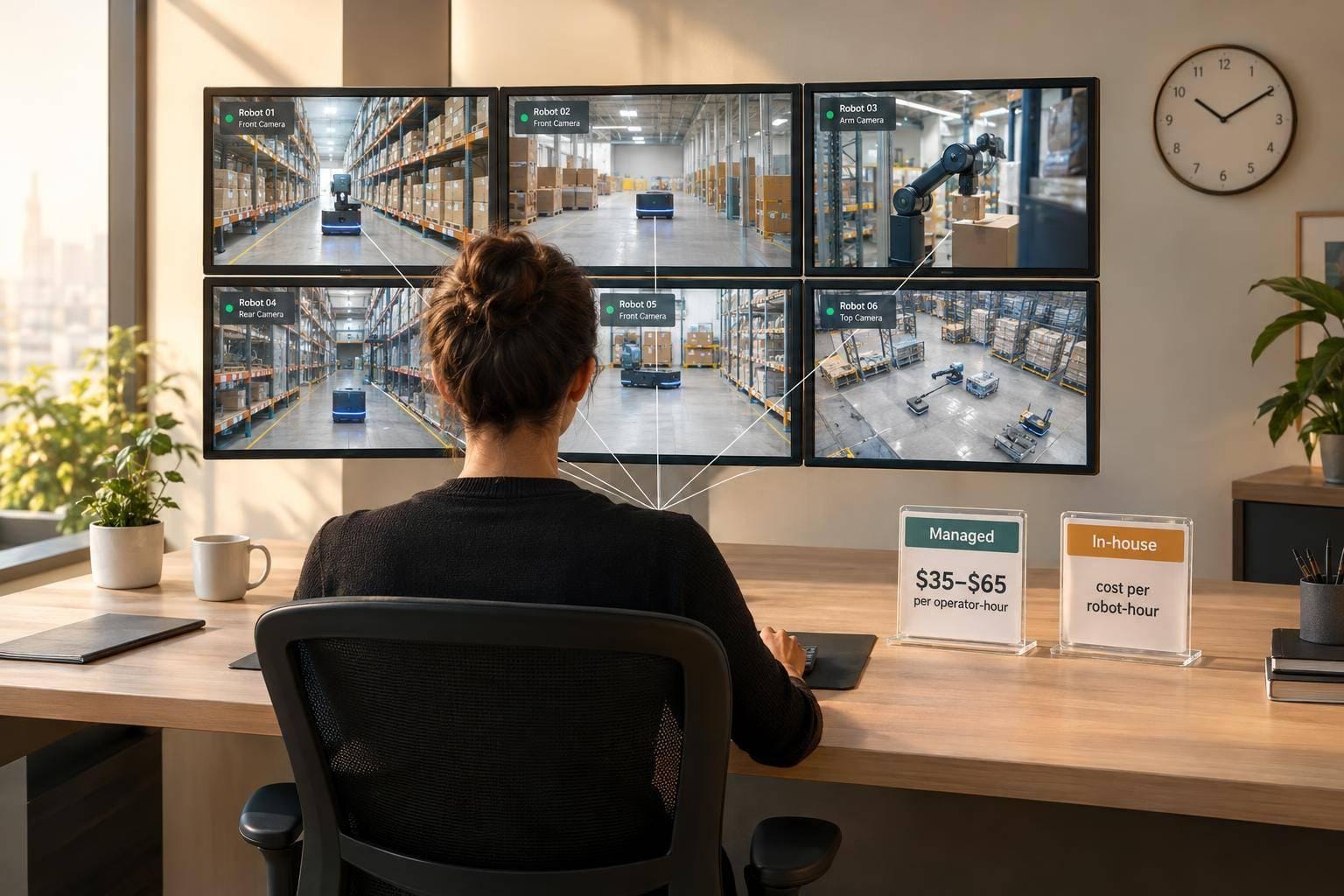
I’d budget $35–$65 per staffed operator-hour for straightforward robot support - not per robot. At one operator per 10 robots, that’s $3.50–$6.50 per supported robot-hour before any costs left outside that rate.
The distinction matters: wages, staffed hours, and active intervention hours aren’t the same thing. I compare costs using <u>total cost ÷ supported robot-hours</u>, with the same coverage and response targets.
Here’s what I include:
- Labor: Pay or service charges, plus recruiting, training, and supervision.
- Workload: Intervention frequency, duration, and simultaneous requests - not just average hands-on time.
- Coverage: Breaks, standby time, backup staffing, and after-hours support.
- Tools: Software, consoles, connectivity, data storage, and setup fees.
Quick Comparison
| Cost factor | Managed service | In-house team |
|---|---|---|
| Labor billing | May charge per staffed hour, intervention hour, or robot | Pays for scheduled staff time, including idle time |
| Coverage | Check minimums, backup terms, and extra charges | Budget for scheduling, relief, and backup |
| Software and support | May be bundled or billed separately | Budget and manage directly |
| Best fit | Variable demand or limited staffing capacity | Predictable demand or close engineering support |
My rule: compare the same service, not just the hourly quote. I’d test low-, expected-, and high-demand budgets before choosing managed, in-house, or hybrid support.
1. Managed Teleoperation Services
Hourly Labor Costs
Published examples range from $12 to $45 per operator-hour: about $12 for basic managed staffing, $25 for standard monitoring and intervention support, and $45 for advanced precision or VR teleoperation. These are sample service prices - not operator wages or an industry benchmark. Check the staffing location, required skills, and whether the price includes recruiting, training, scheduling, and supervision.
To compare rates, convert them into cost per supported robot-hour.
Intervention Staffing
Calculate labor cost per supported robot-hour as billable operator cost per hour × operators ÷ robots supported.
At $25 per hour, one operator supporting 10 robots costs $2.50 per supported robot-hour.
Check whether waiting, documentation, and escalation time are billable. Then test the proposed staffing ratio during peak demand.
Coverage and Response Times
Spell out coverage hours, weekend and holiday service, response deadlines, and the maximum number of concurrent incidents in the contract. 24/7 monitoring does not mean continuous attention to every robot.
Ask who provides break coverage and backup operators, whether standby capacity costs extra, and who escalates issues to engineering. The agreement should also define safe-stop behavior if the remote connection fails. These terms determine whether the hourly quote covers the full service or just labor.
Software and Overhead
Managed services may bundle operators and the teleoperation platform or bill for them separately.
One published model charges $50 per robot per month for the platform, including 50 teleoperation hours, plus $0.90 per additional hour; managed staffing starts at $12 per operator-hour.
Break out platform subscriptions, streaming usage, storage, robot connectivity, hardware, and workforce charges. Confirm who handles robot-specific training, quality reviews, reporting, API integration, and technical support.
Spread setup fees over the contract term. Request a sample invoice that shows minimum commitments, usage overages, and after-hours charges. Use these same cost categories when comparing managed services with an in-house team.
2. In-House Teleoperation Staffing
In-house teleoperation has the same cost categories as a managed service. The difference: your team pays and manages those costs directly.
Hourly Labor Costs
Budget $22–$35 per paid hour for general teleoperation and $30–$55 for experienced, on-site, technical, or 24/7 work. Then add payroll taxes, benefits, workers’ compensation, overtime, shift premiums, recruiting, and paid downtime. You still need coverage when robots sit idle, so those hours add to your in-house cost.
For context, the Bureau of Labor Statistics reported private-industry compensation of $45.65 per hour worked in June 2025: $32.07 in wages and $13.58 in benefits. Use that as a broad employer-cost benchmark - not a teleoperator rate or a full operating cost.
Intervention Staffing
Collect at least four weeks of representative operating data before setting staffing ratios. Track interventions per robot-hour, average and 95th-percentile intervention duration, simultaneous incidents, and escalation rates.
Low intervention utilization doesn’t cut payroll if an operator must stay available. Add robots only when your team can still meet peak demand and response-time targets.
Coverage and Response Times
After pay, coverage is the next major cost driver. One 24/7 post needs 8,760 coverage hours per year, typically requiring about 4–6 full-time-equivalent operators once you account for leave, training, and backup coverage.
Your team must recruit, build schedules, and arrange relief - not just fill shifts on paper. Budget separately for a shift lead and on-call technical escalation, and set clear response-time targets for each.
Software and Overhead
Labor is only part of the internal bill. Include paid onboarding, supervised training, recurring safety training, and incident reviews. Spread recruiting and initial training costs across the productive hours you expect before an employee leaves. Account for breaks, meetings, and equipment checks when calculating available coverage. Don’t count paid leave twice if your compensation model already includes it.
Also budget for teleoperation consoles, software, logging, cybersecurity, primary and backup connectivity, equipment replacement, and control-room space. Allocate supervisor and engineering time based on actual support hours. Divide total allocated operating cost by supported robot-hours to compare your internal budget on the same basis.
Fleet Budget Examples: Calculate Cost per Supported Robot-Hour
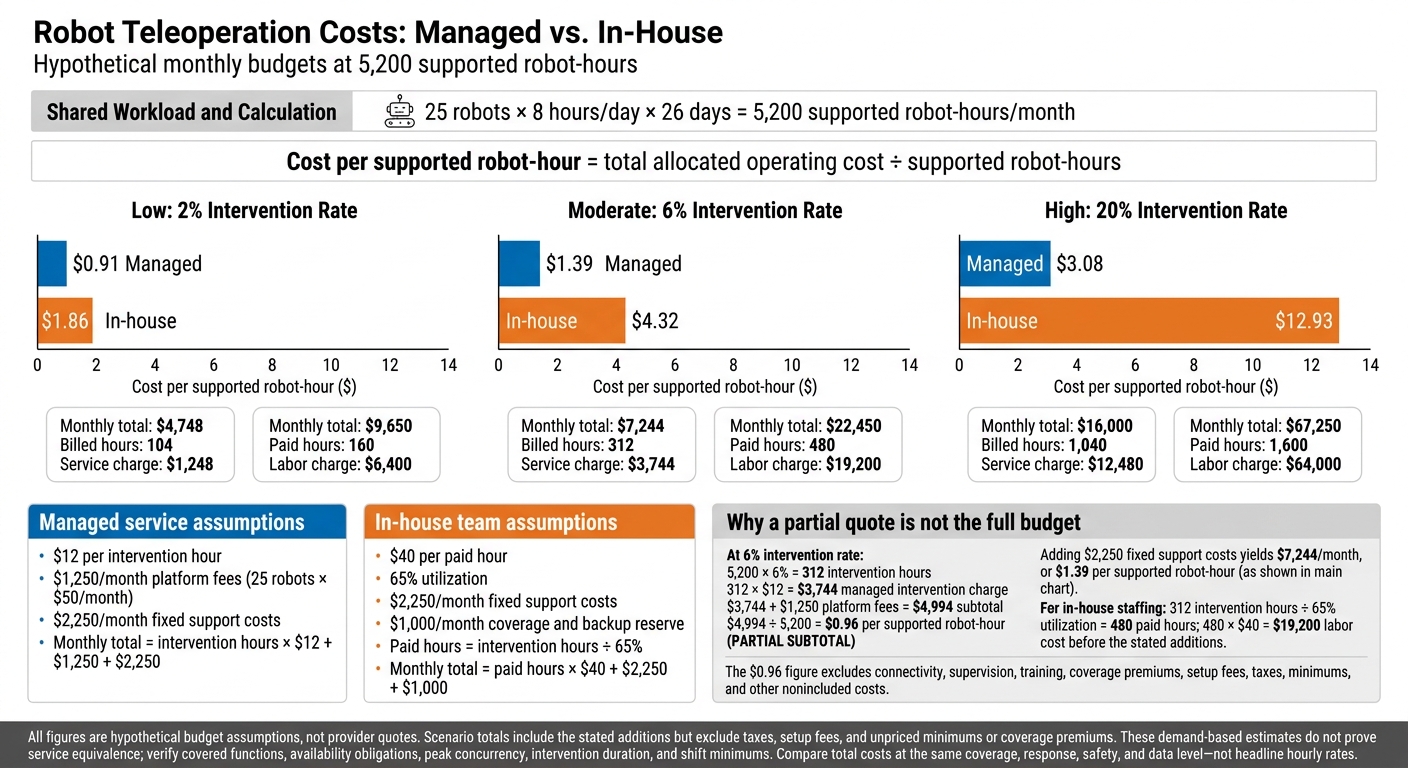
Robot Teleoperation Costs: Managed vs. In-House
These examples put teleoperation costs into one unit so you can compare in-house and managed support. The first looks at managed billing alone. The second compares both models under the same workload. All figures are hypothetical budget assumptions, not provider quotes.
Include every cost left out of the quoted rate. Calculate supported robot-hours from actual operating hours - not purchased fleet capacity or theoretical 24/7 capacity.
Item Calculation Result Supported robot-hours 25 robots × 8 hours/day × 26 days 5,200 Intervention hours 5,200 × 6% intervention time 312 Managed intervention charge 312 × $12/hour $3,744 Platform fees 25 × $50/month $1,250 Subtotal $3,744 + $1,250 $4,994 Cost per supported robot-hour $4,994 ÷ 5,200 $0.96 This subtotal excludes connectivity, supervision, training, coverage premiums, setup fees, taxes, minimums, and other nonincluded costs. At 65% utilization, 312 intervention hours require 480 paid hours, or $19,200 at a $40 loaded hourly rate.
Low-, Moderate-, and High-Intervention Budget Scenarios
With the workload held constant, the comparison below shows how the intervention rate changes the hourly budget.
Both models use 5,200 supported robot-hours per month, with the same fleet size, service window, response targets, and task demand. Managed billing assumes $12 per intervention hour plus $1,250 monthly platform fees; internal labor assumes $40 per paid hour at 65% utilization.
Both models add $2,250/month in fixed support costs; internal budgets also add a $1,000 coverage and backup reserve.
Intervention rate Intervention hours Model Billed or paid hours Labor or service charge Monthly total Cost per supported robot-hour Low: 2% 104 Managed 104 $1,248 $4,748 $0.91 Low: 2% 104 Internal 160 $6,400 $9,650 $1.86 Moderate: 6% 312 Managed 312 $3,744 $7,244 $1.39 Moderate: 6% 312 Internal 480 $19,200 $22,450 $4.32 High: 20% 1,040 Managed 1,040 $12,480 $16,000 $3.08 High: 20% 1,040 Internal 1,600 $64,000 $67,250 $12.93 Totals include the stated additions but exclude taxes, setup fees, and unpriced minimums or coverage premiums.
These are demand-based estimates, not proof that the services are equivalent. Check that both prices cover the same functions and availability obligations. Test both budgets against peak concurrency, longer interventions, and shift minimums. Then recalculate intervention hours as intervention count × average duration and price any extra capacity needed.
Pros and Cons: When Each Model Fits
Use the same cost basis as the prior section to compare each model against workload volatility and control needs.
| Model | Advantages | Disadvantages | Best-fit conditions |
|---|---|---|---|
| Managed services | Less work recruiting, onboarding, scheduling, processing payroll, and supervising daily tasks; pooled staffing across locations; potential access to backup and after-hours coverage. | Minimum commitments, setup or integration fees, coverage premiums, provider dependence, and possible data-access restrictions. | Variable demand, coverage across multiple time zones, fast launches, or too little work to fill dedicated shifts. |
| In-house staffing | Direct control over training, procedures, data access, escalation, and incident review; deeper product expertise. | You handle hiring, training, supervision, backup coverage, and infrastructure - and pay for idle capacity. | Predictable workloads, specialized tasks, confidential operations, or frequent coordination with engineering. |
Match your choice to demand swings, control needs, and how escalations work. In-house staffing suits predictable, sensitive, or engineering-heavy workflows only if you budget for relief coverage.
Check who can access audit records, who owns incidents, and who has authority to approve recovery actions. Then pilot the workload and track response latency, first-time resolution, escalations, repeat interventions, and cost per supported robot-hour.
If routine support and expert escalation require different skills, split the work. A hybrid arrangement pairs managed routine support with internal specialists. Define escalation triggers, handoffs, response targets, incident-record ownership, and recovery authority. Use the same cost-per-supported-robot-hour metric to test whether this split lowers total costs.
Conclusion: Compare Total Cost at the Same Service Level
Teleoperation has no single hourly price. Compare direct wages, fully loaded staffed hours, and supported robot-hours separately.
For recruiting, start with a wage range of $22–$33 per hour. For straightforward support, budget $35–$65 per staffed operator-hour, with higher costs for specialized, 24/7, or safety-critical work. These are planning estimates, not fixed prices. Use your actual staffing ratio to convert staffed-hour costs into cost per supported robot-hour.
Recalculate when intervention frequency, handling time, or operator-to-robot ratios change. Better autonomy may reduce hands-on work, but it doesn't eliminate availability costs. Ask for itemized quotes that spell out billing units, staffing assumptions, minimums, and guarantees.
Using the framework from the examples above, build low, expected, and high budgets by robot, site, task, and shift. Include coverage, training, supervision, software, connectivity, data handling, and incident response. Compare managed and in-house total costs at the same coverage, response, safety, and data level, then divide by supported robot-hours - not headline hourly rates.
FAQs
How can I budget before I have intervention data?
Define what makes a demo acceptable, then estimate how many demos the station can complete:
- Accepted demos/hour = attempts/hour × acceptance rate
- Attempts/hour = 60 ÷ (demo duration + reset time, both in minutes)
Calculate the hourly station cost, including fully loaded operator wages, supervision, hardware, facilities, connectivity, software, storage, and maintenance. Multiply that cost by the planned monthly operating hours, and budget for failure recovery and quality review.
Run optimistic, expected, and conservative scenarios using different acceptance rates and utilization levels.
When does in-house teleoperation become more cost-effective?
In-house teleoperation costs less when its fully loaded cost per accepted, training-ready episode falls below an external provider’s. It’s best suited to confidential workflows, protocols that change often, or work requiring long-term exclusivity.
Keep utilization and acceptance rates high so downtime and rejected sessions don’t drive up costs. Build a budget in U.S. dollars that includes labor, supervision, hardware depreciation, software, and storage. Compare cost per accepted episode, not just hourly rates.
How much backup capacity should I budget for?
Staff around your exception rate × average handling time, not a fixed robot-to-operator ratio. Use your logs to account for incidents that happen at the same time, response delays, recovery time, breaks, safety coverage, and idle time.
Build budgets for conservative, expected, and optimistic scenarios. Weak recovery systems can cut throughput by 10% to 15%. Treat backup capacity as a core operating cost, and adjust your budget as autonomy matures.