Managed Teleop Ops vs Hiring Your Own Operators: The Break-Even Math

Leela Yanamaddi
October 19, 2026

I’d compare total monthly costs at the same service level - not a managed fee against an operator’s wage. Managed teleop often costs less with low demand or long coverage hours. In-house teams can cost less when steady work keeps paid staff busy.
The article’s hypothetical examples show why coverage matters: at 120 productive hours, managed service costs $8,200 per month, versus $9,000 for single-shift in-house coverage or $30,000 for 24/7 coverage.
I’d check three things before choosing:
- Service: Match response times, safety rules, monitoring duties, and backup coverage.
- Total cost: Include fees, benefits, hiring, training, tools, supervision, and startup costs.
- Staffing: Test utilization, demand peaks, absences, and whole-employee hiring - not just average workload.
Quick Comparison
| What I’d compare | Managed teleop | In-house operators |
|---|---|---|
| Cost inputs | Platform, usage, minimums, coverage fees, and customer-paid costs | Loaded wages, hiring, training, tools, and supervision |
| Coverage | Verify promised availability and peak capacity | Fund shifts, breaks, leave, and backups |
| Often costs less when | Demand is low, uneven, or spread across long hours | Work is steady and staff stay busy |
| Break-even check | Apply contract pricing tiers | Apply coverage floors and whole-employee costs |
My decision rule: <u>choose the lower coverage-adjusted monthly total</u>, then track cost per completed intervention as demand changes.
2. Compare Managed Fees With Total In-House Costs
Build a monthly ledger and label each cost bundled, separate, or customer-paid. Confirm those boundaries in the contract so both totals cover the same service level. Then separate what the provider includes from what the customer still pays.
| Cost category | Managed treatment | In-house treatment | How it enters the calculation |
|---|---|---|---|
| Platform and tooling | Software, consoles, logging, and support may be bundled or billed separately | Customer pays for licenses, consoles, connectivity, storage, and security tools | Monthly fees plus allocated equipment costs |
| Operator labor and benefits | Provider wages and benefits sit inside the managed labor fee | Customer pays wages, payroll taxes, benefits, overtime, and shift premiums | Managed billable usage vs. fully burdened employee hours |
| Minimums and coverage | Separate minimum spend, reserved capacity, dedicated coverage, and premium shifts | Scheduled employees and backup staff | Apply contract minimums and add coverage premiums separately |
| Recruiting and training | Onboarding may be bundled; site-specific training may remain customer-paid | Customer pays for recruiting, onboarding, and training | Allocate startup costs; add recurring costs separately |
| Supervision and QA | Scheduling, escalation, and reporting may be bundled or billed separately | Customer pays for supervision, scheduling, coaching, and QA | Monthly labor allocation, excluding bundled charges |
| Integration and safety oversight | Integration, site support, security review, and safety tasks may remain customer-paid | Customer pays for equivalent work | Recurring costs plus allocated startup costs |
Managed Platform, Usage, and Coverage Fees
A managed quote may combine platform fees, operator usage, minimum commitments, onboarding, dedicated coverage, and night, weekend, or holiday premiums. Shared staffing can cut idle time. But response targets, concurrency limits, qualifications, and capacity still limit the savings.
Once you've assigned each cost, calculate the monthly managed total:
$$ C_{\text{managed}} = F_p + \max(r_m H_m, F_{\min}) + F_d + F_s + C_{\text{site}} + \frac{F_o}{N} $$
Here, (F_p) is the monthly platform fee, (r_m H_m) is billable usage, and (F_{\min}) is the minimum usage spend. Dedicated capacity and premium shifts appear as (F_d) and (F_s). Recurring site costs the customer still pays belong in (C_{\text{site}}), while (F_o/N) spreads onboarding costs over (N) months.
Use this total as the managed-side input for the break-even calculation. Use the maximum only when the minimum replaces usage charges, not when it's an added reservation fee. For per-intervention billing, use price × intervention count.
In-House Labor, Hiring, Training, and Tools
Use the same structure for in-house costs so you're comparing the same scope of service.
Start with a documented base wage and employer burden - not an assumed teleoperator market rate. Separate startup costs, including recruiting, initial training, consoles, and integration, from recurring costs such as supervision, scheduling, QA, refresher training, security, connectivity, and logging.
Spread startup spending over a stated period, such as 36 months, and test 12- and 24-month periods too. Add overtime and shift premiums separately unless the labor rate already includes them.
$$ C_{\text{in-house}} = r_{\text{burdened}} H_{\text{paid}} + C_{\text{supervision}} + C_{\text{tools}} + C_{\text{training/security}} + C_{\text{customer}} + \frac{C_{\text{startup}}}{N} $$
Idle Time, Relief Staffing, and Customer Costs
Paid hours aren't intervention hours. Budget for scheduled availability, breaks, vacations, absences, turnover, and backup operators. Include nights, weekends, and holidays when required.
Count each expense once. Don't add benefits already included in a loaded labor rate. If paid labor includes training hours, don't add another training wage allowance. And if headcount already includes relief staff, don't apply an extra relief multiplier.
3. Calculate Break-Even Workload and Staffing
Once both models provide the same service level, find the workload where their total monthly costs cross.
Let (I) be monthly interventions and (t) be average handling time in hours. Productive hours are (H = I \times t), and (u) is productive hours divided by paid hours.
For costs, use (P) for the managed fixed monthly fee, (r_m) for the managed productive-hour rate, (r_i) for the loaded in-house paid-hour rate, and (F_i) for fixed monthly internal costs.
Find the Workload Break-Even Point
If coverage does not set the staffing floor, find the workload threshold by setting the two costs equal:
[ C_{\text{managed}} = P + r_mH \qquad C_{\text{in-house}} = F_i + r_i\frac{H}{u} ]
[ \boxed{H^* = \frac{F_i - P}{r_m - r_i/u}} \qquad \boxed{I^* = \frac{H^*}{t}} ]
The denominator tells you how costs change as workload grows:
- If (r_m - r_i/u > 0), higher workload eventually favors in-house staffing. If it equals zero, fixed costs decide.
- If (r_m - r_i/u < 0), higher workload favors managed operations. Managed operations stay cheaper at every volume if (P \leq F_i).
If (H^* < 0), report which option is cheaper at zero workload instead.
Apply contract minimums before using (H^*). With a usage minimum (M) and customer-paid costs (F_c), use:
[ C_{\text{managed}} = P + \max(r_mH, M) + F_c ]
Solve within each pricing tier, then check that the crossing falls inside that tier.
Account for Coverage and Whole-Employee Hiring
Workload is only part of the calculation. Coverage requirements set the minimum roster.
Let (C) be simultaneous staffed positions and (T) be monthly coverage hours per position. Required position-hours are (S = C \times T).
Convert (S) into (R): the paid hours needed after allowing for breaks, leave, training, and other planned absences. Use whichever is larger - workload-driven hours or coverage-driven hours - then round to whole employees using paid monthly hours per employee, (E).
[ Q = \max(H/u, R) \qquad C_{\text{in-house}} = F_i + r_iQ ]
[ N = \left\lceil \frac{Q}{E} \right\rceil \qquad C_{\text{in-house, rounded}} = F_i + r_iNE ]
Do not turn simultaneous positions directly into headcount. Apply relief and utilization assumptions first, then round. Avoid counting the same lost time twice, and check the roster against shifts, overtime, handoffs, days off, and backup needs.
If employees are scheduled below full capacity, use rostered hours instead of (NE). Recalculate at each staffing step and compare managed costs with the roster cost for that headcount band. A smooth hourly threshold can fall at a workload where the proposed roster cannot meet coverage.
Test Utilization, Handling Time, and Demand Peaks
Test how changes in fees, rates, utilization, coverage, and handling time affect the threshold. The figures below are test inputs, not benchmarks.
| Variable | Low / base / high | Break-even effect |
|---|---|---|
| Managed fixed fee ((P)) | $6,000 / $8,000 / $10,000 monthly | Higher fees generally lower the in-house threshold |
| Managed rate ((r_m)) | $75 / $90 / $110 per productive hour | Higher rates generally lower (H^*) |
| Loaded internal rate ((r_i)) | $35 / $42 / $55 per paid hour | Higher rates increase or eliminate the high-volume in-house cost advantage |
| Utilization ((u)) | 50% / 60% / 75% | Lower utilization increases internal cost per productive hour |
| Recruiting and training | $10,000 / $20,000 / $30,000 | Higher fixed costs increase (H^*); amortize over the same stated period |
| Coverage window | 8 / 16 / 24 hours daily | Longer windows increase the staffing floor |
| Concurrent positions ((C)) | 1 / 2 / 3 | More positions increase coverage hours and headcount |
| Handling time ((t)) | 10 / 15 / 30 minutes | Shorter handling time increases (I^) when (H^) stays fixed |
Label measured inputs and estimates separately. Replay arrivals in 15-minute or hourly buckets against the required response target. Include 2× and 3× bursts, plus an operator absence.
If peaks require extra simultaneous positions, add those hours to (R). Keep utilization within safety, fatigue, and quality limits.
Use these thresholds to compare the four monthly cost scenarios in the next section.
4. Compare 4 Hypothetical Monthly Cost Scenarios
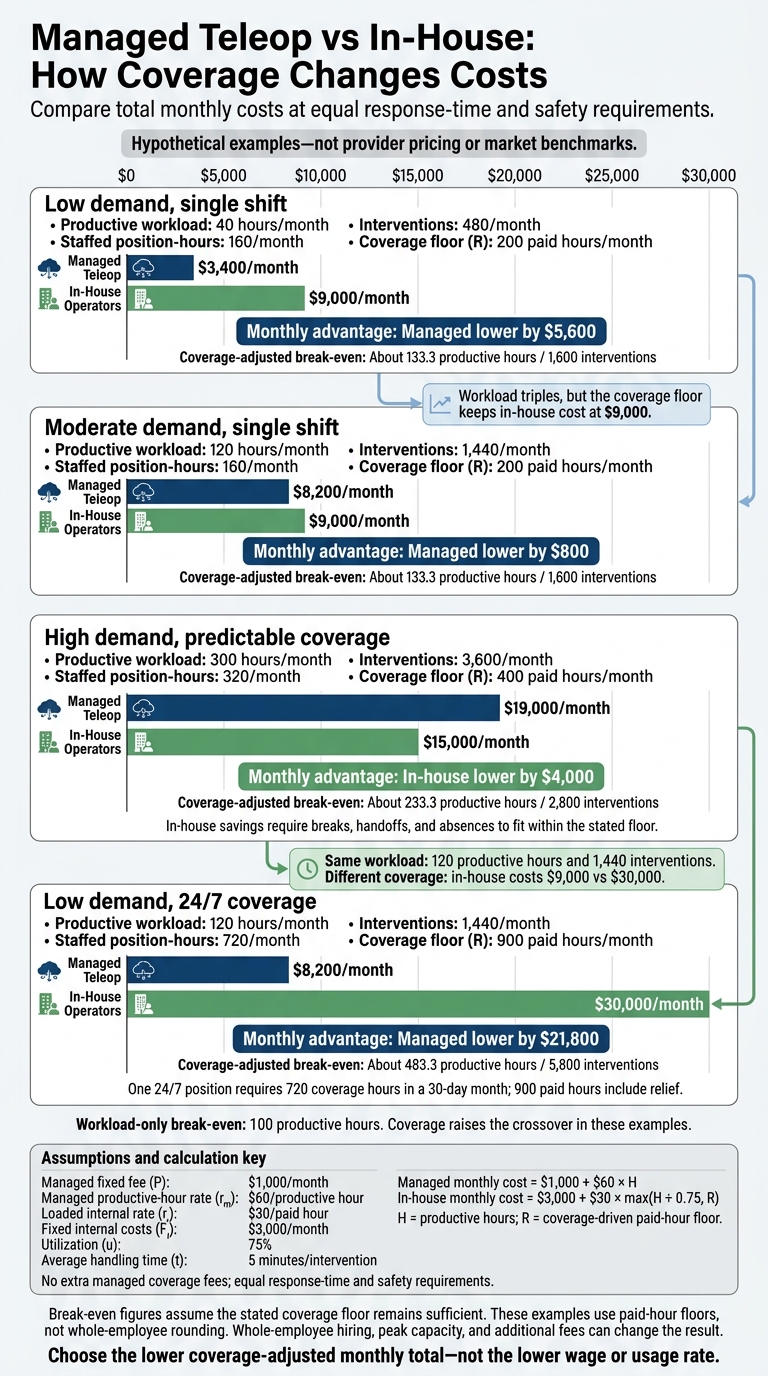
Managed Teleop vs In-House: How Coverage Changes Costs
These are hypothetical rates, not a provider quote: (P = $1,000/month), (r_m = $60/productive\ hour), (r_i = $30/paid\ hour), (F_i = $3,000/month), (u = 75%), and (t = 5) minutes, with no extra managed coverage fees and equal response-time and safety requirements.
Compare each scenario with the 100-hour workload-only threshold.
For these cases, use (C_m = $1,000 + $60H) and (C_i = $3,000 + $30\max(H/0.75, R)).
The table shows when workload sets the cost - and when coverage takes over.
Illustrative monthly comparison - not provider pricing. Break-even figures assume the stated coverage floor remains sufficient.
Scenario Workload and coverage assumptions Managed cost In-house cost Monthly advantage Break-even with coverage floor Low demand, single shift 40 productive hours; 480 interventions; 160 staffed position-hours; (R = 200) paid hours $3,400 $9,000 Managed lower by $5,600 About 133.3 hours / 1,600 interventions Moderate demand, single shift 120 productive hours; 1,440 interventions; 160 staffed position-hours; (R = 200) paid hours $8,200 $9,000 Managed lower by $800 About 133.3 hours / 1,600 interventions High demand, predictable coverage 300 productive hours; 3,600 interventions; 320 staffed position-hours; (R = 400) paid hours $19,000 $15,000 In-house lower by $4,000 About 233.3 hours / 2,800 interventions Low demand, 24/7 coverage 120 productive hours; 1,440 interventions; 720 staffed position-hours; (R = 900) paid hours $8,200 $30,000 Managed lower by $21,800 About 483.3 hours / 5,800 interventions
The first two cases compare single-shift workloads. The last two show how coverage needs can change which option costs less.
Low and Moderate Demand on a Single Shift
Here, the coverage floor - not workload - sets internal cost. The coverage floor keeps internal cost flat until workload exceeds it. Both cases need 200 paid hours, even though active work triples. The crossover is (($9,000-$1,000)/$60 = 133.3) productive hours, above the 100-hour workload-only threshold. Hiring in whole employees could push that crossover higher.
High Demand With Predictable Coverage
At 300 productive hours, the roster reaches the 400 paid-hour floor. The $4,000 in-house edge holds only if breaks, handoffs, and absences still fit inside that floor. Check peak concurrency and coverage gaps from breaks and absences: relief hours do not prove the roster can meet response targets.
Low Demand With 24/7 Coverage
This case flips the comparison: coverage, not active work, dominates cost. One 24/7 position needs 720 coverage hours in a 30-day month; 900 paid hours include relief. That floor pushes break-even to about 483.3 productive hours. Overnight, weekend, supervisor, and minimum-volume fees can move this result.
5. Conclusion: Choose Based on Coverage-Adjusted Total Cost
At the same service level, use workload-only break-even for an initial check - not the final decision. Base your choice on coverage-adjusted break-even. Coverage needs, relief staffing, and whole-employee requirements can wipe out an advantage based on fractional hours.
Use the table below to compare buying conditions.
When Each Model Costs Less
| Operating condition | Usually cheaper | What to validate |
|---|---|---|
| Low or variable demand, pilots, difficult recruiting | Managed operations | Minimum commitments, training, and onboarding costs |
| Extended hours or distributed coverage | Managed operations | Contracted availability, peak capacity, and escalation support |
| Sustained utilization and stable shifts | In-house staffing | Fully loaded costs and a workable relief roster |
| Specialized work with reusable internal tooling | In-house staffing | Productivity gains after training and tool maintenance |
Once you identify the likely lower-cost model, check it using the same monthly inputs and service targets.
Monthly Cost Calculation Checklist
Measure demand: Record monthly interventions, average and percentile handling times, monitoring workload, peak concurrency, coverage hours, response targets, and escalation frequency. Test low, base, and high demand against peak staffing needs.
Price both models in full: Apply the cost ledger, contract minimums, startup-cost allocation period, coverage floor, and whole-employee rounding. Count paid nonproductive time only once.
Report monthly total cost and cost per intervention (monthly total cost ÷ completed interventions). Show the assumptions beside each result. Recalculate as autonomy reduces demand or coverage changes, using the same inputs for both models in each monthly update.
FAQs
How do I estimate utilization before launch?
Run a small pilot with 30–50 episodes per major task variant. Calculate utilization as productive time ÷ scheduled hours, accounting for setup, calibration, recovery, and breaks.
To estimate attempts per hour, use 60 ÷ (average demo duration + reset time), with both times in minutes. Apply your expected acceptance rate to forecast accepted demonstrations per fully loaded station-hour. Check that forecast against robot logs, including autonomous versus assisted completions, downtime, and safety stops.
Should I combine managed and in-house operators?
Yes. This common hybrid approach keeps oversight in-house while adding outside capacity. Keep protocol design, safety standards, governance, and final acceptance with your internal team so you retain direct control over sensitive workflows.
Use managed operators when volumes spike, you need geographic variety, or you’re working in rare settings where permanent in-house infrastructure isn’t yet cost-effective. Apply the same schemas, quality thresholds, and privacy rules across both teams to keep data and day-to-day work aligned.
How do switching costs affect my break-even point?
Switching costs push your break-even point higher by adding one-time expenses spread across expected output. These include recruiting, protocol design, facility setup, calibration, and specialized annotation or teleoperation tools. Depending on instrumentation, costs can range from $5,000 to $200,000 per station.
Your in-house team needs more accepted demonstrations to cover those expenses before its cost per unit drops below a managed provider’s.