The Real Cost of One Hour of Egocentric Data

Leela Yanamaddi
September 21, 2026
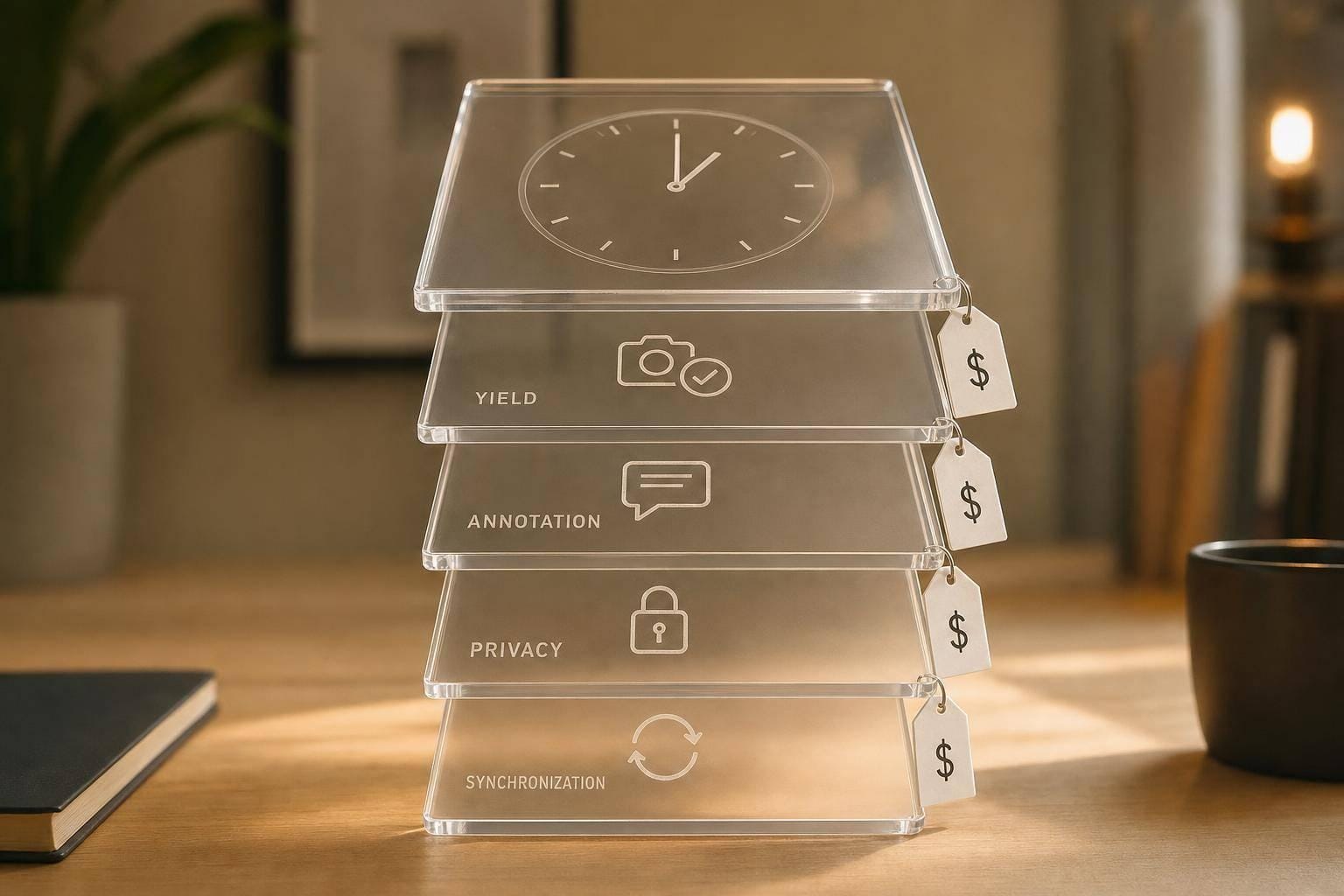
If you budget egocentric data by recorded time, you can miss the true cost by a lot. What you pay for is the hour that survives QC, privacy review, sync checks, and labeling. In many setups, that means 50% to 80% yield at best, and much less for teleoperation. That is why a warehouse program can land near $78 to $124 per usable hour, factory assembly can hit $150 to $220, and teleoperated demos can run $300 to $500+.
Here’s the short version:
- Raw, usable, and labeled hours are different
- Yield drives cost: lower yield means each good hour costs more
- Annotation often costs more than data collection
- Privacy, sync, storage, and PM work add up
- Teleoperation is the most expensive setup
- Small pilots and tighter label scope cut waste early
If I had to boil the article down to one line, it would be this: budget for the usable labeled hour, not the recorded hour.
Quick comparison
| Setup | Typical usable yield | Main cost pressure | Cost per usable hour |
|---|---|---|---|
| Warehouse picking | 50%–80% | Yield loss, relabeling | $78–$124 |
| Factory assembly | 60%–85% | Skilled labor, compliance, deeper labels | $150–$220 |
| Teleoperated demos | 40%–70% | Multi-stream sync, engineering, expert labels | $300–$500+ |
What stood out to me most is how fast costs jump once footage fails review. A program may look cheap at the recording stage, then get much more expensive after redaction, QA, and annotation. That’s the part teams need to price first.
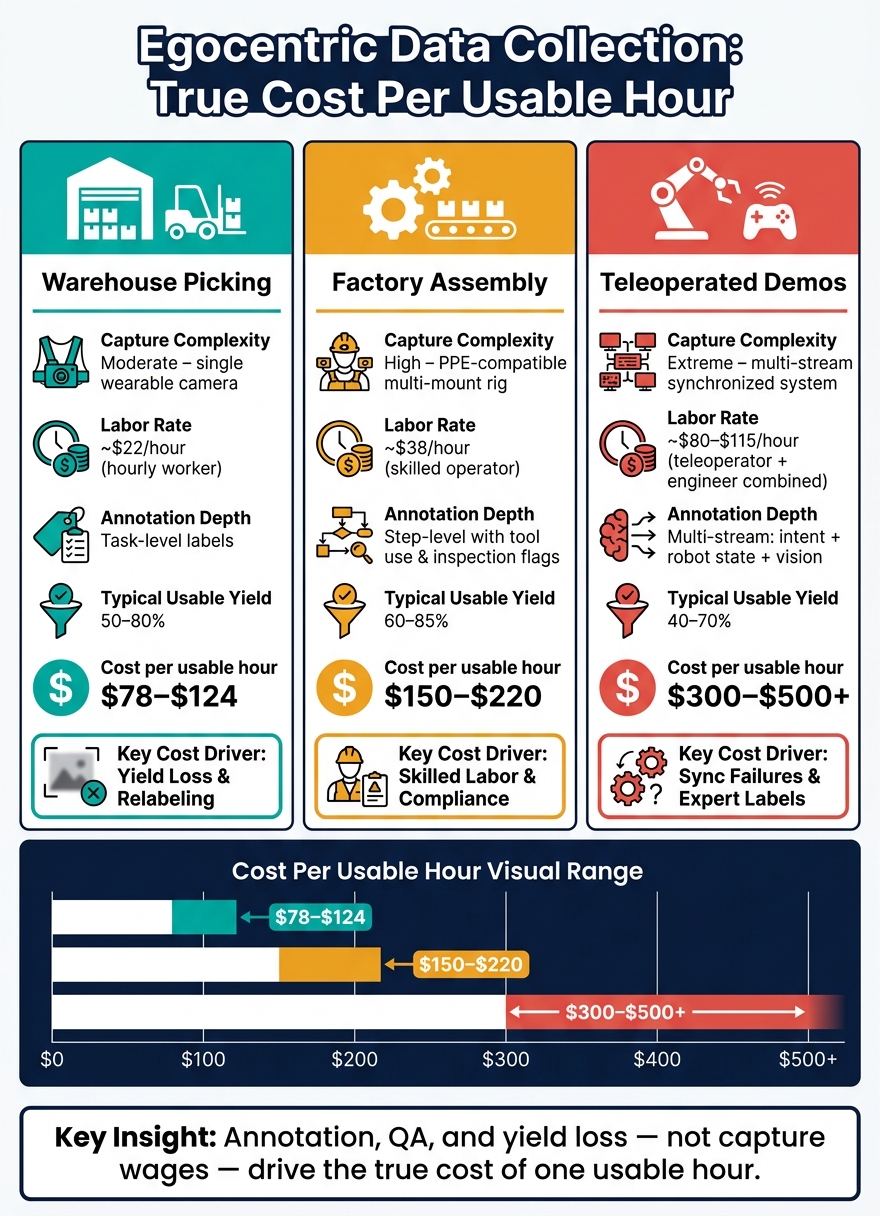
Egocentric Data Collection Cost Per Usable Hour: 3 Industrial Setups Compared
2. The Full Cost Stack Behind One Usable Hour
One usable hour includes labor, hardware, privacy, QC, annotation, sync, storage, licensing, and program management.
People, hardware, and task design
Labor is usually the biggest cost. General workers like warehouse associates often cost $18–$25 per hour with payroll overhead included. Expert labor, such as certified welders or skilled assembly technicians, often lands in the $35–$80 per hour range or higher. Trained teleoperators can cost $80–$150 per hour. That spread has a huge effect on budget planning, especially if you're trying to build a 500-hour dataset.
The hardware stack adds up too. A basic industrial egocentric rig usually includes:
- A head- or chest-mounted camera ($300–$600)
- Specialized mounts for safety helmets or vests ($50–$150)
- Extra batteries and chargers ($50–$150)
- High-speed storage cards ($30–$80)
You also need to plan for wear and tear. In industrial settings, dust, impacts, and chemical exposure can wear gear down fast. Annual hardware attrition often falls in the 10%–20% range. In practice, hardware usually adds about $4–$10 per usable hour.
Task design matters just as much as equipment. A loose instruction like "record your shift" sounds simple, but it can wreck yield. You might get 100 raw hours and end up with only 40 usable hours. That more than doubles the cost per usable hour before annotation even starts. A tighter script with clear start and stop triggers, calibration checks, and mount guidelines can push usable yield to 70%–80% of recorded time.
Privacy, quality control, annotation, and synchronization
In U.S. workplaces, privacy rules add a full layer of work. You need written consent from camera wearers, notice for bystanders, and alignment with company policy or union agreements. Then comes redaction. Blurring faces, badges, and screens can take 2–4x the raw video length in reviewer time, even when semi-automated tools help. For a program producing 1,000 recorded hours each month, consent management and redaction can add $5–$20 per usable hour once labor, tooling, and legal review are included.
Annotation is often the biggest multiplier. Light labeling, like task type plus start and end timestamps, may take only 0.25–0.5 annotator hours per usable video hour. Dense labeling is a different story. Hand pose, object state, gaze, and temporal segmentation can take 5–10 annotator hours per usable video hour. At $25 per hour for annotators and 4 hours of work per usable hour, that's $100 added to each hour of validated data. In many cases, that alone costs more than the original capture.
Vendor benchmarks show the range clearly:
| Annotation Type | Estimated Cost per Annotated Hour |
|---|---|
| Simple video labeling (class tags) | $50–$100 |
| Hand pose extraction | $200–$400 |
| Full egocentric annotation (hand pose + object state + temporal alignment) | $300–$600 |
Synchronization adds another quiet cost center. If you're aligning egocentric video with robot telemetry, motion capture, or audio, each stream may run on a different clock, drift at a different rate, and sample at a different frequency. Getting all of that lined up isn't just busywork. It usually takes specialized engineering time to build and maintain sync pipelines. That can add $3–$15 per usable hour, depending on the number of streams and how often devices are misconfigured.
Storage, licensing, and program management
Once the data passes validation, storage becomes a recurring expense. One hour of 1080p video can take 5–30 GB, depending on codec and bitrate. In U.S. cloud setups, object storage usually costs about $0.015–$0.025 per GB-month. So if you're storing 10 TB of egocentric data, you're looking at $150–$250 per month just for storage, before egress fees or faster storage tiers enter the picture.
File conversion adds more cost in the background. Transcoding, splitting recordings, and extracting frames often add $1–$5 per usable hour when spread across a project.
Licensing is where prices can swing hard. Narrow internal R&D rights cost less. Exclusive datasets with commercial use rights, especially in regulated or proprietary settings, can double or triple the base capture cost once legal risk and contributor opportunity cost are factored in.
Then there's program management. After the data becomes usable, someone still has to coordinate contributors, track consent metadata, watch QA throughput, and produce compliance reports. Those are not side tasks. They turn into direct per-hour costs. One of the simplest ways to avoid getting blindsided is to keep a per-hour cost dashboard that assigns PM, legal, and reporting time to each dataset.
These layers don't hit every workflow the same way. Warehouse picking, factory assembly, and teleoperated demonstrations each bring their own cost profile.
3. Cost Scenarios for Three Industrial Data Collection Setups
Using the cost stack above, here’s what three common industrial setups can look like in practice - and what one usable hour ends up costing in each case.
Warehouse picking: yield-sensitive economics
A typical warehouse picking program might look like this:
- Worker pay at about $22/hour including overhead
- Amortized wearable camera cost of $3/hour
- Operational coordination at $5/hour
- Basic privacy review at $2/hour
- Moderate task-level annotation at $30/hour of video
That brings the total to about $62 per recorded hour.
Then yield changes the math fast. At 80% yield, cost lands around $78 per usable hour. At 60%, it jumps to about $103. At 50%, it reaches about $124. Same program, same recording setup - just less usable footage. That alone creates a 59% increase in cost.
Most of that loss usually comes from three things. First, occlusions and poor camera angles can wipe out 10+ minutes per hour. Second, fuzzy task definitions lead to relabeling. If 20% of annotated footage needs a second pass, annotation cost goes from $30 to ~$36/hour. Third, a second QC pass for edge cases can add another $8/hour. That pushes the baseline from $62 to $70 per recorded hour, and at 60% yield the cost rises to ~$117 per usable hour instead of $103.
Factory assembly: higher expertise and compliance overhead
Factory assembly starts from a higher labor base. Assume a fully loaded operator rate of $38/hour. PPE-compatible rigs add about $6–$8/hour, and on-site technical support adds around $4/hour.
Safety and compliance work adds another layer. Coordinating with EHS, documenting restricted capture zones, and handling union rules and consent procedures can add $6–$10/hour across the program.
Annotation is where costs climb the most. Step-level labeling has to break down each assembly action, mark tool use, and flag inspection checkpoints. That usually calls for domain-aware reviewers charging $60–$100/hour of video, plus another $15–$25/hour for QA.
A workable estimate looks like this: $38 (labor) + $8 (rig) + $8 (compliance) + $80 (annotation + QA) = $134 per recorded hour. At 70% usable yield, that works out to about $191 per usable hour. That’s well above warehouse picking at a similar yield because the work needs more skill, more safety controls, and deeper annotation.
Teleoperated demonstrations: synchronized data at the high end of the range
Teleoperation sits at the top end because every part of the stack costs more at the same time. Operator labor alone often runs $55–$75/hour, and a supervising engineer adds another $25–$40/hour.
On top of that, instrumenting robot joints, forces, and control signals adds an amortized engineering cost of about $20–$30 per recorded hour. Hardware for synchronized egocentric and robot-view streams adds $10–$15/hour. Synchronization infrastructure - timecode servers, network bandwidth, and multi-stream storage - adds another $8–$20/hour, depending on how much data is being moved and stored. Specialized annotation is also expensive here. Matching operator intent, robot state, and multi-view video often needs robotics-aware staff charging $80–$140/hour of video, plus heavy QA.
This setup is also much more fragile from a yield standpoint. Sync failures can ruin whole segments. A little clock drift or a packet drop doesn’t just make the footage messy - it can make it unusable. If 25% of recorded time is lost to sync errors, usable yield drops from 80% to ~55%. That turns a $200/recorded hour program into roughly $364 per usable hour. At 40% yield, the same cost stack can go past $500 per usable hour.
The table below sums up the main cost drivers and the usual usable-hour ranges:
| Warehouse Picking | Factory Assembly | Teleoperated Demos | |
|---|---|---|---|
| Capture complexity | Moderate – single wearable camera | High – PPE-compatible multi-mount rig | Extreme – multi-stream synchronized system |
| Labor type & rate | Hourly worker – ~$22/hour | Skilled operator – ~$38/hour | Teleoperator + engineer – ~$80–$115/hour combined |
| Annotation depth | Task-level labels, moderate complexity | Step-level with tool use and inspection flags | Multi-stream: intent + robot state + vision |
| Typical usable yield | 50–80% | 60–85% | 40–70% |
| Illustrative cost per usable hour | ~$78–$124 | ~$150–$220 | ~$300–$500+ |
4. Why Costs Rise Fast - and How to Lower Cost per Hour
The scenarios above point to a simple pattern: costs don’t creep up. They jump. Once part of your recorded footage becomes unusable, the cost per usable hour climbs fast. And when collection, QA, and rights tracking sit in different tools, teams often don’t see where the money went until it’s too late. The fix is pretty direct: improve usable yield, keep annotation lean, and track costs in one place.
Improve usable yield before scaling collection
The fastest way to lower cost per usable hour usually isn’t pushing vendors for a lower rate. It’s stopping the loss of footage you already paid to record.
In industrial settings, 20%–40% of recorded hours are commonly discarded. On top of that, another 10%–30% can fail during annotation because hands, tools, or other key objects aren’t visible well enough to label.
A structured pilot can catch most of that early, before it snowballs. Pilot 10–20 hours per scenario, log every failure reason, and measure each session against clear acceptance rules. For example:
- “hands visible for at least 80% of frames”
- “no more than 10% of frames with severe motion blur”
Have annotation leads review sample footage during the pilot phase, not after a full rollout. That way, they can spot scenes that will be costly to label - or impossible to label at all - while changes are still cheap.
Rig setup matters just as much as the task script. A calibrated camera angle - often a 10° to 15° downward tilt from eye level for picking tasks - plus mounting that fits the motion pattern, fixed resolution and frame rate settings, and a pre-flight checklist can cut framing-related rejects by 30%–60%. That matters a lot in places where workers used to adjust rigs on their own.
Match annotation depth to model needs
Once yield is in better shape, annotation depth becomes the next big cost driver. The rule here is simple: use the lightest label set that still supports the model.
The gap between minimal labeling and dense labeling can be 2x to 5x in cost per hour. And active learning methods have shown labeling-effort cuts of 30%–70% while keeping model performance in place.
A practical way to handle this is to start with the model’s target behaviors and work backward. Must-have labels - hand pose, object identity, tool contact, task step boundaries - should go on every hour that passes QA. Secondary labels - rich scene descriptions, fine-grained action taxonomies, material attributes - should stay limited to a smaller, high-value slice.
A staged workflow helps keep that under control:
- A first pass handles basic segmentation and temporal markers at lower cost
- A second pass adds task semantics
- Expert review covers only the 10%–30% of hours where domain knowledge and safety risk matter most, such as rare failure cases, complex assembly sequences, or teleoperated demonstrations of contact-rich tasks
That last part has a clear budget impact. Fully annotated egocentric robot hours can cost $100 to $500 depending on task complexity. So limiting expert review to the hours that actually improve model performance isn’t just a process choice - it’s a spending choice.
Use infrastructure that keeps costs visible
Even when capture and labeling run well, cost control falls apart if tracking is split across different systems. When capture, QA, annotation, sync, storage, and consent all live in separate tools, cost visibility gets fuzzy. Teams can miscount usable hours, label the same footage twice, or realize too late that some footage lacks proper rights documentation. When that happens, they may have to throw out a big chunk of a dataset they already paid to annotate.
A unified system ties capture, QA, synchronization, annotation, and rights tracking to each asset. That turns cost per usable hour into a live metric instead of a rough estimate made after the fact. Problems show up at ingestion, not halfway through training. It also cuts rework, shortens QA cycles, and keeps spending visible at each stage.
5. Conclusion: Budget the Usable Hour, Not the Recorded Hour
Budget the usable hour: the footage that clears privacy checks, passes QC, includes complete annotations, and syncs cleanly with the signals your model needs. That’s the unit that shapes budget, vendor pricing, and model throughput.
Usable-hour cost is usually driven more by annotation, QA, and program overhead than by contributor wages alone. Ego4D showed how fast de-identification work can overtake capture labor. Industrial programs run into the same issue with privacy review, sync errors, and label rework. That’s why de-identification and QA often cost more than capture itself.
Budget each capture setup on its own. A warehouse picker, assembly technician, and teleoperator don’t produce the same cost curve. The right target is cost per usable hour, not cost per recorded hour.
The fix starts before collection begins. Define scope, lock rights, and set written quality thresholds. If scope is vague, consent is weak, or QC is unclear, recorded footage can turn into unusable spend.
Budget the usable hour. Measure yield in the first pilot. Keep annotation tied to the model’s actual needs. Track costs at every stage, not just at the end of the quarter.
FAQs
Why is usable yield so important?
Usable yield is what decides whether your data spend pays off.
In Physical AI, raw data is often messy. It can be noisy, inconsistent, or missing the context a model needs to learn from it.
High usable yield means the data is clean, labeled correctly, and ready for training. Low yield leaves models to fill in the blanks. That hurts performance and turns recorded egocentric footage into noise instead of actual model progress.
What usually makes teleoperation cost the most?
Teleoperation is usually the most expensive option because it depends on human help for edge cases and exceptions that autonomous systems still can’t handle on their own.
In plain English: when the system gets stuck, a trained operator has to step in and take control.
That changes the cost picture quite a bit. Instead of a one-time expense, teleoperation becomes a recurring service cost. And that adds up fast. At about $120 per operator-hour as of early 2026, that human-in-the-loop safety net is still a major operating expense.
How can I lower cost per usable hour?
Lower the cost per usable hour by making both collection and processing leaner. Where it makes sense, swap costly teleoperation for lower-cost, high-quality human footage. At the same time, cut cleanup work by standardizing timestamps, tags, and reason codes.
Log every teleoperation session or manual override with a reason code and a failure clip. Use simulation for rare events. Then add automated quality gates, checked by verified experts, so more of what you collect can actually be used as training data.