Can You Legally Train on It? A Rights Checklist for Video Training Data

Leela Yanamaddi
November 26, 2026

Access to a video does not mean permission to train on it. Before ingestion, verify who owns it, whether the planned use is allowed, and which privacy, workplace, and local laws apply. A purchased dataset or public download still needs review.
This checklist covers 5 steps for Physical AI and robotics teams:
- Define the use: Record training tasks, commercial plans, recipients, locations, and retention.
- Trace ownership: Check the source and rights for video, audio, annotations, and sensor data.
- Review permissions: Check training, copying, deployment, partner access, and redistribution separately.
- Check other legal duties: Review consent, biometrics, workplace rules, confidential material, and cross-border transfers.
- Document approval: Link each asset and version to a signed decision, enforce restrictions, and review again when uses change.
Missing proof means pause - not approval. Keep unresolved footage out of training and sharing until the required review is complete.
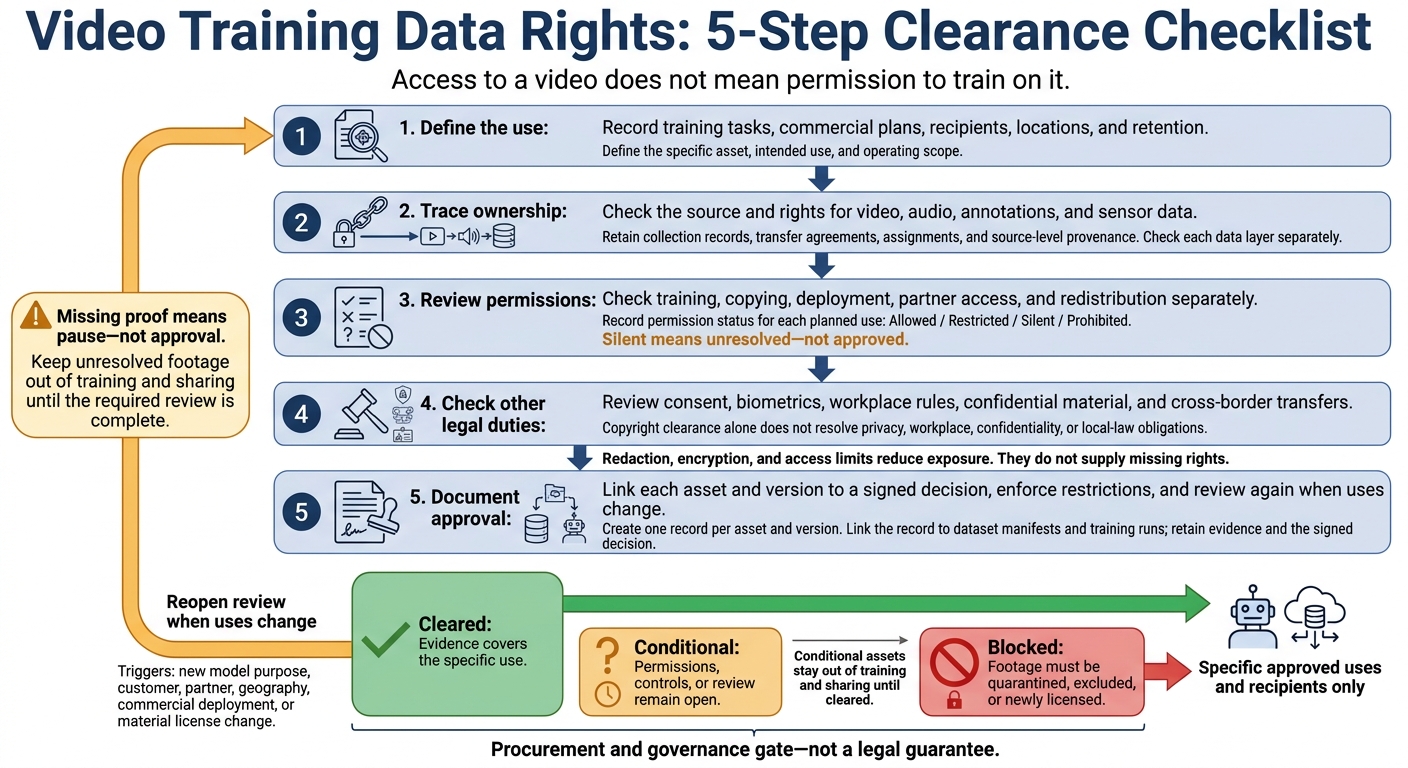
Video Training Data Rights: 5-Step Clearance Checklist
2. Verify Video Sources and Ownership
Once you’ve defined the scope, trace each recording’s origin before using it for training. Before reviewing licenses, identify who created each file and which rights transferred at every step.
Trace Collection and Transfers
☐ Trace each recording back to its recorder and rights holder. Record who filmed it, the source organization, collection date and location, device or sensor, and recording method. For wearable-camera demonstrations, identify both the wearer and any commissioning party. Connect each transfer to its governing agreement so you can document the chain from the original recording to the training copy.
Evidence to retain: collection forms, source metadata, upload records, transfer agreements, and transformation logs linking originals to clips, redactions, annotations, and dataset versions.
Check Rights for Every Data Layer
☐ Check rights for video, audio, annotations, and sensor streams separately. Embedded music, artwork, screens, and documents may require separate permissions. Wearable-camera demonstrations, factory footage, and third-party datasets often contain material owned by someone other than the main recording’s owner. Permission to film at a facility does not prove ownership.
For U.S. employee footage, confirm whether recording fell within the scope of employment. For commissioned footage, verify a valid assignment or work-made-for-hire basis. Payment alone does not transfer copyright. Resolve subcontractor rights as well.
Evidence to retain: employment terms, contractor agreements, signed assignments, facility authorizations, and third-party permissions.
Match Proof to Source Type
☐ Back each source claim with documents. A dataset name, download page, or contributor statement does not prove ownership. Use the matrix below to check source claims against the rights held. No source category gets automatic clearance.
| Source category | Ownership evidence | Training rights | Commercial-use permission | Redistribution rights | Escalation triggers |
|---|---|---|---|---|---|
| Public-domain assertion | Author, source, date, jurisdiction, and documented public-domain analysis | Asset-level status verified in relevant jurisdictions; contractual limits checked | Privacy, confidentiality, and trademark issues assessed separately | Source terms and downstream restrictions checked | Unclear jurisdiction, government authorship, embedded third-party content |
| Expressly licensed footage | License text, covered assets, and licensor authority | Express or clearly applicable training grant | Commercial scope covered | Cloud, contractor, and partner access, plus redistribution, covered as needed | Ambiguous training scope, conflicting restrictions |
| Contributor-collected footage | Contributor identity, collection records, and signed contribution terms | Training, preprocessing, and retention covered | Commercial development and deployment covered | Dataset redistribution and partner access granted | Missing workplace authority or captured-content rights |
| Commissioned recordings | Statement of work, signed assignment or valid work-made-for-hire basis, and subcontractor terms | Training and derived-data uses covered | Commercial exploitation covered | Client, contractor, and partner access, plus redistribution, covered as needed | Unsigned terms, filming-only grant, retained contractor rights |
| Third-party dataset | Source-level provenance, upstream licenses, curator authority, and exact version | Licensing authority verified for each component | Inherited commercial restrictions checked | Partner access and redistribution covered separately | Unknown upstream rights, incompatible licenses, missing provenance |
If a source lacks proof of ownership or authority, mark it Hold - missing evidence before training. Keep it on hold until you obtain the evidence or legal review resolves the gaps. A curator’s warranty does not replace proof of the underlying rights.
Evidence to retain: the completed source assessment, archived license text, supporting contracts, and public-domain analysis where applicable.
3. Check Licenses and Training Permissions
Once you confirm who owns the footage, check what the license allows.
☐ Review copyright and contract rights separately. Read the governing agreement, incorporated policies, amendments, and the license version in effect when you acquired the footage. The license must clearly cover your planned use. Permission for “viewing,” “research,” or “analytics” usually isn’t enough.
Match Permissions to Planned Uses
Map the permissions to every use you plan.
☐ Check each step, not just model output. For robotics training, review downloading, copying, storage, frame extraction, annotation, preprocessing, training, fine-tuning, evaluation, commercial deployment, and partner access. Complete this matrix for each asset, selecting one status per row. Silent means unresolved - not approved.
| Planned use | Permission to verify | Status to record |
|---|---|---|
| Internal training | Copying, storage, preprocessing, training, and approved infrastructure | Allowed / Restricted / Silent / Prohibited |
| Fine-tuning and evaluation | Further model development, testing, and benchmarking | Allowed / Restricted / Silent / Prohibited |
| Customer deployment | Commercial use, permitted products, and deployment scope | Allowed / Restricted / Silent / Prohibited |
| Model improvement | Reuse for new versions and retention after expiration | Allowed / Restricted / Silent / Prohibited |
| Dataset redistribution | Distribution of footage, frames, annotations, embeddings, and derivatives | Allowed / Restricted / Silent / Prohibited |
| Partner access | Contractor, cloud-provider, affiliate, and research-partner access | Allowed / Restricted / Silent / Prohibited |
Evidence to retain: Keep the complete license text, relevant clauses, and written clarifications linked to the asset and license version. Record access, sublicensing, and transfer rights separately for footage, annotations, embeddings, derivatives, outputs, and model files, where applicable. Permission to deploy a model does not automatically permit sharing its training dataset.
Flag Restrictions and Legal Uncertainty
When permission exists, turn its limits into rules your team can follow.
☐ Turn restrictions into operating controls. Check terms covering noncommercial use, research-only use, attribution, redistribution, derivative works, share-alike requirements, automated processing, field of use, geography, duration, and deletion. Record whether termination applies separately to source files, derivatives, and model files. Add required notices to dataset manifests before training.
☐ Pause uses with unresolved terms. Escalate conflicting documents, unclear training scope, embedded third-party media, and reliance on U.S. fair use. Fair use depends on the facts; it is not blanket permission to train.
Evidence to retain: Keep a restriction register that names each clause, affected assets, the owner responsible for compliance, and the deadline. Retain attribution requirements, written resolutions, and, where needed, counsel’s analysis of purpose, amount copied, receipt method, reproduction risks, and market effects.
4. Check Privacy, Workplace Rules, and Applicable Laws
After reviewing copyright and licenses, check whether privacy rules, workplace requirements, and local laws also allow training. Robotics footage often includes people, screens, badges, and controlled spaces. Copyright clearance alone does not resolve these obligations.
Verify Consent and Individual Rights
☐ Identify everyone visible or audible: workers, visitors, bystanders, contractors, customers, and minors. Record whether faces, voices, names, uniforms, badges, license plates, screens, or other details could identify them. Verify a valid legal basis for recording, audio capture, training, downstream sharing, retention, and reuse - including commercial use. Check access, deletion, objection, and opt-out rights. Safety notices do not equal training consent. Keep: releases, notices, legal-basis assessments, retention rules, and request-handling records.
☐ Separate ordinary footage from biometric processing. A visible face is not always biometric data. Determine whether the project only detects people or also identifies, matches, tracks, or creates templates for them. Send face geometry, voiceprints, gait templates, and similar biometric features for legal review. Document the purpose, retention period, security controls, and deletion process.
Illinois, for example, generally requires written notice, a stated purpose and retention period, and written consent before collecting covered biometric identifiers; its law also provides significant statutory damages for violations.
Check Facility and Confidentiality Terms
☐ Verify site authority and workplace obligations. Review facility permission, NDAs, employment and customer agreements, camera policies, workforce notices, and applicable collective-bargaining duties. Check footage, audio, and annotations for trade secrets, customer information, facility layouts, security procedures, and controlled technical data. Confirm that site and contract terms allow downstream access. Keep: facility approval, contract restrictions, access records, redaction logs, and recipient agreements.
Redaction, encryption, and access limits reduce exposure. They do not supply missing rights.
Blurring a face does not authorize disclosure of a confidential production process.
Quarantine unresolved footage before ingestion.
Map Jurisdictions and Cross-Border Transfers
Factory, warehouse, and wearable-camera video often records workers, visitors, and incidental audio.
☐ Map collection, storage, processing, and recipient locations. Include where people were recorded and where annotators access footage. Check applicable state privacy, biometric, recording, and employee-monitoring laws. Review audio separately because recording-consent rules vary by state and circumstances. For international transfers, verify the transfer mechanism and recipient safeguards. Keep: the jurisdiction map, current legal analysis, and transfer documentation.
| Finding | Required action | Review priority |
|---|---|---|
| Missing ownership or facility authorization | Pause use; obtain ownership or facility permission records | High |
| Identifiable people | Verify notice, consent, legal basis, objection, deletion, and retention; redact or exclude if unresolved | High |
| Conversations or incidental audio | Resolve recording-consent requirements; remove audio or obtain required consent | High |
| Biometric extraction | Pause extraction pending applicability, notice, consent, retention, and security review | High |
| Confidential or controlled information | Restrict access; review NDA, export, and customer obligations; redact or exclude | High |
| Third-party media, screens, documents, or signage | Clear separate rights or remove unlicensed content | Medium to high |
| Cross-border collection, processing, storage, or sharing | Confirm transfer mechanism, safeguards, and local rights procedures | High |
| Adequate rights evidence but excessive exposure | Apply minimization, encryption, and access limits | Medium |
5. Conclusion: Document Approval Before Training
After reviewing the source, license, and privacy issues, document the decision in an asset-level record.
Create an Asset-Level Rights Record
Create one record per asset and version after provenance, license, and privacy review. Cover every file, derivative, and new version - not just the dataset. Link each record’s ID to dataset manifests and training runs. Use this ledger template.
| Field | Information to record |
|---|---|
| Asset and version ID | Stable identifiers and parent-asset links |
| Source and ownership | Source, collection method, rights holder, contracting party, copyright status |
| Collection details | Collection date and jurisdiction |
| Permission evidence | Links to licenses, assignments, releases, and consent records |
| Authorized uses and sharing | Training, evaluation, internal and commercial use, publication, approved recipients, and transfer limits |
| Privacy and legal findings | Privacy, workplace, biometric, voice, confidentiality, and export-control findings |
| Limits and duties | Geographic limits, expiration, deletion, return, audit, and incident-notification duties |
| Evidence location | Contract, release, review-note, and approval-history links |
| Decision | Status, reviewer, approving authority, and decision date |
Assign Clearance Status and Get Sign-Off
Assign a status based on the evidence:
- Cleared: Evidence covers the specific use.
- Conditional: Permissions, controls, or review remain open.
- Blocked: Footage must be quarantined, excluded, or newly licensed.
Connect these decisions to pipeline access controls. Conditional assets stay out of training and sharing until cleared.
Use the record to decide whether an asset can enter training. Require a signed decision from the accountable data owner and relevant legal, privacy, or security reviewers. Document authorized and prohibited uses, approved recipients, time and geographic limits, and safeguards.
Escalate disputed ownership, unclear training scope, fair-use reliance, biometric or voice processing, incomplete consent, cross-border issues, and confidential industrial content. Keep the signed decision - not just the status label.
Review Rights When Uses Change
Reopen the review when there’s a new model purpose, customer, partner, geography, commercial deployment, or material license change. Track expiration, deletion, return, incident-notification, and audit duties. Keep the change log, renewed approvals, and records showing those duties were fulfilled.
If the footage has already been used to train a model, consult counsel before promising deletion, retraining, or continued use.
Treat this checklist as a procurement and governance gate, not a legal guarantee. Missing evidence is not approval: before training, clear the specific asset for the specific use documented in the ledger.
FAQs
Can I use research-only footage to build a commercial prototype?
Not without explicit, written permission from the licensor. Research-only or evaluation-only agreements typically permit testing - not commercial training or development.
Access to footage doesn’t grant training rights. Before using it for commercial training, make sure the license covers your intended use or get written authorization.
What if someone withdraws consent after model training?
Immediately restrict access and quarantine or remove the affected files. Acknowledge the withdrawal within 3 business days and complete removal within 30 days.
Deleting files does not guarantee that the model has unlearned the content. Formally document the decision to remove or retrain the model. For future training, create a new, versioned dataset that excludes the withdrawn content. Keep an auditable record of the withdrawal, the actions taken, and the removal date.
How do I resolve conflicting licenses in a video dataset?
Review licenses source by source and asset by asset, rather than treating the dataset as a whole. Match each planned use - commercial training, annotation, or model sharing - to the clauses in each agreement.
If your rights matrix shows that an agreement is silent on a use or sets conditions for it, block that footage until you get written legal approval. Apply the most restrictive license to each asset. Past approval may not cover a new purpose.