Rights-Cleared vs Scraped Training Data: What Actually Holds Up in an Audit

Leela Yanamaddi
November 14, 2026
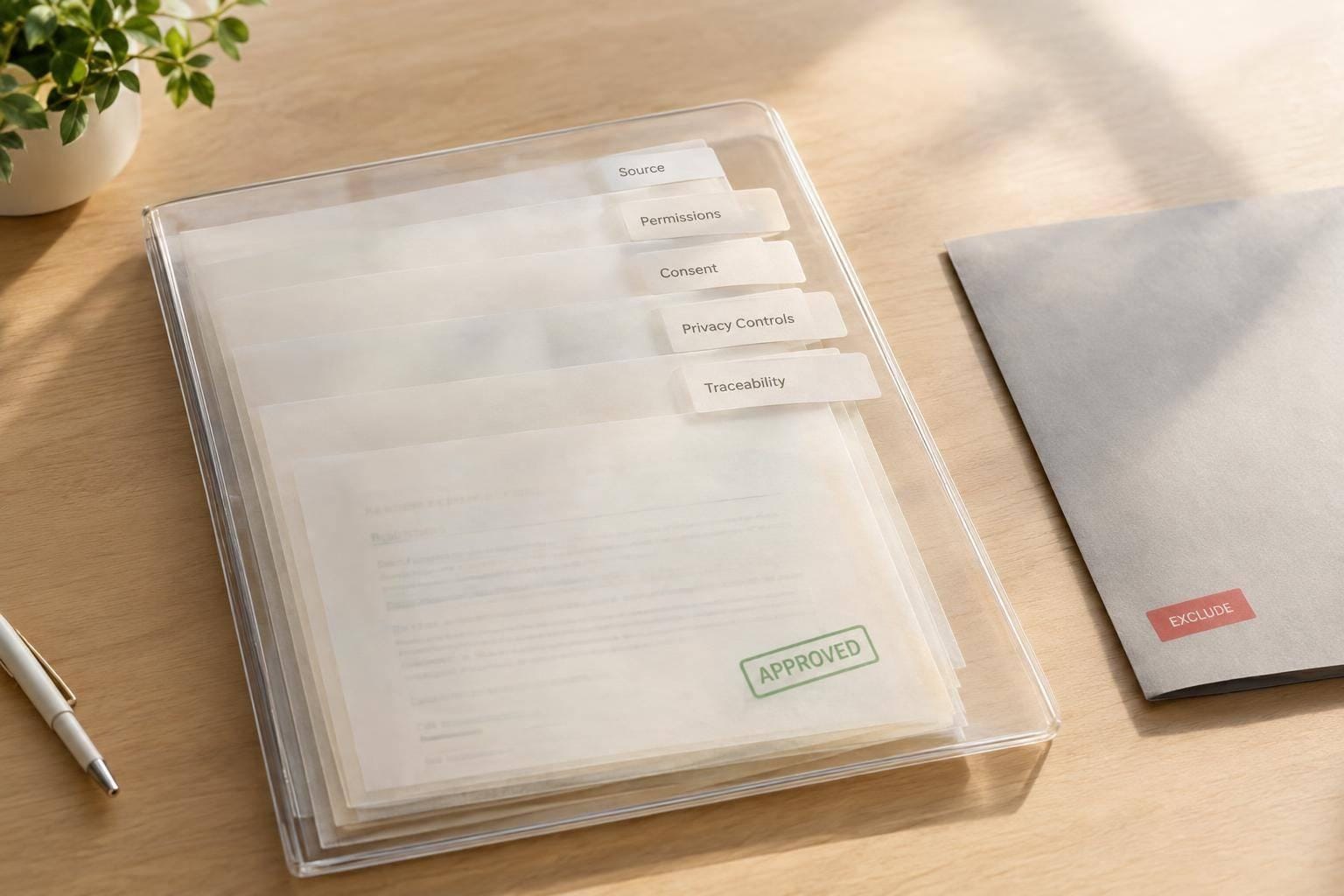
A “rights-cleared” label does not pass an audit. Records do. For each training clip, check its source, permission for the planned use, required consent, privacy controls, and links to datasets and model versions.
The key difference: rights-cleared describes a permission claim; scraped describes a collection method. Scraped footage may have a valid license. Commissioned footage may still have gaps.
Quick Comparison
| Audit check | Rights-cleared footage | Scraped footage |
|---|---|---|
| Source and history | Verify supplier authority, asset IDs, and edit logs | Verify source URLs, retrieval dates, saved terms, and file hashes |
| Training permission | Match signed agreements to each planned use | Check the exact asset’s license or other legal basis |
| People and privacy | Check releases, required consent, and privacy controls | Check uploader authority, required consent, and privacy controls |
| Changes and withdrawals | Trace restrictions and deletions to datasets and training runs | Trace takedowns and exclusions to datasets and training runs |
Use 3 decisions: approve verified files for a stated use, hold fixable gaps for review, or quarantine or exclude unresolved assets. Test supplier claims with reviewer-selected samples, and revisit approval when uses, laws, or permissions change. Deleting a clip does not undo training.
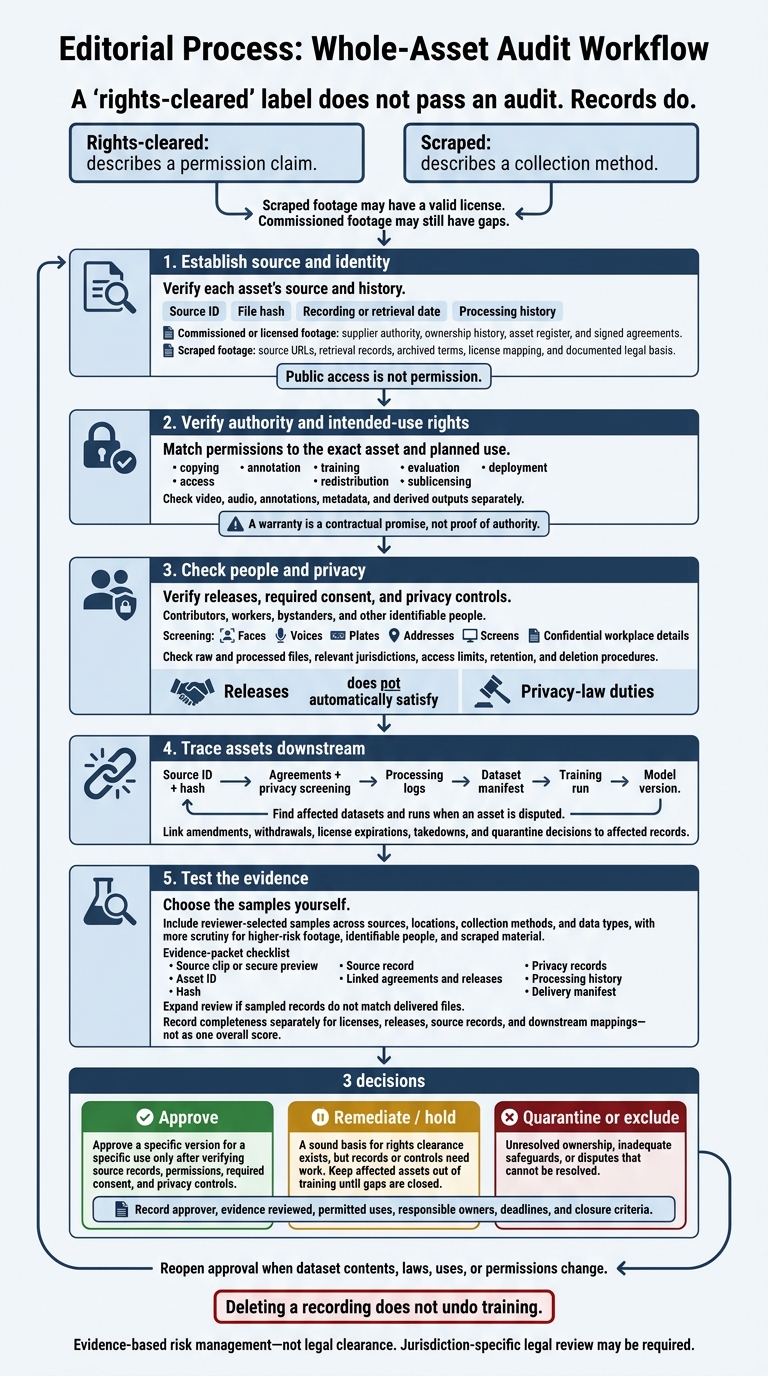
Training Data Audit: From Evidence to Approval
Rights-Cleared vs. Scraped Data: Required Records
Rights-cleared means documented permission. Scraped describes how data was collected. The two can overlap: scraped material may have a valid license, while commissioned footage may still have unresolved rights. Public access to a training clip helps establish its source - not permission to use it.
Classify each asset by its supporting evidence, not its label.
| Collection method | Claimed rights | Supporting records | Common gaps |
|---|---|---|---|
| Commissioned demonstrations | Supplier can license the recording and training use | Contributor agreements, workplace authorization, rights-holder authority, asset register | Recording release omits training, audio, or customer access |
| Licensed third-party footage | License permits specified uses | Executed agreement, covered asset IDs, term, territory, sublicensing terms | Viewing or redistribution rights mistaken for training rights |
| Web scraping | Public access or a displayed license is claimed to support reuse | Source URLs, retrieval records, archived terms, license mapping, documented legal basis | Unknown owner; access confused with permission |
| Mixed-source collection | Rights established across the collection | Per-asset rights classification, source history, exception log | Dataset-wide label hides incompatible licenses |
After identifying the collection method, verify the rights for each asset.
Rights-Cleared Data: Check Authority and License Scope
Request the asset ID, recording date and location, collector, file hash, and ownership history. Then verify who has authority to grant each right.
Match the agreement to each intended use: copying, annotation, training, evaluation, deployment, access, redistribution, and sublicensing. Check video, audio, annotations, metadata, and derived outputs separately, along with retention and deletion terms. Record any restrictions. “Commercial use” does not mean permission for every downstream activity.
Scraped Data: Record Sources and Verify Permission
Preserve source URLs, creator and platform names, retrieval timestamps, collection tools, applicable terms, license metadata, crawl and text-and-data-mining signals, and file hashes. Archive the terms that applied when the material was collected.
A compliant crawl is not permission to train. Require creator authorization or another documented legal basis for the intended use. Link opt-out, takedown, deletion, and exclusion records to the affected dataset versions.
Example: Released Demonstrations vs. Unverified Web Videos
For wearable-camera warehouse demonstrations and public task videos, compare the records below - not simply the source category. Use these audit criteria to test the evidence supplied.
Audit check Released wearable-camera demonstrations Unverified public task videos Available rights evidence Verify releases cover recording, annotation, training, evaluation, and commercial use; match them to source assets URLs and retrieval records establish origin, but unknown creators or reuse rights leave permission unresolved People and workplace safeguards Check bystanders, minors, audio, badges, screens, shipping labels, and sensitive workplace details against consent and redaction records Inspect the same elements; do not assume uploader permission covers other people, music, or workplace confidentiality Provisional decision Approve verified files; hold or exclude unresolved files. Hold or exclude unresolved files.
Compare the Evidence an Auditor Can Check
Use this matrix to check each file, rather than relying on the dataset label.
| Audit area | Rights-cleared data: verify | Scraped data: verify |
|---|---|---|
| Chain of custody | Producer, date, location, source ID, hash, and processing history | URL history, capture date, downloaded hash, snapshot, and removal record |
| Training rights | Signed agreement covering training video, modification, storage, and intended use | License, public-domain status record, or documented legal basis tied to the exact asset and intended use |
| Contributor consent | Releases or informed-consent records linked to demonstrators and separately recorded participants | Authority record for the uploader or rights holder; consent for identifiable people where required |
| Privacy controls | Face and voice handling records, redaction rules, access controls, retention limits, and incident procedures | Screening records for faces, voices, plates, addresses, screens, and confidential workplace details |
| Withdrawal handling | Procedures and records for revocation, deletion, license expiration, and disputes | Takedown, exclusion, quarantine, and model-impact procedures and records |
Once the file-level record is clear, check who can grant each right and whether that permission covers each data type.
Check Rights Holders, Permissions, and Data Types
A warranty is a contractual promise, not proof of authority. Check which rights each signer controls. Then map those rights to raw footage, transcripts, pose labels, telemetry, and embeddings.
Record whether restrictions still apply after cropping, annotation, augmentation, and downstream sharing. Permission to use a recording does not automatically cover every data type derived from it. Send unclear grants for legal review before use.
Check Privacy, Recorded People, and Jurisdictions
Review releases separately from privacy-law duties. Check contributors, workers, bystanders, and other identifiable people across the jurisdictions where collection, storage, processing, training, and deployment take place. Look beyond copyright to faces, voices, biometric data, location, plates, and confidential workplace details.
Test “anonymized” claims against both raw and processed files. Blurring faces does not prevent identification through voices, gait, tattoos, screens, or location clues. Require documented access limits, retention periods, and procedures for deletion or correction requests. Record privacy risks and the steps taken to reduce them in the asset record.
Trace Assets and Track Changes
Trace a sampled recording from its source ID and hash through its agreement, privacy screening, processing logs, dataset manifest, training run, and model version. Then check the reverse path: can the team find affected datasets and runs when someone disputes an asset?
Keep amendments, withdrawals, license expirations, and quarantine decisions in a rights-event register linked to those records. Deleting a file does not prove the model is unaffected.
The NIST AI Risk Management Framework and AI RMF Playbook offer guidance on provenance, documentation, and tracking dataset changes, including deletion or rectification requests. This is risk-management guidance - not NIST certification or legal clearance. Record unknown provenance as unknown, not verified. If the trace stops here, send the asset for further review in the next step.
Find Documentation Gaps and Verify Supplier Claims
Tie each documentation or control gap to an asset or batch ID. Assign an owner and a deadline to fix it. Use the checks below to classify each gap as minor, remediable, or blocking.
Flag Missing Licenses, Releases, and Privacy Records
Flag viewing-only, personal-use, or redistribution-only grants that don't establish permission for the intended training activity. Check for unclear coverage of commercial use, derived models, and customer access, along with missing signatures or unsigned amendments.
Compare release coverage against the delivered audio, faces, voices, locations, and workplace details. Flag missing bystander procedures and inconsistent privacy records.
Flag Source Gaps and Missing Withdrawal Procedures
Flag URLs that lack retrieval dates or preserved source records, as well as missing asset identifiers. Platform terms don't prove creator authority.
Require a documented withdrawal workflow. If a manifest can't link affected recordings to datasets and training runs, the remediation is incomplete.
Request a Sample Evidence Packet
After flagging gaps, check a sample of the underlying records directly. Choose the samples yourself, drawing from different sources, locations, collection methods, and data types. Give higher-risk workplace footage, identifiable people, and scraped material more scrutiny.
Request the source clip or secure preview, asset ID, hash, source record, linked agreements and releases, privacy records, processing history, and delivery manifest. Check whether the packet resolves the types of gaps you flagged. Use confidential review or a secure data room for agreements containing sensitive information. Expand the review if sampled records don't match the delivered files.
If the sample fails, map the gap to the exact asset or batch. Ask the supplier to isolate a selected clip, suspend its use, and identify affected models or datasets.
Record completeness separately for licenses, releases, source records, and downstream mappings. Don't hide gaps in a single overall score. Require supporting evidence before treating the claim as verified.
Conclusion: Approve, Remediate, or Exclude
Turn the record review into a decision backed by evidence.
For Physical AI procurement and collection, rights-cleared is a claim, not proof. Public access does not grant permission. Approve only when intended-use rights, privacy safeguards, and traceability are documented.
Record the Dataset Decision
Approve a specific version for a specific use only after verifying source records, permissions, required consent, and privacy controls.
Remediate when there’s a sound basis for rights clearance, but records or controls still need work. Keep affected assets out of training until those gaps are closed.
Quarantine or exclude assets with unresolved ownership, inadequate safeguards, or disputes that cannot be resolved.
Record who approved the decision, the evidence reviewed, permitted uses, responsible owners, deadlines, and closure criteria.
Keep a Dataset Audit Checklist
Keep these fields with the decision record:
- Identity and lineage: Dataset version, collection dates and locations, source IDs or hashes, manifests, and transformation history.
- Rights and people: Rights holders, contributors, linked licenses and releases, allowed and prohibited uses, privacy assessments, and required safeguards.
- Decision controls: Approval status, retention limits, withdrawal or dispute restrictions, remediation owners, deadlines, and closure criteria.
- Downstream scope: Affected models, customers, jurisdictions, cross-border transfers, and deployment uses.
Review Again When Uses or Laws Change
Reopen approval when dataset contents, laws, or uses change. Different uses and jurisdictions may require different permissions and controls.
Document whether withdrawals apply to stored files, derivatives, retraining, or deployed models. Deleting a recording does not undo training.
NIST guidance supports documentation and risk management, but it does not replace jurisdiction-specific legal advice.
FAQs
How many training clips should I sample in an audit?
Run automated integrity checks on 100% of the delivery. For provenance, rights, and quality, manually review at least 200 clips or 2% of the delivery - whichever is larger.
Target warehouse zones, contributor groups, and dates in your sampling. Oversample challenging footage, such as occluded or low-light clips. If any sample fails, investigate the entire batch, not just the failed clip.
Can I use older footage if releases omit AI training?
No. Permission to record footage or use it in media does not automatically cover AI training.
Check that the original consent or license explicitly covers training, annotation, and commercial deployment. If it doesn’t, the footage isn’t cleared for those uses. Quarantine the files and seek new permission or legal review.
What should I do if consent is withdrawn after training?
Treat affected data as restricted and quarantine or remove the files from your dataset immediately. Deleting source data doesn’t prove that a model has unlearned it. Document any decision to remove or retrain the model as a separate, formal decision.
Keep an auditable record of the withdrawal, the action taken, and the removal date. For future training, release a new, versioned dataset that excludes the retracted content and meets all updated requirements.