Humanoid Robot Safety Checklist for Factory Floors

Leela Yanamaddi
August 31, 2026
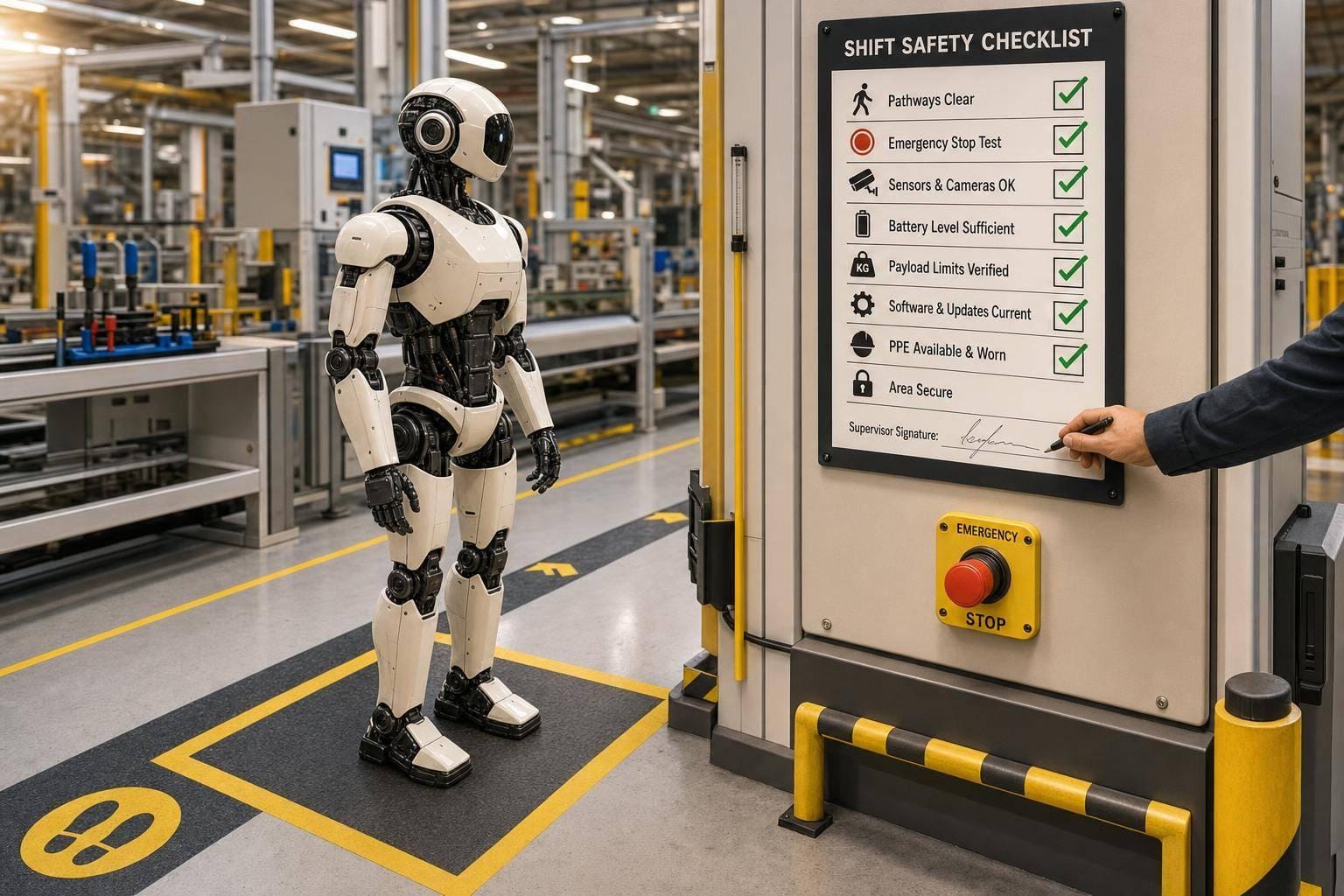
If a humanoid robot shares floor space with people, I treat the safety check as a must-do before every shift and before every new task. One missed check can lead to a fall, a blocked aisle, a bad tool match, or a stop device that no one can reach fast enough.
Here’s the short version: I check the floor path, balance systems, reach limits, tool setup, payload, worker spacing, emergency stops, training records, teleoperation triggers, and supervisor sign-off. If any item fails, I keep the robot out of autonomous use until the issue is fixed and logged.
A few points stand out right away:
- Pre-shift checks happen every shift
- Task checks happen before each new job
- Workers stay out of the robot’s full motion zone while it moves
- E-stops must be visible, reachable, and manually reset
- Any fail needs corrective action and supervisor review
- Risk reviews must be updated after changes like software, tools, payloads, layout, or near misses
I also keep in mind that factory injury costs can add up fast in the U.S., often reaching thousands of dollars per incident, so a simple repeatable check process is not just about paperwork. It helps catch small problems before they turn into larger ones.
In plain terms: this checklist is a shift-by-shift control for shared robot workspaces, with a strong focus on falls, motion, human spacing, stop access, and documented oversight.
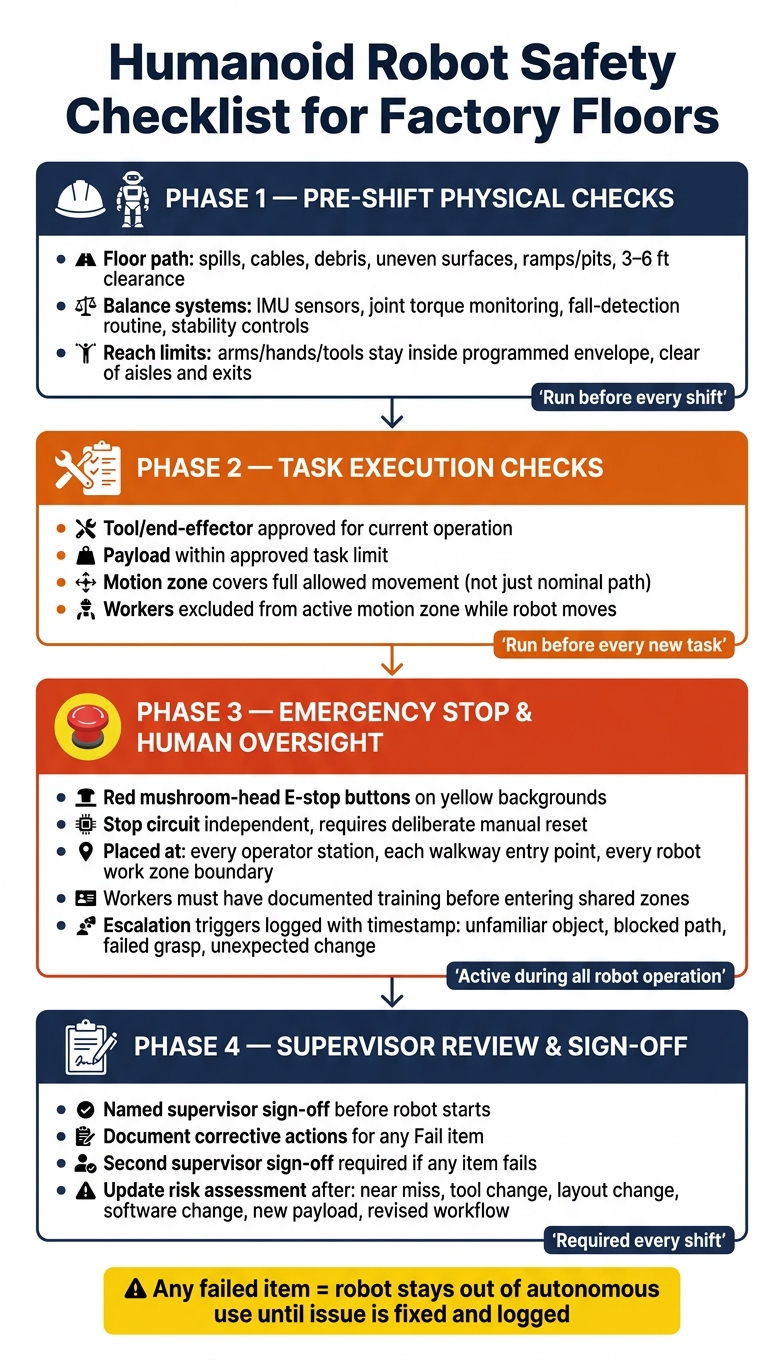
Humanoid Robot Safety Checklist: Pre-Shift to Sign-Off Workflow
The Danger of Humanoid Robots
Pre-Shift Physical Safety Checks: Stability, Falls, and Motion Boundaries
Run these checks before autonomous mode so you know the robot can stand, walk, and move safely around people and equipment. Go through each subsection in order at the start of every shift. Do not skip any step.
Fall Risk and Floor Condition Checks
Start with the floor and the planned travel path before startup. If you spot a hazard, clear it before the robot runs. Complete every check each shift.
| Item | Inspection Action | Pass / Fail |
|---|---|---|
| Spills | Visually scan the full path and clean any spill | ☐ Pass ☐ Fail |
| Cables/hoses | Secure or reroute anything crossing the path | ☐ Pass ☐ Fail |
| Debris | Remove all objects from the path and turning zones | ☐ Pass ☐ Fail |
| Uneven surfaces | Keep the robot off these areas until repaired | ☐ Pass ☐ Fail |
| Ramps/pits | Keep the robot away from these areas | ☐ Pass ☐ Fail |
| 3–6 ft clearance around the path | Measure and confirm the route stays clear | ☐ Pass ☐ Fail |
Balance Systems and Protective Stop Verification
A clear floor by itself isn't enough. Check the robot's stability systems before any movement. Confirm that inertial measurement units (IMUs), joint torque sensors, stability controls, and fall-detection routines are online before autonomous movement starts. Complete every check each shift.
| Item | Inspection Action | Pass / Fail |
|---|---|---|
| IMU and inertial sensors | Confirm active status in the robot's diagnostic interface | ☐ Pass ☐ Fail |
| Joint torque monitoring | Verify all joints report within the normal torque range | ☐ Pass ☐ Fail |
| Fall-detection routine | Run the manufacturer's self-test and confirm it passes | ☐ Pass ☐ Fail |
| Stability controls | Confirm stability control systems are enabled and reporting normally | ☐ Pass ☐ Fail |
Reach Limits and Safe Motion Envelopes
Check that the robot's arms, hands, and tools stay inside the programmed reach envelope. They also need to stay clear of aisles, exits, and nearby stations. Perform this check every shift.
| Item | Inspection Action | Pass / Fail |
|---|---|---|
| Reach envelope compliance | Confirm arms, hands, and tools stay inside programmed limits and out of aisles, exits, and adjacent stations | ☐ Pass ☐ Fail |
If any check fails, keep the robot out of autonomous operation until the issue is cleared.
Task Execution Checklist: Tools, Payloads, and Worker Spacing
Once the robot clears pre-shift checks, run these task-level controls before every new job. Record them before each task starts.
Tool Handling and Attachment Inspection
Use the approved task definition as the operating standard. A robot can pass pre-shift checks and still fail at the task level if the wrong tool is attached. Before starting, confirm that the tool or end-effector is approved for the current operation.
Payload Limits and Task Boundaries
Check that the planned payload stays within the approved task limit. Update the log any time the task, tool, or payload changes. If the task changes, recheck the tool, payload, and motion zone before restarting.
Use the table below to log task-level controls before each operation:
| Task | Approved Tool | Payload Limit | Reach/Motion Zone | Worker Access Rules | Supervisor Sign-Off |
|---|---|---|---|---|---|
| - | - | - | - | - | ☐ Signed ☐ Pending |
Worker Spacing and Shared-Workspace Rules
Shared workspaces need clear worker access rules when humanoid robots are operating near people. The robot may shift its path during execution, so the human exclusion zone must cover the robot's full allowed motion, not just its nominal path.
Set the full allowed motion zone for the task and keep workers outside it while the robot is moving. Keep the active workspace closed to workers until the task ends or the robot pauses.
Emergency Stop Access and Human-in-the-Loop Oversight
Once task checks pass, add two more controls: immediate stop access and human oversight.
Emergency Stop Devices and Clear Stop Paths
Even with task limits in place, a robot still needs a fast way to stop.
Use red mushroom-head emergency-stop buttons on yellow backgrounds. The stop circuit must be independent and require a deliberate manual reset before the robot can start again.
Place stop devices:
- within immediate reach of every operator station
- at each entry point to a shared walkway
- at the boundary of every active robot work zone
Before each shift, a supervisor must check that no device is blocked and that egress routes are clear.
Worker Training and Safe Approach Procedures
A clear stop path matters, but it only helps if workers know when to step in and when to stay back.
Any worker who shares space with a humanoid robot must have documented training on file before entering a shared zone. That training should cover:
- entering shared zones
- receiving tool or part handoffs
- responding to alarms, unexpected motion, or robot stops
Treat a stopped robot as live until a supervisor confirms a safe state and approves re-entry.
Teleoperation Escalation and Live Monitoring
Sometimes hitting stop isn't the end of the story. The task needs to pass to a human before the robot makes another move.
Set clear escalation triggers that require a supervisor or remote teleoperator to take control before the robot tries the next action. Common triggers include an unfamiliar object, a blocked path, a failed grasp, or an unexpected change in the work area.
Log every escalation with a timestamp, the trigger, and the action taken.
Supervisor Review, Documentation, and Checklist Template
After the checks are done, wrap up the shift with supervisor review and documentation. Each shift should have named supervisor sign-off before the robot starts.
Daily Sign-Off and Incident Documentation
Use the same fields on every checklist so records stay consistent and easy to trace. Document the safety checks that were completed, not just the final result.
| Field | Format / Example |
|---|---|
| Date | August 31, 2026 |
| Time | 8:30 AM |
| Shift | Morning / Swing / Night |
| Robot ID | HUM-092-X |
| Area | Assembly Line B |
| Inspector | John Doe |
| Overall Checklist Status | Pass / Fail / N/A |
| Corrective Actions | Reach limits recalibrated |
| Supervisor Sign-Off | [Signature/Digital ID] |
If any item is marked Fail, document the corrective action before the robot is cleared. That also requires second supervisor sign-off.
When to Update Risk Assessments
Use the signed checklist to spot changes that call for a new risk review. A signed daily checklist does not replace a current risk assessment.
Revise the assessment after:
- a near miss
- a tool change
- a floor layout change
- a software change
- a new payload
- a revised workflow
Also update the risk assessment after any change to motion paths, tools, payloads, floor conditions, or human access rules.
Conclusion: The Minimum Safety Checks to Repeat Every Shift
The minimum repeatable checks are the ones that protect every shift. On every shift, confirm the same core items: fall and stability risks are clear, reach and motion limits are active and verified, tools and payloads stay within rated capacity, worker spacing rules are enforced, and every emergency stop device is unobstructed and working.
Tasks must stay within validated boundaries, and a supervisor must review and sign off before the robot starts. If a major change happens mid-shift, pause work and review the checklist and risk assessment again before moving forward.
Those checks and sign-off make up the repeatable safety process.
FAQs
Who should complete the checklist each shift?
The supervisor should complete or verify the checklist each shift, with human-in-the-loop review for new tasks or unusual robot behavior.
It should cover fall risks, reach limits, tool handling, worker spacing, emergency stop paths, and task limits to help keep humanoid robots and workers safe on the factory floor.
What changes require a new risk assessment?
Any change that affects robot stability, reach, tool handling, worker spacing, emergency stop access, task limits, or supervisor oversight should trigger a new risk assessment.
Recheck fall risk, anti-tip systems, reach limits, grip force, payload integrity, exclusion zones, and emergency stop paths. If tasks move outside predefined limits or new hazards appear, review the setup before operation continues.
What should happen after a failed safety check?
Stop work until the issue has been reviewed and fixed. Before restarting, check fall risks, reach limits, tool handling, worker spacing, emergency stop paths, and task limits again.
A supervisor should review the failure and operating data to make sure the robot resumes work only within its programmed limits.