How to Package Multimodal Robotics Datasets

Leela Yanamaddi
September 10, 2026

If your robotics dataset is not synchronized, versioned, and easy to load, it is not ready for ML.
When I package multimodal robotics data, I focus on 4 things first: structure, time alignment, machine-readable metadata, and handoff checks. That means every episode needs one ID, every sensor stream needs one shared clock, every label needs a clear link to a frame or timestamp, and every file needs validation before release.
Here’s the short version:
- I keep raw, processed, and labeled files in separate folders
- I use one episode ID across video, sensors, and annotations
- I store sync details in metadata, down to jitter, offsets, and matching rules
- I use JSONL manifests, SHA-256 checksums, and versioned split files
- I package video, sensor tables, labels, and loader code so ML teams can start with less setup work
In practice, this means a pick-and-place run should ship with linked RGB video, depth, audio, joint states, gripper state, force/torque data, and labels under one trajectory. If one label lands even 200 ms off, model training can learn the wrong thing. That is why packaging is not just file cleanup. It is the last data-quality step before training.
A simple way to think about it:
| Area | What I make sure is in place |
|---|---|
| Folder layout | Clear paths for raw, processed, videos, sensors, annotations, metadata, and splits |
| Sync | One time base, UTC timestamps, and written sync rules |
| Labels | Episode-, segment-, or frame-linked annotations |
| Metadata | Dataset info, modality schema, and per-asset manifests |
| Validation | Checksums, schema checks, split checks, and sample load tests |
Bottom line: I treat dataset packaging like a handoff contract. If ML engineers have to guess file links, timing, schema, or splits, the package is still unfinished.
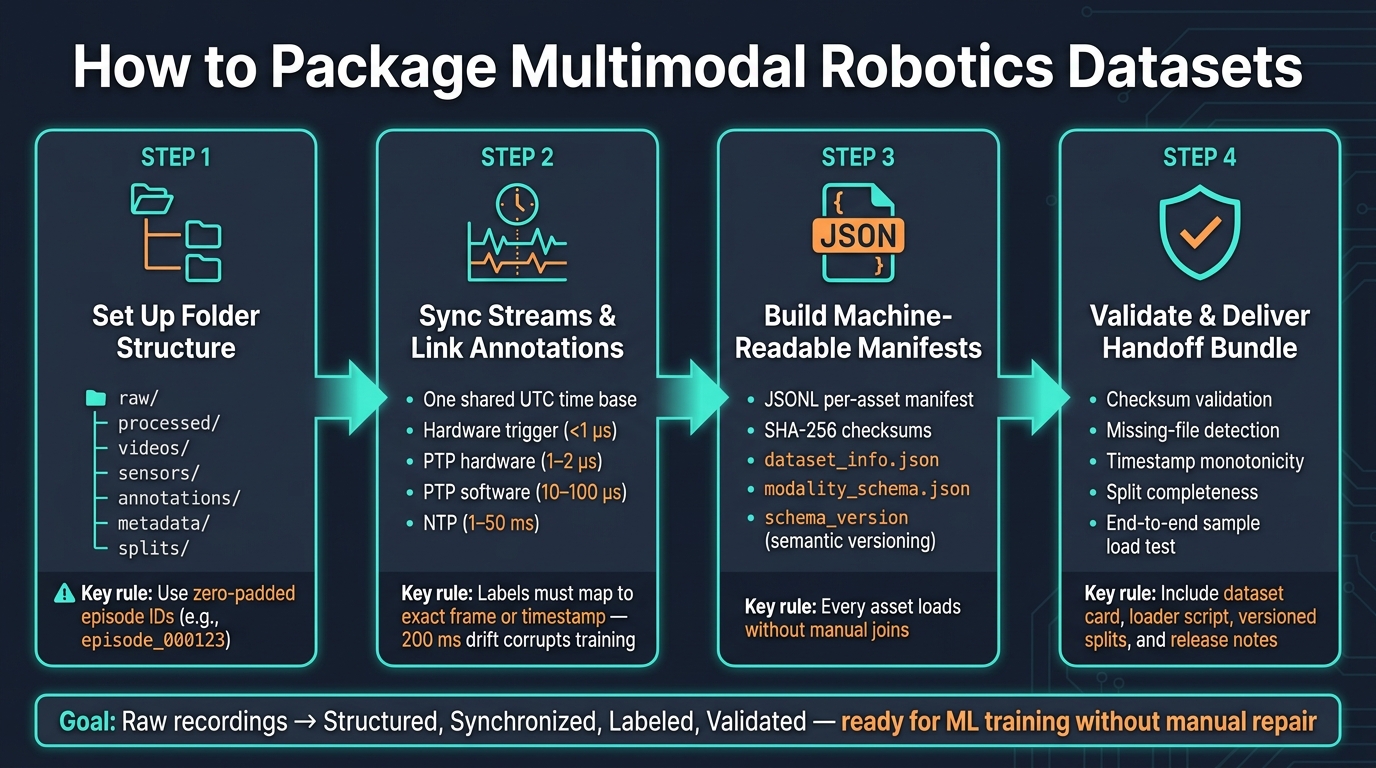
How to Package Multimodal Robotics Datasets: 4-Step Framework
Designing Data Infrastructures for Multimodal Mobility Datasets
Step 1: Set Up a Folder Structure That Separates Raw, Processed, and Labeled Assets
Keep raw camera streams, processed sensor tables, and annotations in clearly named directories. That way, an engineer can look at the package and understand it right away.
Use:
raw/for original recordingsprocessed/for standardized outputsvideos/for episode MP4ssensors/for Parquet streamsannotations/for labelsmetadata/for schema and manifestssplits/for train/val/test IDs
Choose a Root Hierarchy and Episode Naming Pattern
This setup falls apart if files don't share the same episode ID. Use zero-padded IDs like episode_000123 so files sort the right way and paths stay predictable.
That gives you matching paths like videos/episode_000123.mp4, sensors/episode_000123.parquet, and annotations/episode_000123.json.
If you have more than one camera, add a short modality tag but keep the core ID the same. For example: videos/episode_000123_cam_front.mp4 and videos/episode_000123_cam_wrist.mp4.
For large collections, shard episodes into numeric ranges so directories don't get messy. Episodes 000000 through 000999 can live under videos/000000_000999/, then the next thousand under videos/001000_001999/, and so on. Write the chunk size into dataset_info.json so downstream tools can compute paths directly instead of scanning directories.
Document the Folder Structure in Metadata Files
Every dataset package should ship with two machine-readable files.
dataset_info.json explains the top-level layout. That includes the episode ID pattern, sharding scheme, modality list, time base, and pointers to split files.
modality_schema.json handles the per-modality details. It should define things like frame rate for each camera, column names and units for each sensor stream, and required fields for annotation files such as episode_id, timestamp or frame_index, category_id, and confidence.
When these files are present and accurate, ML engineers can build ingestion pipelines programmatically instead of piecing the layout together by hand. Without a reliable schema file, large collections are much harder to onboard.
With the schema in place, the next job is picking the layout that matches how your pipeline reads data.
Compare Common Folder Layouts Before Picking One
The three layouts below cover most robotics packaging cases. Pick based on access pattern, not on what looks nicest in a diagram.
| Layout | Root directories | Best suited for | Trade-offs |
|---|---|---|---|
| Episode-centric | episodes/episode_000123/{videos, sensors, annotations} |
Teleoperation sessions, task demonstrations, per-episode QA | Easy to copy or archive individual episodes; directory count grows with dataset size |
| Video-plus-tabular | videos/, sensors/, annotations/ (episode ID ties them) |
Training pipelines that treat video and structured data as separate inputs | Fast modality-specific access; requires a manifest to link files across directories |
| Raw-log-centric | raw/ as primary (for example, ROS bags), processed/ derived |
Datasets that will be reprocessed multiple times or where the raw log is canonical | Preserves full fidelity; processed artifacts must be regenerated and tracked separately |
Use video-plus-tabular for training pipelines. Use episode-centric when debugging or handing off individual runs matters more.
Once the paths are fixed, the next step is to align every stream to the same time base.
Step 2: Synchronize Sensor Streams and Link Annotations to the Right Timestamps
A neat folder tree doesn't help much if your streams don't line up. If sensors run on different clocks, a "grasp success" label can land on a video frame taken 200 ms before contact. That kind of drift poisons the labels you train on. Packaging isn't done until every stream uses a documented time base and every label maps to an exact frame or timestep. So the next job is simple in theory: get everything onto the same clock.
Record a Clear Time Base and Synchronization Method
Choose one source of truth for time - robot controller time, a PTP grandmaster, or a dedicated time server - and map every sensor to it. Use UTC epoch timestamps with microsecond precision across all streams. Don't mix device-local time with wall-clock time.
For fast manipulation or contact-heavy grasping, use hardware triggers or PTP. NTP or post-hoc alignment is better saved for slower workflows.
| Method | Precision | Typical Use Case |
|---|---|---|
| Hardware trigger | Under 1 μs jitter | Multi-camera rigs, camera-to-IMU alignment |
| PTP / IEEE 1588 (hardware timestamping) | 1–2 μs | Ethernet sensor rigs, distributed robot fleets |
| PTP / IEEE 1588 (software timestamping) | 10–100 μs | Single-switch robot networks, moderate timing needs |
| NTP / chrony | 1–50 ms | Coarse logging, non-critical event timelines |
| Post-hoc alignment | Depends on source drift | Legacy datasets, mixed-rate streams |
Write the method down in metadata/time_sync.json. That file should include:
- the time base
- the sync method
- software versions
- expected jitter
- any known per-device offsets
If you used post-hoc alignment, also include the matching method, such as nearest-neighbor or interpolation, the tolerance window, and what should happen when no good match is found. Don't hide those misses - mark gaps clearly.
Once the timing is locked in, labels can point to the right samples instead of "close enough" ones.
Store Annotation Links at the Episode, Segment, and Frame Level
Each annotation record needs episode_id plus either frame_index or timestamp. Add sensor_id when the label applies to one modality. Those fields let ML teams join labels to the correct sample without writing custom lookup code every time.
A good pattern is to organize annotations by episode, then segment, then frame. Segment-level records - task phases like "approach", "grasp", and "place" - should include start_time and end_time in the same UTC epoch format used by the sensor streams. Frame-level records, like bounding boxes, segmentation masks, and per-frame success flags, should use the same episode ID and frame index as the video and sensor files in that episode. Text instructions and teleoperator notes belong at the episode or segment level, with clear references to the segment IDs they describe.
Keep storage paths predictable too. Use annotations/episodes/<episode_id>/segments.json for phase labels and labels/<episode_id>/<sensor_id>/<frame_index>.png for mask assets. Then reference those paths in the dataset manifest with fields like segment_annotations_path and label_mask_path so ML teams can walk the package by code, not guesswork. That sets up the manifest work in Step 3.
Step 3: Build Manifests, Metadata, and Naming Rules That Make the Package Machine-Readable
This step turns synced assets and annotations into a package that ML code can index on its own. The goal is simple: every asset should load cleanly in ML pipelines without manual joins and not by manual inspection.
Build a Per-Asset Manifest and a Dataset-Level Metadata File
Use JSONL so each line contains one JSON object. Each record should include:
dataset_idepisode_idasset_idmodalityfile_pathrelative to the dataset root, so the package stays portabletimestamp_startandtimestamp_endin ISO 8601 UTClabel_refschecksumusing SHA-256splitschema_versioncreated_at_utc
Here’s a concrete entry for a front-camera video file in a warehouse picking dataset:
{"dataset_id": "warehouse_pick_v1",
 "episode_id": "ep_000123",
 "asset_id": "ep_000123_cam_front",
 "modality": "rgb_video",
 "file_path": "episodes/ep_000123/video/front_cam_2026-09-10T14-32-05Z.mp4",
 "timestamp_start": "2026-09-10T14:32:05.000Z",
 "timestamp_end": "2026-09-10T14:36:47.500Z",
 "label_refs": ["labels/ep_000123/front_cam_actions.json"],
 "checksum": "sha256:3a9f...",
 "split": "train",
 "schema_version": "1.0.0",
 "created_at_utc": "2026-09-10T15:05:12Z"}
Keep dataset_metadata.json at the root for dataset-wide fields such as name, ID, description, license, provenance, collection window, privacy notes, owner, and changelog. Set label_refs to the annotation paths from Step 2 so loaders can move from manifest to label without guesswork.
Set Naming Rules That Scale Across Teams and Collection Rounds
File names are one of those boring things that can wreck a dataset fast. Once multiple teams and collection rounds get involved, small naming differences turn into duplicate assets, broken file links, and fuzzy episode references during training.
Use this structure:
[dataset_id]_[episode_id]_[sensor_id]_[YYYY-MM-DD]T[HH-mm-ss]Z_[modality]_[vX.Y].ext
For example:
warehouse_pick_v1_ep_000123_cam_front_2026-09-10T14-32-05Z_rgb_v1.0.mp4
A few rules matter here. Use a canonical sensor registry, fixed modality suffixes, one split-label source, and asset-level versioning. And never overwrite corrected files. If a file changes, version it. That one habit saves a lot of pain later.
Compare Metadata Approaches for Different Pipeline Maturity Levels
The best metadata format depends on your team’s size and tooling. A small team can keep things lean. A more built-out pipeline usually needs stronger schema rules and linked data.
| Approach | Complexity | Interoperability | Best suited for |
|---|---|---|---|
| Simple JSON manifest | Low | Moderate | Small teams and prototypes |
| JSONL per-asset manifest | Medium | High | Multimodal robotics datasets with many files and episodes |
| Schema-based metadata such as RO-Crate | High | Very high | Mature pipelines, multi-team collaboration, long-term archival |
For most robotics teams that are collecting data and training models at the same time, JSONL per-asset manifests usually hit the sweet spot. They’re streamable, easy to validate with a script, and easy to extend when you add new modalities or fields.
Treat schema_version as a first-class field from day one. Follow semantic versioning so a MAJOR bump marks a breaking change, a MINOR bump adds optional fields, and a PATCH fixes documentation. That keeps loaders working across dataset versions without forcing custom migration code every time the schema changes.
With manifests and naming rules in place, Step 4 moves to storage formats and handoff validation.
Step 4: Pick Storage Formats, Verify Integrity, and Hand Off the Dataset to ML Teams
With the manifest done, the last step is to package the dataset in a way ML teams can use right away. That means picking formats that fit training, checking every file, and shipping a handoff bundle that works on day one.
Select Storage Formats for Video, Tabular Streams, and Raw Logs
Once the files are machine-readable, the release step comes down to three things: format choice, integrity checks, and handoff.
Pick formats based on how the data will be used. Use video for review, Parquet for tabular streams, and native logs for raw records. Store video in compressed MP4 or MKV containers. Then pair each video with a frame-index Parquet table so downstream code can slice episodes without decoding the full file. That setup keeps episode alignment intact and makes frame-level access much faster.
Parquet is the right fit for synchronized sensor, control, and action data. It’s smaller than CSV or JSON, reads faster in training loops, and enforces a schema. That embedded schema also helps keep data types and field names consistent.
Keep raw logs as the audit trail. Use processed tables as the training layer. That separation makes life a lot easier when something looks off and a team needs to trace it back to the source.
Run Validation and Integrity Checks Before Handoff
After the storage choices are set, run release checks before delivery. Don’t ship the dataset until it passes a full validation sweep. The release should fail automatically if any of these checks fail:
- Checksum validation (SHA-256) on every file in the manifest
- Missing-file detection to confirm every episode reference points to an actual file
- Timestamp monotonicity within each episode to catch sync drift
- Annotation-path resolution to verify label references aren’t broken
- Split completeness to confirm train, validation, and test files cover the intended episodes without overlap
- Schema validation against expected column names, data types, and required fields
- End-to-end sample load test from a clean environment, loading full episodes through the intended pipeline
The end-to-end sample load test is the last gate. It catches runtime failures that plain validation can miss. On paper, a dataset can look fine. Then the loader crashes in a fresh environment, and suddenly the handoff falls apart. That final test helps stop that kind of mess before it reaches the ML team.
Deliver a Handoff Package ML Teams Can Use Right Away
Once validation passes, bundle the files ML teams need from day one. The data files by themselves are not enough.
A full handoff bundle should include:
- a dataset card
- the versioned manifest
- schema documentation
- versioned train/validation/test split files
- a sample loader script or notebook
- versioned release notes that explain what changed from the prior version
Split files should be explicit, versioned lists of episode IDs, not rules hidden in code. For robotics data, split at the episode level, not the frame level. If you split by frame, nearly identical adjacent samples can leak across sets, which can throw off evaluation.
The loader script should make the basics plain: required inputs, returned object structure, and one working example that loads a fully aligned episode. If ML teams have to reverse-engineer the loader just to get started, the handoff isn’t done.
Conclusion: What a Complete Multimodal Robotics Dataset Package Should Include
After Steps 1–4, the package should work like one load-ready contract for frontier AI teams. It takes raw recordings and turns them into something structured, synchronized, labeled, and checked.
| Component | What It Does |
|---|---|
| Consistent folder structure | Separates raw, processed, and labeled assets |
| Verified synchronization | Aligns every modality to one time base |
| Explicit annotation links | Maps labels to episode, timestamp, or frame |
| Per-asset manifests + dataset metadata | Defines schema, checksums, and file relationships |
| Clear naming rules | Keeps assets stable across collection rounds |
| Validated storage assets | Confirms file integrity and schema compliance |
| Handoff bundle | Gives ML teams loaders, splits, and release notes |
When those pieces are in place, the dataset can move from collection to training without manual repair. ML teams can load synchronized video, sensor streams, and annotations without stopping to clean things up by hand.
FAQs
What is the best way to sync mixed robot sensors?
Use a structured process: sync all sensor streams, video, and logs to a common UTC-based clock. Then apply one naming hierarchy across sites, assets, and processes so teams don’t run into alignment mistakes later.
Add metadata such as machine state, operator ID, and work orders. Keep raw data in its original format, and use a manifest to connect files with annotations or labels for a clean ML handoff.
How should I version robotics datasets after relabeling?
Package multimodal robotics datasets under one namespace with a clear hierarchy. Keep a canonical asset master that maps system-specific IDs to shared identifiers for robots, cameras, sensors, and timestamps. Sync every stream to UTC so data lines up cleanly and drift doesn't creep in.
Use a manifest to connect raw sensor logs, human demonstrations, and teleoperation logs. Add metadata like machine state, work order, and worker ID. Store the data in raw, standardized, and decision-ready formats.
What files should an ML-ready robotics dataset include?
Include raw sensor logs, first-person video, time-synced metadata, and a manifest file that links each asset to its context, such as machine state, work orders, or human demonstration labels.
Normalize timestamps to UTC during ingestion. Also capture metadata such as device IDs, units, and operator notes.
Keep a three-tier structure:
- raw data
- standardized data
- decision-ready aggregates
At handoff, include documentation for the asset hierarchy, taxonomy, and failure-case labels.