Error Auditing for Egocentric Task Datasets

Leela Yanamaddi
September 5, 2026
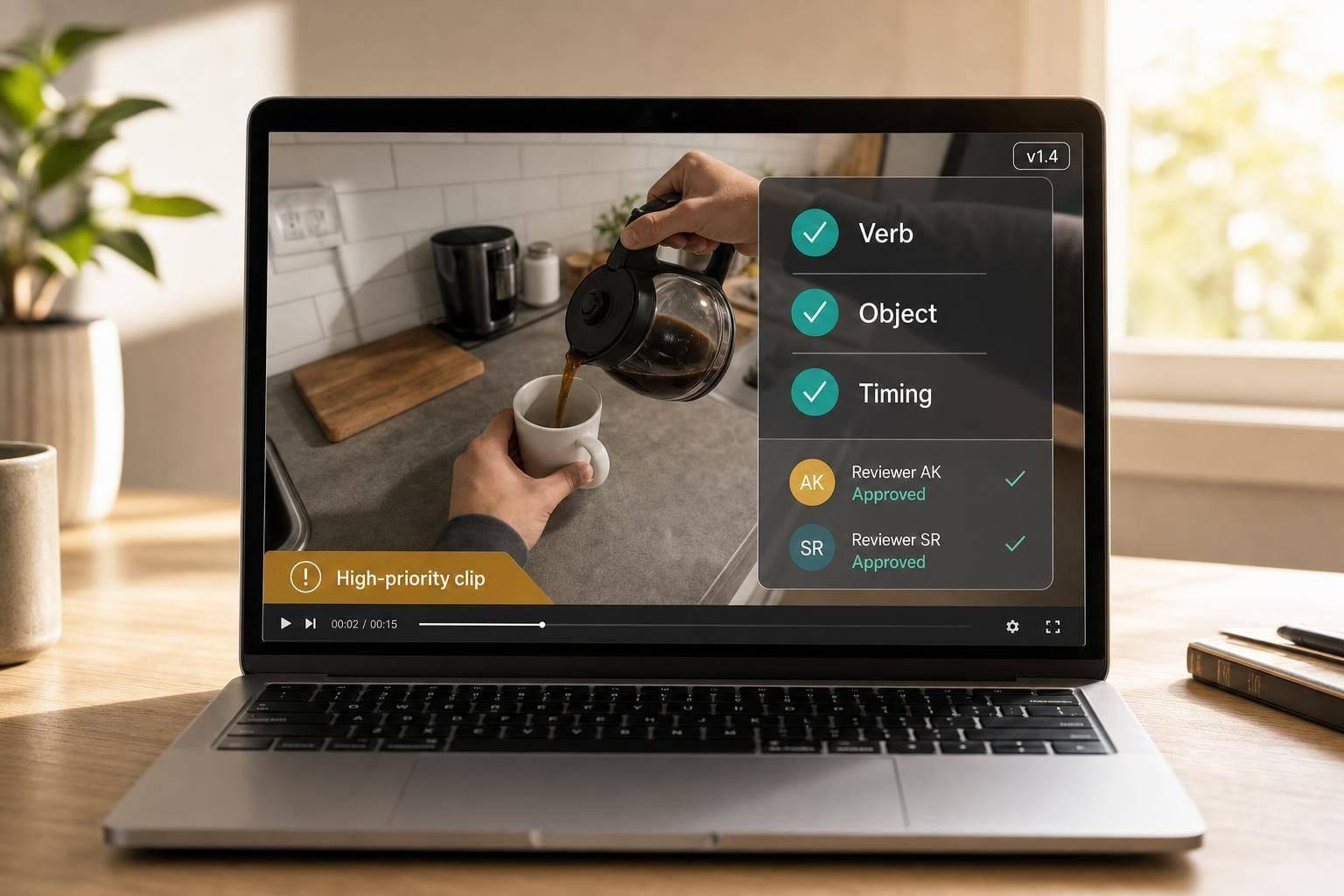
Bad labels can break a good dataset fast. If I’m auditing egocentric task data, I should check wrong action labels, bad timing, wrong hand or object tags, and missing metadata before anything else.
Here’s the short version:
- I start with high-risk clips, not random ones
- I check whether the action is clearly visible on screen
- I review verb, object, timing, hand, and outcome
- I use two reviewers on a sample, then adjudicate disagreements
- I track every fix in a versioned correction log
- I report error rates, agreement scores, sample size, and affected dataset versions
A few numbers show why this matters. In one manual audit of 300 EPIC-KITCHENS samples, reviewers found 3.3% verb errors, 6.0% noun errors, and 5.7% timing errors. Other work shows that even 5%–10% label noise can hurt transfer and out-of-domain results. This is particularly critical for Physical AI in manufacturing, where precise perception is required for safe machine interaction.
If I want a clean process, I keep it simple:
- Rank errors by model impact
- Review disagreement cases and model failure cases first
- Check clips frame by frame for visible evidence
- Measure agreement with kappa and temporal IoU
- Log every correction by sample ID and dataset version
Here’s a quick comparison of what deserves attention first:
| Error type | What goes wrong | What I review first |
|---|---|---|
| Wrong action label | The clip teaches the wrong action | Verb and object match |
| Bad segment timing | The action starts or ends at the wrong time | First contact and final motion |
| Hand/object attribution error | The wrong hand or item is marked | Visible hand use and object contact |
| Missing metadata | Filtering and tracking break later | Task IDs, step order, version fields |
The main idea is simple: I should audit the errors that change the learning signal, confirm labels only from what the video shows, and keep every fix tied to a new dataset version.
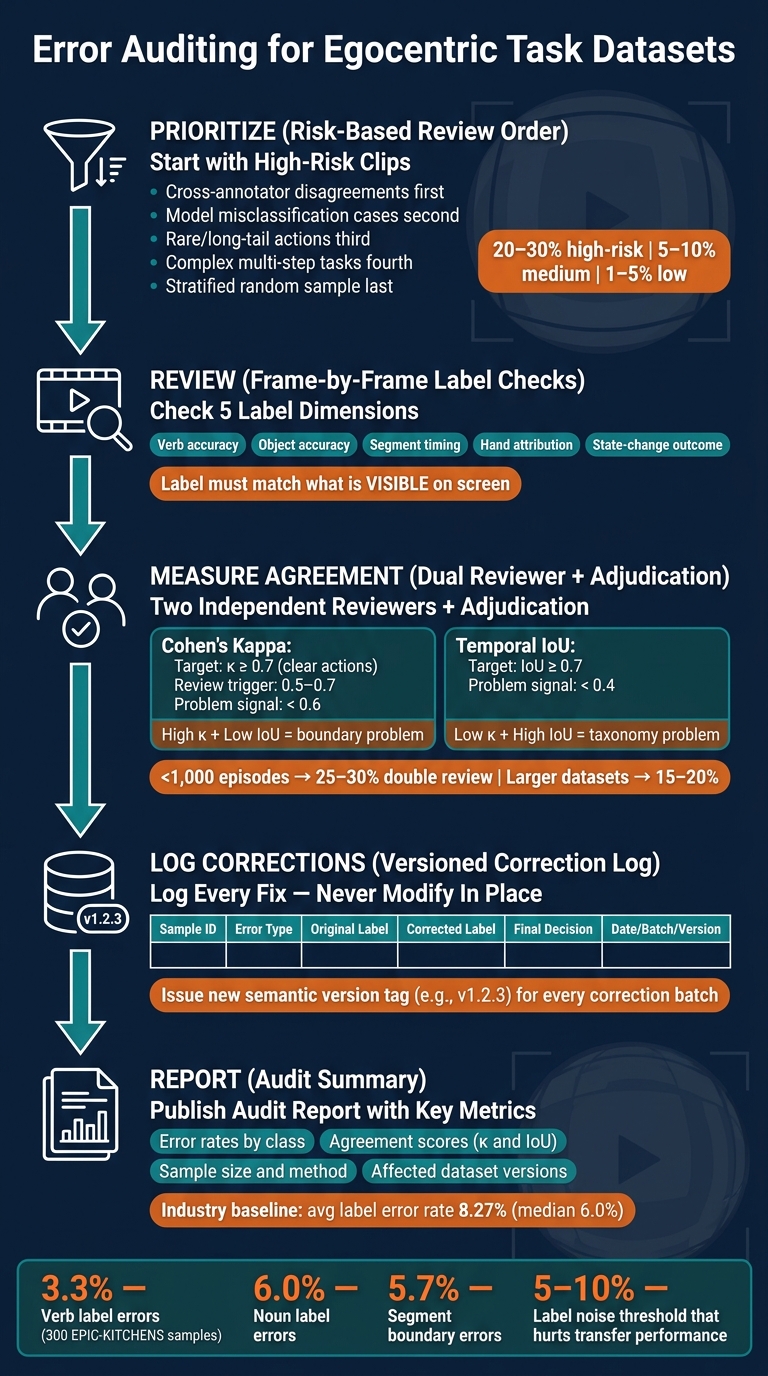
Error Auditing Process for Egocentric Task Datasets
Annotate your Egocentric Data with Labellerr
Which errors matter most and what to review first
Focus on errors that change the learning signal. Wrong verbs, bad boundaries, and wrong attribution do the most damage. Formatting issues are annoying, but they usually don't change what the model learns.
A manual audit of 300 random samples from EPIC-KITCHENS found:
- verb label errors in 3.3% of segments
- noun label errors in 6.0%
- segment boundary errors in 5.7%
Research also shows that even 5–10% label noise can sharply reduce out-of-domain robustness and transferability.
That gives you a clear review order: check semantic and temporal errors first, then deal with lower-stakes cleanup.
Use a risk-based review order instead of random spot checks
Random spot checks sound sensible, but they often burn time on low-risk clips.
Start with samples flagged by cross-annotator disagreement. If two reviewers disagreed on labels, boundaries, or actor assignment, that's a strong sign something is off.
Next, look at segments a model misclassifies often. In plain English, the model may already be pointing at noisy labels for you.
Then move to rare actions and long-tail objects. A bad label on something like "reset emergency stop" or "calibrate sensor" matters more than it might seem, because the model gets so few chances to learn those cases in the first place.
After that, review complex multi-step tasks. These are the clips where overlapping actions, hand switches, and messy timing tend to cause trouble.
Once those groups are covered, use stratified random sampling on everything else. A solid starting point is:
- 20–30% of high-risk groups
- 5–10% of medium-risk groups
- 1–5% of low-risk groups
Within each group, pick samples at random so you don't bake sampling bias into the audit.
Error types compared by review difficulty and downstream risk
| Error type | Review difficulty | Effect on training | Effect on evaluation |
|---|---|---|---|
| Action-label mistake | Medium–High | Teaches wrong verb–object semantics; can cause systematic policy errors | Misreports performance by counting wrong actions as correct |
| Bad segment timing | Medium | Corrupts temporal alignment; harms sequence models and action detection | Affects timing metrics and segmentation benchmarks |
| Attribution error | Medium | Confuses hand, tool, or actor roles; degrades robot control learning | Misattributes task responsibility; skews per-actor analysis |
| Noncritical naming or format mismatch | Low | Minimal impact on core learning signal | Complicates cross-subset comparisons; usually fixable without retraining |
Put semantic and temporal errors at the top of the queue. After that prioritization step, verify each action label against the first-person video frame by frame.
How to check action labels in first-person video
For high-risk clips, start with one rule: the label has to match what you can actually see in the video. Not what the annotator inferred. Not what the narrator said. Not what probably happened. Some egocentric annotation guides say this outright: reject clips when the narrated action is not visible in the footage. That rule should drive your review of the highest-risk clips.
Verify verb-object consistency and segment timing
Watch the labeled segment once at normal speed so you understand the scene. Then go back and scrub through it frame by frame. Check the verb and object together in the same pass. Does the verb fit the motion on screen? Does the object label point to the exact item being handled, not just something nearby?
A lot of errors are small, but they matter. Say a clip is labeled "pour water" from the moment a person grabs a bottle. That sounds close enough at first glance. But the action doesn't start until liquid is visibly leaving the container. That gap can be a few seconds, and it's one reason frame-level review is worth the effort.
For timing, use a simple three-pass method:
- Watch the segment once for context.
- Scrub backward from the labeled start until you find the first frame of contact or core motion.
- Scrub forward from the labeled end to make sure the action's effect is finished before the segment stops.
This kind of tighter timing check has been shown to help. Research comparing phase-based annotation with standard timing found that explicit phase definitions improved average temporal IoU from 0.63 to 0.83, while standard deviation fell from 0.22 to 0.11.
Check object state changes, hand attribution, and task completion
For actions that change an object's state, compare the before-and-after frames next. Look for three parts: the pre-state, the transition, and the post-state. If the final state never appears on screen, flag the clip as "outcome not visible." That's a cleaner call than filling in the blank.
Hand attribution matters most when a dataset tracks left and right hands or other two-hand actions. If the acting hand is clear, use thumb direction, wrist angle, and where the hand appears in the frame to confirm the label. If the view is blocked or partly hidden, mark it ambiguous. A guess can easily turn into bad training data.
Action-label checks at a glance
| Check | Evidence to look for | Common errors to flag | Reviewer action |
|---|---|---|---|
| Temporal boundaries | First contact frame; last frame of meaningful motion | Segment starts during preparation; ends before task completes | Adjust start/end timestamps to bracket the action tightly |
| Object labels | Clear hand–object contact; distinct visual identity of the item | Nearby but untouched object labeled; generic scene-level noun used | Correct to the specific manipulated object; note multiple-object context |
| Hand attribution | Hand visibility; thumb/wrist orientation; side-of-frame position | Hand labeled when occluded; inconsistent attribution across sequence | Confirm only when clearly visible; otherwise mark as ambiguous |
| State-change labels | Before/after object state; visible transition during segment | Final state never shown on screen; narration accepted without visual confirmation | Flag as "outcome not visible" if transition isn't captured; trim or relabel |
Human review, agreement, and deciding how much data to inspect
After single-clip label checks, add double review to see whether your rules lead people to the same call.
Use two reviewers plus adjudication on a sampled subset
Use two independent reviewers on a sampled subset. Spread that sample across task types, settings, annotators, and other high-risk slices. For datasets with fewer than 1,000 episodes, send 25%–30% of episodes to double review. For larger datasets, use 15%–20% as a starting point, then lean harder into visually messy or high-risk strata.
Each reviewer should work on their own, without seeing the other person’s labels. They should log:
- chosen action labels
- segment timestamps
- a confidence rating
- notes on occlusion or unclear rules
When the two reviewers don’t match, have a more experienced auditor watch the footage again and settle the case against the written guidelines. For timing disputes, use slow motion or frame-by-frame review. That adjudicated set becomes your highest-confidence subset.
Also document reviewer background for every audit: experience level and guideline version. This sounds a bit dry, but it pays off later. If disagreements start piling up around one reviewer or one task type, that metadata helps you tell the difference between a training problem and footage that’s just hard to label.
Measure agreement with kappa and temporal overlap
Use kappa for label correctness and temporal IoU for boundary correctness. Cohen's kappa measures categorical agreement on action labels beyond what chance would produce. Target κ ≥ 0.7 for clear actions, and treat 0.5–0.7 as a review trigger for harder cases. Anything below 0.6 is a sign that the label taxonomy, reviewer training, or both need work.
Temporal IoU covers the timing side. It measures how much two reviewers’ segment boundaries overlap relative to their combined span. Target temporal IoU ≥ 0.7. Values below 0.4 usually mean boundary rules are fuzzy or the transition itself is hard to pin down.
Read those two metrics together, not in isolation.
High kappa with low IoU means reviewers agree on the label but not the timing, which usually points to a boundary-definition problem.
Low kappa with high IoU means they agree on when something happens but not what to call it, which points to a taxonomy or training problem.
Adjudication helps surface the kind of plausible mistakes that a one-pass review can miss, especially when both labels and boundaries are shaky. Record adjudicated decisions in the correction log so later versions keep the resolved label and boundary.
Tracking corrections over time and reporting audit results
Persist every correction in a versioned log. That’s what makes audits repeatable across releases.
Log every corrected sample with version history
After adjudication, store the corrected labels in a versioned log so later audits can trace each change.
Log these fields for every correction:
| Field | Why it matters |
|---|---|
| Sample ID | Pinpoints the video segment so any reviewer can pull it up and check the fix in a future audit. |
| Error type | Sorts mistakes by category, like wrong verb, mis-timed segment, or wrong object, which helps reveal labeling patterns across batches. |
| Original label | Keeps a record of what the annotator or model first marked. That matters for root-cause analysis and before/after comparisons. |
| Corrected label | Sets the new ground truth for training and evaluation going forward. |
| Final decision | Shows who changed the label, why they changed it, and the final adjudicated outcome. |
| Date, batch, and release version | Connects the fix to a specific collection batch and dataset release so teams know exactly which model runs used data before or after the correction. |
Also log the tool version and guideline version.
Never modify a dataset release in place. Keep the original version immutable, and issue a new semantic version tag, such as v1.2.3, when corrections are applied.
What to include in an audit report
Once corrections are logged, summarize them in a report that downstream teams can scan fast.
Keep the report short, but make it specific enough that someone who didn’t review the data could still reproduce the audit. Include the sample size, sampling method, agreement metrics, adjudication rule, and error rates by class - not just one overall number. A survey of annotation quality across multiple datasets found an average label error rate of 8.27% (median 6.0%). Per-class breakdowns only work when corrections are logged by type from the start.
End with the affected dataset versions and the exact fixes applied. For example:
"All fixes incorporated into Dataset v1.3; v1.2 and earlier contain known timing errors in assembly task segments."
That one line can stop downstream model teams from training on stale labels without realizing it.
FAQs
How do I prioritize clips for an audit?
Prioritize clips where action labels miss human intent or expert judgment. Start with cases where the model gets object interactions wrong or finishes a task with logic that seems plausible but is still incorrect.
Review a solid sample of clips checked by verified specialists. They often spot issues automated checks miss.
Log every correction or override with the reason behind it. That way, each fix can be reused as structured training data.
What counts as enough visual evidence to correct a label?
Enough visual evidence means the sample can be checked on its own and matched against a clear, set standard for the right action.
In practice, use:
- a second expert review
- automated quality checks to filter noise
- contextual labeling for failures or defects
- tracking the reason for each human correction
How should I version and report dataset fixes?
Track version fixes by logging each corrected sample, the exact reason it was corrected, and whether the change was an override or a rejection. Set clear review criteria up front so every report follows the same rules.
For quality control, pair expert review with automated checks. Over time, those logs turn into a useful set of examples that help teams learn from edge cases and cut down on future manual fixes.