Egocentric Data Quality: What Makes a Clip Trainable

Leela Yanamaddi
September 19, 2026
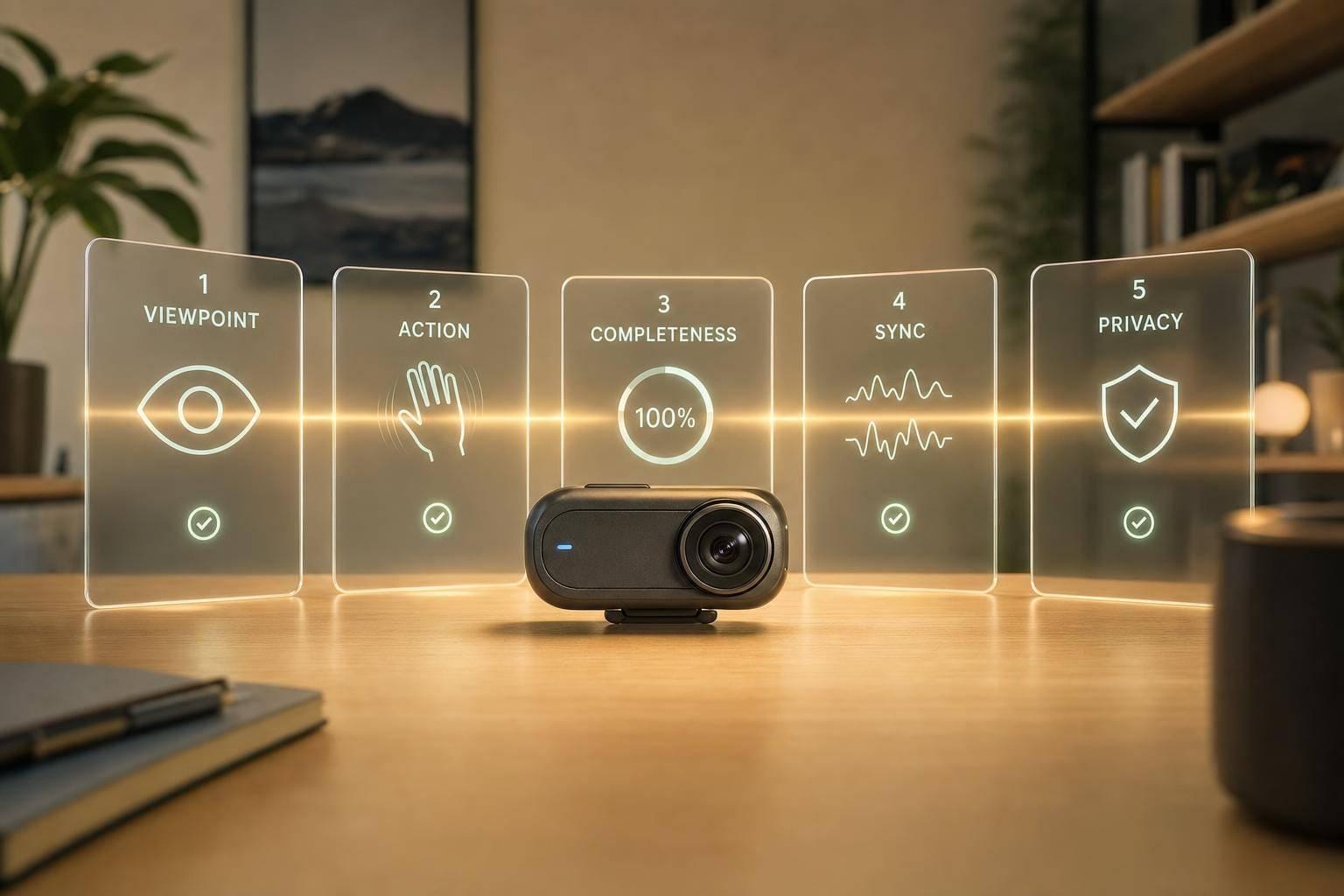
A clip is trainable only if a labeler can see the task start, action, and result without guessing. If even one core gate fails, the clip should stop before annotation.
Here’s the short version:
- Five pass/fail gates decide whether a clip can be used:
- Viewpoint relevance
- Meaningful human action
- Temporal completeness
- Synced audio and sensor data
- Privacy and consent compliance
- A clip can look fine and still fail if:
- hands leave the frame
- the task starts late or ends early
- blur hides object contact
- timestamps drift
- consent or de-identification is missing
- The article also gives simple cutoffs and review rules, such as:
- flag clips when more than 40% of frames are blurred
- use about 110° horizontal field of view for two-hand tasks
- treat κ ≥ 0.70 as the bar for label agreement
In other words: pretty footage is not the goal. Usable task evidence is.
If I were screening clips, I’d make one call at the end: pass, revise, or reject. Pass means every gate clears. Revise means a small fix like trimming, shifting sync, or blurring PII. Reject means the task signal, timing, file health, or permission record is too broken to use.
This piece boils trainability down to one plain question: Can a model learn the task from this clip without guesswork?
Egocentric Video Data Annotation: First-Person Perception for AI Robotics & Human-Object Interaction
What makes an egocentric clip trainable
A clip can look fine at first glance and still be useless for training. The difference comes down to a few hard gates. Here, there are five pass/fail checks: viewpoint relevance, meaningful human action, temporal completeness, synced audio and sensor data, and privacy and consent compliance. If one of these breaks in a major way, the clip should stop there. This isn't a scorecard. It's a set of gates.
| Dimension | Pass | Fail |
|---|---|---|
| Viewpoint relevance | Active workspace in frame; task objects visible | Camera drifts to background; workspace cropped out |
| Meaningful action | Clear reach, grasp, move, place, inspect, or adjust visible | Idle motion; hands absent; no object contact |
| Temporal completeness | Full task arc from setup to finish | Clip starts mid-task or cuts before completion |
| Synced audio and sensor data | Synced video, audio, and sensors with timestamps | Missing streams; sensor gaps; no clip-level metadata |
| Privacy and consent compliance | Consent documented; faces blurred; no corrupted files | No consent record; PII exposed; duplicate or broken files |
The first three checks are about what the camera sees. The last two decide whether the clip can move into a labeling pipeline.
Viewpoint relevance and task-centered framing
The camera should line up with the worker's point of view while the task is happening. In plain terms, the main workspace - like a countertop, assembly bench, or control panel - needs to stay in frame for most of the clip during the moments that matter. Tools, parts, or ingredients should take up enough of the frame to be seen clearly when they're in use.
If the workspace drops out of frame, the model loses the task state it's supposed to learn. A short glance away isn't a big deal. But if you get several seconds of floor-only footage during a key manipulation step, that's a fail.
Background mess isn't a problem by itself. What matters is whether the task area still stands out. A clip starts to fail when unrelated things - other people, bags, or clothing - keep blocking the workspace during the most important actions.
Clear hand-object interaction and meaningful action
In egocentric video, the main signal is the way hands work with objects. A trainable clip shows the whole chain: reach, grasp, move, place, inspect, adjust. Those steps should be visible and tied to a clear task goal, whether the person is tightening a bolt, plating a dish, or wiring a connector.
Hands need to be visible during the key contact steps. Not just fingertips. Not just shadows. The object being handled also needs to be clear enough that its edges and position can be judged.
This is where bad motion quality can ruin an otherwise decent clip. Heavy blur that turns separate sub-actions into one smear, or a low frame rate that makes steps blend together, pushes the clip toward rejection for fine-grained action recognition. And if the clip shows one static pose with no change in state, there's not much there for a model to learn from.
Temporal completeness and usable metadata
Trainable clips need the full task arc: setup, first contact, execution, verification, and termination. At the bare minimum, the start of the action and the execution phase should be fully recorded with clear transitions. Best case, the clip begins when the actor gets the workspace ready and runs through the final hand-off or cleanup.
You should also verify the metadata that makes the clip usable downstream:
- Clip ID
- Timestamps
- Clip boundaries
- Phase markers for first contact, execution, and completion
Without that structure, even a visually strong clip becomes much harder to sort, label, and use.
How to evaluate camera motion, framing, and task visibility
Camera stability, blur, and field of view
When you review a clip, start with the camera. The main question is simple: does the motion follow the task, or does it feel jumpy and random?
A move from a bin to a conveyor belt is fine if it tracks the work. But if the camera suddenly jerks and you lose the hand or the object, that clip fails. A simple rating system works well here:
- Stable: motion follows the task and tracking stays clear
- Borderline: motion is a bit shaky, but the action is still readable
- Unusable: motion breaks tracking or makes the action hard to follow
Blur needs a separate check. A good rule of thumb: if more than about 40% of frames are blurred, flag the clip as low quality. Exposure matters too. If a clip is overexposed, light-colored tools or hands can get washed out. If it is underexposed, dark gloves or parts can blend into the background, which makes segmentation unreliable.
For bimanual tasks, the camera also needs enough width. A horizontal FOV of at least 110° helps keep both hands in frame. If the view is too narrow and cuts hands off at the wrist or hides the result zone, flag it for a mount or lens adjustment instead of treating it as a simple re-shoot issue.
That distinction matters. A clip can be visible and still not be usable for learning.
Hand visibility, object clarity, and occlusion
Even steady footage can fail if the hands or objects are hard to make out. At every step, an annotator should be able to tell what the object is, which hand is active, and what action is happening.
Object clarity means the item is recognizable on its own, without extra guessing. If annotators have to infer too much, the clip should be rejected for fine-grained labeling.
Hands should stay visible from approach to release. Reviewers should see at least the wrist and most of the fingers in frame, not just fingertips or vague shadows. This is where framing problems show up fast:
- In bin picking, a camera mounted too low can let the bin rim block the grasp point.
- In assembly tasks, a downward tilt may show only forearms and part of the workspace, hiding whether a component was inserted the right way.
- In warehouse scanning, a chest-mounted camera can let the scanner head block the label at the exact moment of contact.
These are the kinds of issues that should be caught before annotation starts.
A few setup choices help a lot. Gloves should stand out from the background. And moving the camera to slightly above eye level, instead of chest level, can cut down on self-occlusion and keep the workspace easier to read.
Checking that the full task is visible, not just the middle
Clear hands and sharp objects still are not enough if the clip starts late or ends early. Scrub through the full timeline and check for setup, contact, result, and reset.
Setup shows the starting state and the worker’s intent. Result shows proof of success or failure before the clip ends, like a barcode confirmation or a placed component. Reset shows the hand pulling away or the tool being set down, which signals that the task unit is finished.
If a clip starts after contact has already happened, or cuts away before the outcome is checked, it loses the cause-and-effect chain the model needs. That missing context makes it harder to learn how an action changes the world state.
In most cases, those clips should be marked for re-collection unless the dataset is meant to cover micro-actions only. It also helps to set boundaries around natural task units, not fixed time windows, so each segment stands on its own and can be used for training without extra context.
How to verify sync, annotation readiness, and dataset hygiene
Timestamps, audio or sensor alignment, and clip boundaries
Once a clip passes the visual check, the next job is making sure every stream lines up.
At the bare minimum, video, audio, IMU, gaze, and any other sensor stream need to share one time reference. In plain English, all timestamps should move forward without gaps, backward jumps, or duplicate timecodes. Audio should have a known sampling rate and a clear offset from the start of the video. Sensor logs should point to that same clock too.
If hardware sync isn't there, use a visible sync cue like three claps and drop the frames before the marker.
Clip boundaries matter just as much. The clip should include the full action from start to finish. If it begins in the middle of a task or cuts off before the outcome, you've got a labeling problem waiting to happen.
Annotation readiness for action, phase, and object labels
After timing is checked, make sure the clip can actually be labeled without guesswork.
A clip is annotation-ready when labelers can assign action, phase, object, and outcome labels using only what they can see and hear. Research comparing annotation quality and quantity found that incorrect class labels hurt mean average precision more than missing annotations or localization uncertainty. That's a big deal. A clip that makes annotators guess doesn't just lead to fuzzy labels. It creates bad labels that can damage training.
To help annotators do the job well, attach:
- task ID
- environment info
- device details
- sensor metadata
That context tells them what task they're looking at and which objects matter. If annotators keep disagreeing on the action, phase, or outcome, the clip isn't ready yet.
Privacy, consent, duplicates, and corrupted files
Once a clip is labelable, there's one more filter: is it even allowed in the dataset?
A consent record means every clip has a documented record, such as a signed form or digital agreement, that states how the footage can be used, how long it can be kept, and whether the participant can withdraw. In the U.S., you also need to follow state privacy law and IRB requirements.
Before a clip enters a shared dataset, de-identify anything that could point back to a person. That includes faces, badges, screens, addresses, and spoken names.
Then check for duplicates and broken files before ingestion. Perceptual hashing or embedding-based similarity methods can flag clips that are re-encoded copies of the same recording or near-identical takes from the same session. If duplicates slip through, models can overfit to certain scenes and skew the dataset's distributional statistics.
Every file should also be fully decoded. That's how you catch truncated clips, codec errors, or missing headers. Validate each file against the expected resolution, frame rate, and duration. If a file fails decoding or shows major missing data, exclude it outright.
A trainability checklist for collection teams
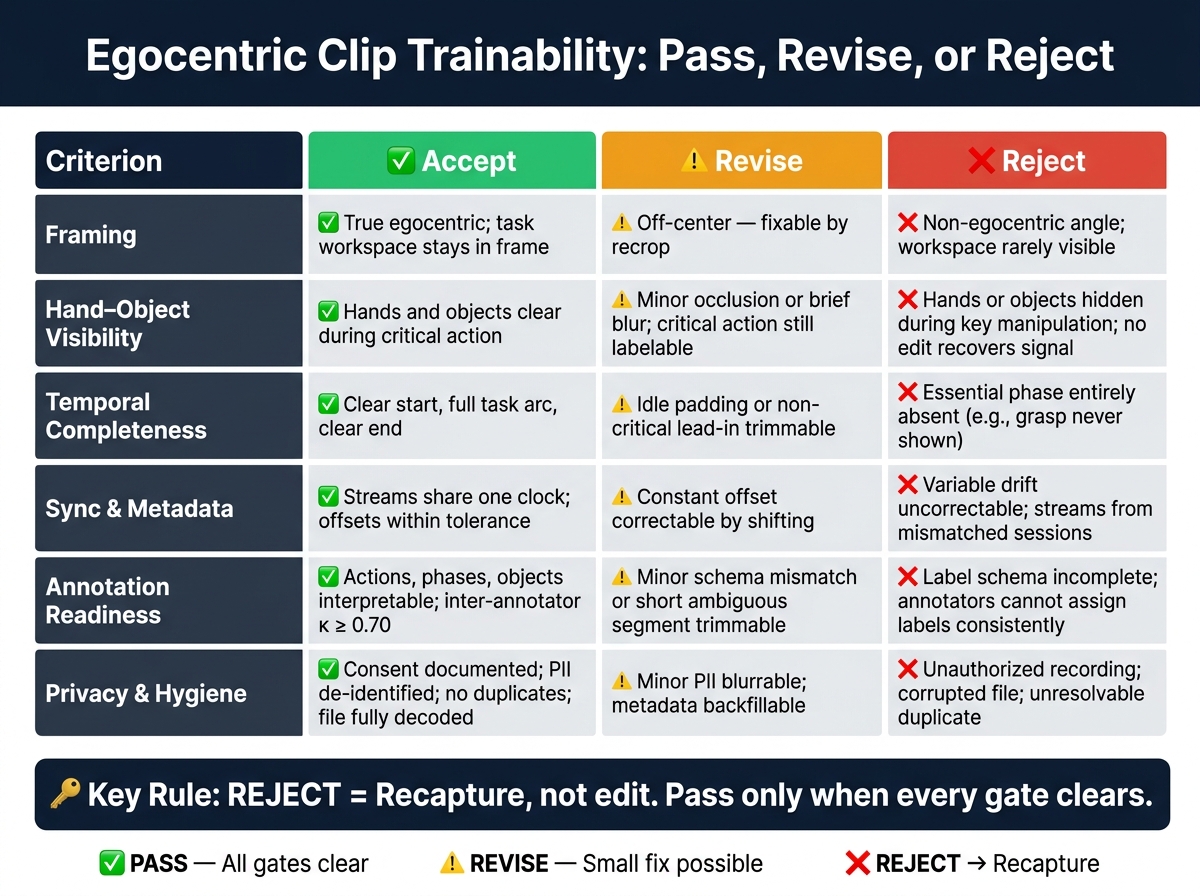
Egocentric Clip Trainability: 5-Gate Pass, Revise, or Reject Rubric
Pass, revise, or reject rubric
After screening, give each clip one of three decisions: pass, revise, or reject. This rubric turns clip review into a repeatable call instead of a gut check.
Pass clips only when they clear every threshold. Revise clips when a small edit can fix the issue. Reject clips when the core signal is missing, sync can't be fixed, or privacy problems can't be redacted. In this workflow, reject means recapture, not edit.
Checklist table for consistent reviews
Use this table to keep review calls aligned across collection teams. Check clips in the same five-stage order every time: viewpoint, visibility, temporal completeness, sync and metadata, then privacy and hygiene. That way, reviewers are working through the same path instead of making one-off judgment calls.
| Criterion | Accept | Revise | Reject |
|---|---|---|---|
| Framing | True egocentric; task workspace stays in frame | Off-center - can this be fixed by recrop? | Non-egocentric angle; workspace rarely visible |
| Hand–object visibility | Hands and objects clear during critical action | Minor occlusion or brief blur - can the critical action still be labeled? | Hands or objects hidden during key manipulation; no edit recovers the signal |
| Temporal completeness | Clear start, full task arc, clear end | Idle padding or non-critical lead-in trimmable without losing the sequence | Essential phase entirely absent (e.g., grasp never shown) |
| Sync and metadata | Streams share one clock; offsets stay within tolerance; boundaries align | Constant offset correctable by shifting | Variable drift uncorrectable with a linear fix; streams from mismatched sessions |
| Annotation readiness | Actions, phases, and objects are interpretable; inter-annotator agreement κ ≥ 0.70 | Minor schema mismatch or short ambiguous segment trimmable without losing the sequence | Label schema is incomplete or ambiguous; annotators cannot assign action, phase, and object labels consistently |
| Privacy and hygiene | Consent documented; PII de-identified; no duplicates; file fully decoded | Minor PII blurrable or redactable; metadata backfillable | Unauthorized recording; corrupted file; unresolvable duplicate |
Conclusion: Build datasets from clips models can learn from
Used the same way across reviews, this rubric keeps unusable clips out of the dataset. The standard is simple: can a model learn from this clip or not?
For that to happen, the task needs to stay visible, the sequence needs a full beginning-to-end arc, the streams need to line up, and the clip needs to be clean enough to label and use. Filtering clips upstream - before they hit annotation queues - helps keep only trainable examples in the pipeline.
FAQs
When should a clip be revised instead of rejected?
Revise a clip when the problem can be fixed with clearer signals or reprocessing. That includes better task visibility, clearer object interaction, fuller time coverage, sensor/audio sync, or missing annotation fields.
Don’t reject it if the demo is still usable after those fixes and still keeps the “why” behind the action and the intervention context. If that context or data trail can’t be recovered, rejection makes sense.
How much missing context makes a clip untrainable?
A clip becomes untrainable when it doesn't include the context needed to explain why something happened. If key metadata is missing - like reason codes, failure labels, or the exact machine state - the clip stops being useful as a training example.
Without that context, a model can't tell the difference between a normal task change, a manual override, and a real equipment failure. And when the data trail is missing or broken, the footage can't support continuous improvement.
What should reviewers check before sending clips to annotation?
Before sending clips to annotation, reviewers need to make sure each event has a reason code, a failure clip, and a clear escalation path. Otherwise, the dataset turns into noise fast.
They should also check that clips pass automated quality gates, include the required metadata like timestamps and machine states, and stay in sync with the sensor streams that give the training data its context.