Syncing IMU and Stereo Video: Timestamp Alignment Problems and How to Fix Them

Leela Yanamaddi
October 29, 2026
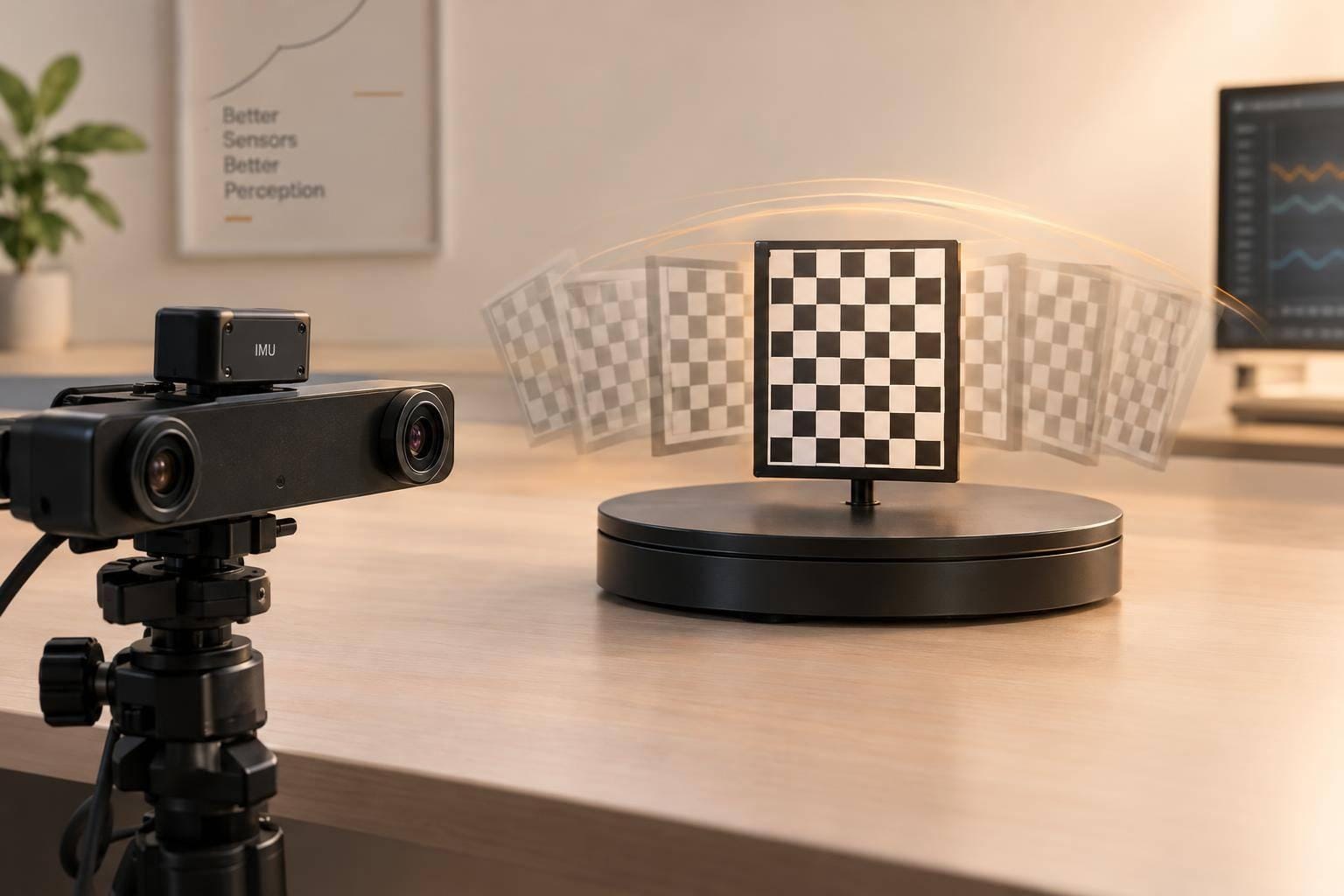
I align IMU samples with image exposure times - not arrival times. Even a 20 ppm clock-rate error can add up to 12 ms over 10 minutes, so matching timestamps at startup isn’t enough.
I check camera–IMU timing and left–right exposure timing separately. My approach is to:
- Check the clocks: Keep raw timestamps, clock details, exposure metadata, and delivery times.
- Find the error: Separate fixed offset, clock drift, delivery jitter, and stereo exposure skew.
- Apply the right fix: Use timestamp shifts for fixed offsets, clock mapping for drift, and verified hardware timing for stereo exposures.
- Match and test: Interpolate IMU data at corrected exposure times, retain samples between frames, and flag gaps or resets.
My final check is <u>timing error under expected motion</u>, across the whole recording. Aligned timestamps alone don’t prove aligned exposures - or remove blur and rolling-shutter effects.
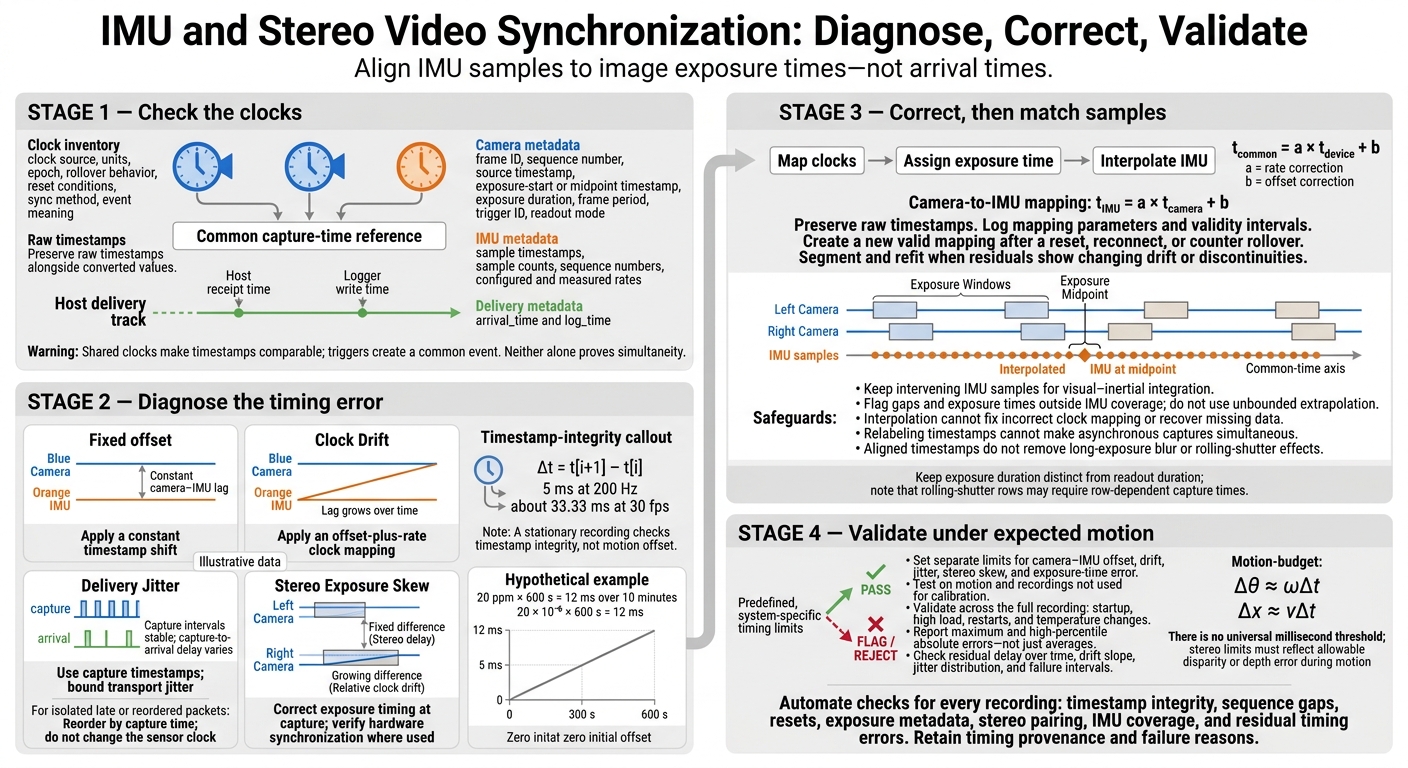
IMU and Stereo Video Synchronization: Diagnose, Correct, Validate
Visual-Inertial Sensor Calibration -- A Complete Tutorial and Discussion
Set a Common Capture-Time Reference
Once you’ve separated camera–IMU offset from stereo skew, identify the clock behind each timestamp before comparing sensors.
Build a clock inventory for the left camera, right camera, IMU, host, middleware, and logger. For every timestamp field, record its clock source, units, epoch, rollover behavior, reset conditions, sync method, and event meaning. Check those meanings against device documentation or metadata. A field named frame_time doesn’t tell you enough.
Record Source Timestamps and Exposure Details
Keep raw timestamps alongside converted values so you can diagnose misalignment and check corrections. For each camera, retain the frame ID, sequence number, source timestamp, exposure-start or midpoint timestamp, exposure duration, frame period, trigger ID, and readout mode. For the IMU, retain sample timestamps, sample counts, sequence numbers, and both the configured and measured rates. Store host receipt and logger write times separately as arrival_time and log_time.
Check whether an IMU timestamp marks sampling or packet delivery, especially when one packet contains multiple samples. Compare timestamp intervals with the configured rate, then confirm the behavior in vendor documentation. Arrival order is not capture order - use source timestamps and sequence numbers instead.
Use Shared Clocks, Hardware Triggers, or Clock Mapping
Choose a timing source that fits your hardware and validation budget.
| Approach | Timing uncertainty | Setup effort | Main failure risks |
|---|---|---|---|
| Shared clock, such as Precision Time Protocol (PTP) or a hardware counter | Depends on clock hardware and configuration | Moderate to high | Lost clock lock, unequal network path delays, wrong clock domain, trigger latency |
| Hardware trigger | Low when trigger-to-exposure latency is measured | High | Variable trigger latency, missed triggers, electrical noise, rolling-shutter timing, rate mismatch |
| Mapped device clocks | Depends on clock stability and mapping quality | Moderate | Changing drift, resets, poor calibration motion, wrong timestamp meanings |
| Host arrival timestamps | Dominated by transport and software jitter | Low | Queueing, buffering, reordering, scheduling delays, dropped packets |
Shared clocks make timestamps comparable; triggers create a common event. Neither alone proves simultaneity. Measure trigger-to-exposure latency and its variation for each camera, and verify how the trigger relates to IMU sampling. PTP precision also depends on network hardware and configuration.
Map each device clock to one reference using t_common = a × t_device + b, where a corrects rate and b corrects offset. For every conversion, log the source and target clocks, parameters, calibration time, validity interval, and firmware or driver version. Never overwrite raw values or carry a mapping across a reset, reconnect, or counter rollover. Flag the affected data and create a new valid mapping.
Diagnose Offset, Drift, Jitter, and Stereo Skew
Use recorded timestamps to tell four timing failures apart: fixed offset, drift, jitter, and stereo skew. Test them in that order, starting with fixed offset - the simplest case.
| Observed pattern | Likely cause | Test | Typical fix |
|---|---|---|---|
| Visual and gyro peaks show a constant lag | Fixed camera–IMU offset | Cross-correlate angular-velocity signals across several motion segments | Apply a constant timestamp shift |
| Alignment worsens over time | Rate mismatch | Estimate offset in early, middle, and late windows | Apply an offset-plus-rate clock mapping |
| Arrival delay varies, but capture intervals stay stable | Transport jitter or buffering | Plot capture-to-arrival delay | Use capture timestamps and bound transport jitter |
| One frame or packet arrives late, but neighboring events stay aligned | Transport delay or reordering | Compare sequence numbers and capture times | Reorder by capture time; do not change the sensor clock |
| Left and right images show different motion phases | Stereo exposure skew | Compare paired exposure times throughout the recording | Correct the stereo delay or use a shared trigger |
| Blur remains despite aligned timestamps | Exposure-time limit: long exposure or rolling shutter | Check exposure duration and readout timing | Shorten exposure, add light, or model row-dependent timing |
Check Timestamp Integrity Before Motion Calibration
Before fitting motion, check that each stream’s timestamps move forward and are evenly spaced. Start with a stationary recording. It lets you check timestamp integrity, but it cannot estimate motion offset.
Plot Δt = t[i+1] − t[i] for each stream separately. Check timestamp units, missing or duplicate records, and resets. Expect intervals of 5 ms at 200 Hz and about 33.33 ms at 30 fps.
Plot capture-to-arrival delay separately, too. For paired capture events or trigger edges, a constant time difference points to offset. A steady slope points to rate mismatch, while scatter around that slope indicates jitter.
Estimate Camera–IMU Offset From Rotation
Record varied rotations around all three axes without repeating the same motion pattern. Derive visual angular velocity, transform it into the gyro frame, match the units, and resample both signals onto a common time grid.
Use cross-correlation for the first estimate, then refine it with rotation residuals. Validate the result on a separate segment. A stationary rig, constant-rate spinning, poor feature tracking, or incorrect rotational extrinsics can all make the estimate ambiguous.
Track Left–Right Exposure Skew Over Time
If camera–IMU timing checks pass, check whether the left and right cameras still drift apart.
Compare corresponding left–right exposure timestamps and each camera’s frame intervals across the full recording, not just the first few frames. Use trigger IDs to confirm pairing when available. Treat image motion as supporting evidence; don't rely on host arrival order.
A fixed difference points to stereo delay. A growing difference points to relative clock drift. For growing skew, use a shared trigger if supported, then verify the resulting exposure timing.
Aligned timestamps won't remove long-exposure blur. Rolling-shutter rows also need separate exposure-time modeling.
Hypothetical example: A 20 ppm relative clock-rate error accumulates
20 × 10⁻⁶ × 600 s = 12 msover 10 minutes. Check skew at the beginning, middle, and end. A steady increase supports a rate mismatch - not a constant camera–IMU offset or an isolated packet delay.
Choose the Right Timing Correction
Once you identify offset, drift, stereo skew, or transport delay, choose the smallest correction that addresses it. Use calibration to estimate the timing relationship, clock correction to apply it, and interpolation to sample IMU values at the corrected exposure time.
| Method | Use case | Main limit | Implementation complexity |
|---|---|---|---|
| Fixed timestamp shift | Stable camera–IMU offset | Cannot correct clock-rate differences | Low |
| Affine clock correction | Offset plus drift | Requires separate fits across resets or nonlinear drift | Low to moderate |
| IMU interpolation | Sample at a mapped exposure time | Cannot fix clock mapping or recover missing data | Low |
| Motion-based temporal calibration | Unknown offset | Needs varied motion and reliable spatial calibration | Moderate to high |
| Hardware synchronization | Tight timing budget | Requires verified hardware | High |
Correct Fixed Offsets and Clock Drift
Use t_IMU = a × t_camera + b. Fit synchronization events spread across the recording, then check the residuals. If they grow over time or jump abruptly, split the recording into segments and refit. Don’t force one global model to fit. Keep raw timestamps alongside corrected values so you can audit the mapping.
Match IMU Samples to Image Exposure Times
After clock mapping, assign each image its correct exposure time before interpolating IMU data. Map both camera streams and the IMU to a common time reference. Choose an explicit point in the exposure, such as the midpoint, then interpolate between the IMU samples immediately before and after it.
Keep the intervening IMU samples for visual–inertial integration. Don’t reduce the stream to one value per frame. Interpolation cannot repair an incorrect clock mapping - it will estimate the signal at the wrong physical instant.
Reject or flag exposure times outside the available IMU range or across detected data gaps. Don’t allow unbounded extrapolation. When rolling-shutter timing matters, use row-dependent capture times and, where needed, a continuous-time model. Keep readout duration separate from exposure duration.
Fix Exposure Timing and Track Delivery Delays
Use this approach when stereo skew or delivery delay - not IMU rate error - is the main problem. If software timing exceeds your error budget, use hardware triggers or exposure-return signals. Check actual exposure timing, not just trigger-command timing.
Correct stereo skew at capture. Relabeling timestamps cannot make asynchronous captures simultaneous. Keep arrival timestamps, frame IDs, and sequence-gap checks to distinguish late delivery from late capture. Calculate capture-to-arrival delay only after both timestamps share the same clock, then check timing against your system’s limits.
Validate Synchronization Against Timing Limits
After applying a timing correction, verify that the remaining error falls within the system’s timing budget.
Set pass/fail limits before testing. Use traceable capture timestamps, verified clock mapping, and a documented exposure-time convention to define separate limits for camera–IMU offset, drift, jitter, stereo skew, and exposure-time error. Report maximum and high-percentile absolute errors - not just averages. Accept only recordings that meet the system timing budget.
Measure Residual Errors Under Expected Motion
Test the correction on a recording and motion not used for calibration. Derive timing limits from the allowable error at the highest expected motion: Δθ ≈ ωΔt for rotation and Δx ≈ vΔt for translation. For stereo, link exposure skew to the allowable disparity or depth error during movement. There’s no universal millisecond threshold.
Include slow and fast rotations, translations, vibration, stops, and direction reversals, along with representative lighting and scene texture. After applying the timing correction, compare camera and IMU motion using correlation, reprojection error, or pose error. Report residual delay over time, drift slope, jitter distribution, and failure intervals. Check stereo geometry separately: static recordings can hide timing errors that matter during fast motion.
Test full sessions, including startup, high load, restarts, and operating temperature changes. Report failing intervals alongside aggregate statistics.
Once the correction passes motion-based validation, automate the same checks for every recording.
Automate Timing Checks for Collection and Deployment
Run checks during collection and after each take for duplicate or nonmonotonic timestamps, sample-count mismatches, sequence gaps, clock resets, missing exposure metadata, incomplete stereo pairs, and insufficient IMU coverage. Reject recordings with unexplained discontinuities or residual errors above the defined limits before they enter perception or control pipelines. Retain the numerical result and failure reason.
For evlo.ai data collection workflows, define these checks as dataset requirements, not platform defaults. Keep source timestamps, clock domains, mapping and calibration versions, exposure conventions, correction parameters, thresholds, and validation results with each recording. Flag unsupported fields, and store timing provenance with every recording so downstream users can filter by validated synchronization quality.
FAQs
How often should I recalibrate camera–IMU timing?
Check the camera–IMU extrinsic relationship daily. Just 3–5 mm of drift can corrupt precision assembly data. Monitor timing synchronization drift, correct it within agreed-upon tolerances, and set pipelines to automatically flag sessions that exceed the threshold.
Start each shift with a short calibration check, such as walking a marked path or performing standard rotations. This helps detect sensor drift before it affects the day’s footage.
Can I salvage recordings without exposure timestamps?
Often, yes. If you didn’t use hardware synchronization, align the streams manually using a visible cue, such as a clap or an LED flash. Drop frames before the marker to line up the streams. You can also use motion-based temporal offset estimation or interpolation to map sensor data to the video.
Record the alignment method, tolerance window, and any remaining gaps in your metadata so others can use the dataset for downstream tasks.
How do I convert depth accuracy requirements into timing limits?
Start by defining your task’s speed and geometry requirements. For high-speed manipulation or contact-heavy grasping, use hardware triggers or PTP to keep jitter below 1 microsecond. General robotics tasks can tolerate time offsets of up to 50 milliseconds.
For high-speed robot arms, flag camera-to-IMU timestamp differences that exceed a task-specific threshold of 5–10 milliseconds. Document these limits in your project specification before collecting data.