Multi-Stage QA for Video Datasets: Rejecting Bad Data Before It Reaches Training

Leela Yanamaddi
October 27, 2026

I treat video as training-ready only after it passes all five QA gates. Before recording starts, I set task-specific pass rules, assign reviewers, and block failed or unchecked samples from training exports.
Here’s what I check:
- Collection: Task completion, required coverage, consent, and privacy handling.
- Ingestion: File integrity, metadata, required streams, calibration, and synchronization.
- Visual review: Whether the action, objects, contact points, and outcome are visible.
- Annotation: Label accuracy, track continuity, timing, and resolved reviewer disagreements.
- Final acceptance: The exact export, split leakage, coverage targets, training rights, and review records.
My rule: <u>every required check must pass</u>. I correct what the source supports, request a new recording when needed, and reject unusable samples. Timing and visibility limits depend on the task - not one universal number. I also track repeat failures so the next batch has fewer of them.
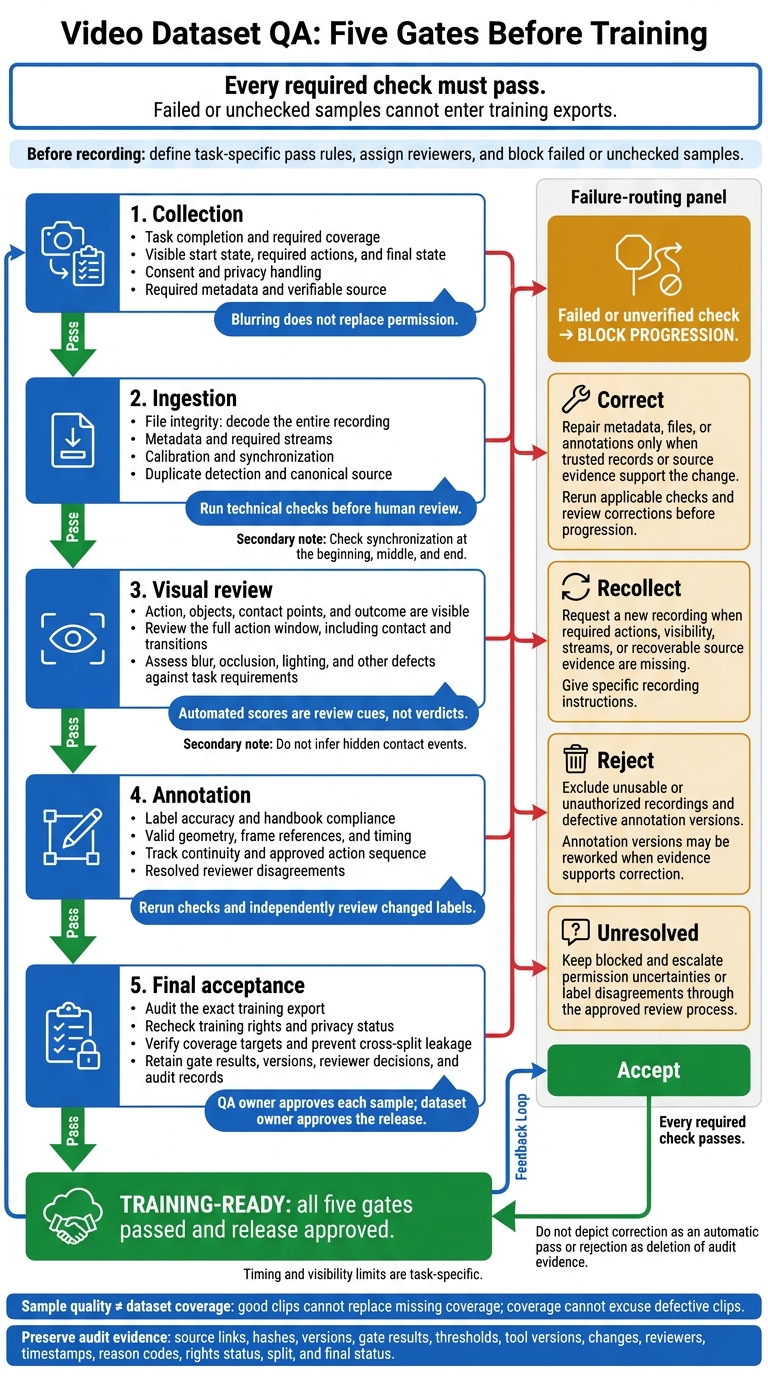
Video Dataset QA: Five Gates Before Training
Collection Checklist: Check Task Coverage and Consent
Before uploading, tag each clip with its task ID/version, contributor ID, device/camera ID, location category, timestamp with time zone, viewpoint, resolution, frame rate, lighting, background, unusual conditions, consent-record ID, privacy-processing status, and reviewer decision.
Verify Complete Tasks and Visible Interactions
Check the recording against the task specification. Reviewers must be able to see the defined start state, every required action in order, and the final state. A recognizable scene isn’t enough. The acting hand or actuator, manipulated object, and critical contact points must be identifiable.
Brief occlusion is acceptable only if the surrounding frames make the action clear. Hidden interactions, missing endings, and off-camera actions require a new recording.
Track clip quality separately from dataset coverage. Keep counts of required, collected, accepted, and remaining clips by task version, contributor, location, viewpoint, speed, object configuration, and approved edge case. Keep usable clips while collecting missing categories separately. Label intentionally collected failures or partial demonstrations as separate quality categories - not successful demonstrations.
Verify Permissions and Route Collection Failures
Confirm that consent was obtained before recording and covers storage, annotation, training use, retention, and intended access and sharing. Check restrictions on faces, voices, private spaces, bystanders, and sensitive data. Finish all required privacy processing before accepting a clip. Blurring does not replace permission. Include consent procedures and use restrictions with each clip.
Correct missing metadata only when a trusted record supports the change. Recollect clips with incomplete tasks, hidden interactions, poor framing, unsuitable lighting, or missing required scenarios. Give specific recording instructions rather than “try again.”
Reject recordings that lack valid permissions, verifiable sources, or the assigned task, or that show prohibited activity. Send permission uncertainties through the approved privacy process before allowing the clip to move forward.
Ingestion and Visual Checklists: Check Files and Footage
Validate Files, Metadata, and Synchronization
Run technical checks before human review. This gate keeps corrupted or unusable recordings out of annotation. Decode every recording from start to finish with the approved toolchain, such as FFmpeg. Check file size, checksum, container, codec, duration, resolution, orientation, frame rate, and decoded frame count. Flag decode errors, premature end-of-file errors, frozen sections, timestamp resets, and unexplained frame gaps. Compare checksums and recording IDs to catch duplicates. Keep one canonical source instead of counting copies as separate demonstrations.
Match each file to its manifest. Check session and task IDs, camera identity, capture software version, and calibration reference. Confirm that all required video, depth, audio, and robot-state streams are present. Check synchronization at the beginning, middle, and end: one aligned event doesn't rule out later drift. Set timing tolerances for the task; 10–33 milliseconds is only a reference point for 30–100 FPS recordings. Missing or mismatched calibration must block acceptance when learning depends on geometry.
Quarantine failed recordings and assign a primary reason code, severity, owner, and disposition. Preserve the original file, metadata, checksum, tool version, repair settings, and linked derivative ID. Fix packaging, metadata, or a known constant offset only when evidence supports the repair, then rerun validation. Reject unrecoverable files and request recollection if the source is truncated, frames are missing, a required stream was never captured, corruption can't be repaired, or synchronization can't be established. After file integrity and synchronization pass, check the footage frame by frame.
Check Image Quality and Action Visibility
After technical validation, inspect the footage for defects that could hide the action. Use automated flags to detect blur, clipped highlights, dark frames, shake, glare, compression artifacts, obstructions, and overlays. Treat scores as review cues, not verdicts. Calibrate thresholds by camera and task, and show reviewers the frames that triggered each flag. Inspect unflagged footage too - the camera may still be pointed away from the task.
Review the full action window, slowing down around contact and transitions. Confirm that reviewers can reliably judge the robot action, object identity and state, contact, and outcome. Keep brief, noncritical defects only when the specification allows them. Don't infer a hidden contact event. Log failures such as SEVERE_BLUR or CRITICAL_OCCLUSION with frame numbers or timecodes. Block release to annotation when critical footage is unreadable or missing. Request recollection for capture defects unless an intact source can restore the footage, and record the recheck result. Only footage that passes these checks should move to label review.
Annotation Checklist: Check Labels, Tracks, and Timing
After footage passes visual review, confirm that labels follow the handbook before annotation starts. Use the label handbook as the gate standard. Define class meanings, label hierarchy, required geometry, object identities, action start and end frames, and allowed transitions. Explain how occlusion differs from truncation at the image edge, when tracks continue through hidden frames, when reappearance requires a new ID, and who resolves uncertain cases.
Validate Label Structure and Sequence Accuracy
Run automated checks on every annotation version. Block missing labels, invalid classes, duplicate object IDs, zero-area or illegal geometry, nonexistent frame references, invalid timestamps, and segments that run past the clip. Check required coverage, forbidden gaps or overlaps, and transitions against the approved action sequence, not a generic order.
Watch clips in playback rather than reviewing stills alone, and adjust boundaries frame by frame. Follow each object to catch identity switches, drifting boxes, wrong visibility states, and interpolation through occlusion that the footage doesn't support. Confirm that text, audio, and sensor annotations use one video timebase and describe the same event window.
Once the structure passes, check how disagreements are resolved and corrections are carried forward.
Resolve Label Disagreements and Recheck Corrections
Have two annotators independently label a representative overlap sample. Cover every class, action difficulty, camera angle, occlusion pattern, truncation case, and operating condition - not just easy clips. Track class agreement, segmental F1 at 50% overlap, and boundary displacement separately. Set project-specific thresholds instead of using one composite score.
Reviewers resolve rule-based disputes. Subject-matter experts handle semantic ambiguity, unclear task intent, uncertain object identity, and modality conflicts. Record the conflicting labels, evidence, governing rule, adjudicator, decision, and whether the guideline needs revision.
Reject defective annotation versions. Correct labels, geometry, tracks, and boundaries where the evidence supports a correction. Reject and rework versions with unresolved identity switches, invalid sequences, repeated rule violations, or systematic omissions. Request recollection only when the demonstration cannot support any defensible label.
Rerun all automated checks, then have an independent reviewer check every changed label in its surrounding context. Require expert sign-off for high-risk edits. Preserve both versions, reviewer identity, timestamps, reason codes, and final disposition. Only corrected, auditable annotation versions can move to final acceptance.
Final Acceptance Checklist: Approve Data for Training
Final acceptance is the last gate before training export. Once annotation passes, audit the exact export that training will use. Any failed or unverified required check blocks release. Assess sample quality and dataset readiness separately: good clips cannot make up for missing coverage, and coverage cannot excuse defective clips.
Verify Release Requirements and Audit Records
Rerun all earlier automated checks on the exact release files, then complete an independent human review. Verify consent, privacy handling, and training rights. Check release coverage against the required task, environment, operator, and object quotas for physical AI applications. Keep each complete session in one split, and check for duplicates across training, validation, and test sets.
For every accepted sample, retain source links, hashes, dataset and annotation versions, gate results, thresholds, tool versions, changes, reviewer, timestamp, reason code, privacy and license status, split, and final status. A QA owner approves each sample after independent review; the dataset owner approves the release. Keep compliant surplus footage in an approved reserve instead of discarding it. If a release check fails, use the matrix below to decide what happens next.
Decision Matrix: Accept, Correct, Recollect, or Reject
Set all numerical limits in the project specification - not during review.
Possible task-dependent requirements include drift ≤40 ms, ≥95% task-critical frame visibility, zero missing frames during critical manipulation, and 100% valid required labels and frame references. These are policy options, not universal standards; critical blur or occlusion still blocks acceptance when it hides the required action.
Use this matrix to choose one of four actions: accept, correct, recollect, or reject. Accept only when every required check passes.
| Defect | Severity or pass condition | Detection gate | Disposition | Owner | Audit evidence |
|---|---|---|---|---|---|
| Corrupted or undecodable file | Critical | Integrity and playback test | Reject or recollect if the source can be recaptured | Ingestion QA | Checksum, decoder log, failure code |
| Missing required metadata | High | Schema and metadata validation | Correct from a trusted source; otherwise reject | Data operations | Before/after record and source reference |
| Synchronization drift | High; within the approved millisecond threshold | Timestamp and cross-stream alignment test | Correct if recoverable; otherwise recollect | Pipeline engineer | Drift report and correction parameters |
| Blur or occlusion | High if task-critical evidence is hidden; otherwise within the approved affected-frame limit | Frame-quality and visibility review | Correct only through an approved non-destructive transform; otherwise recollect or reject | Capture QA | Frame ranges, quality scores, reviewer decision |
| Incomplete task | Critical | Task-completeness checklist | Recollect | Collection lead | Missing-phase code and task review |
| Invalid labels | High | Schema and label audit | Correct and re-review | Annotation lead | Original label, correction, second review |
| Broken tracks | High; required objects remain linked through the action | Track continuity check | Correct when frames support reconstruction; otherwise reject or recollect | Annotation lead | Track-gap report and adjudication |
| Unresolved disagreement | Critical; requires adjudication or meeting the agreement target | Double review and adjudication | Block release; escalate or correct | QA adjudicator | Reviewer votes, rationale, final label |
| Exact or near duplicate | No redundant copies or cross-split leakage | Hash and similarity search | Remove duplicate; retain the authorized canonical sample | Dataset curator | Matched IDs, similarity score, retained ID |
Conclusion: Use QA Results to Reduce Repeat Failures
For each collection batch, track acceptance, rejection reasons, correction and recollection rates, annotation agreement, synchronization failures, and unresolved errors. Feed recurring defects back into all five gates to reduce repeat failures.
FAQs
How do I set QA thresholds for my robotics task?
Before collection begins, set pass, repair, and rejection criteria in your statement of work. Cover task validity, sensor synchronization, image quality, and annotation agreement. Use automated checks alongside human review.
Calibrate thresholds with a 100–200-sample pilot, then apply them to every batch. Run automated validation on all data and manually spot-check a representative sample. Label defects as critical, major, or minor to guide acceptance, quarantine, or remediation.
How can I automate QA without missing critical defects?
Use a multi-stage QA pipeline with automated checks before human review. Screen every incoming clip for file integrity, schema compliance, timestamp order, exposure, blur, and sensor synchronization.
Set strict rejection thresholds. Before labeling, automatically reject or quarantine clips with critical defects, such as missing hands, object visibility problems, or synchronization failures. Save expert review for nuanced decisions about task completeness, framing, and context-dependent occlusions.
When should I recheck previously accepted video data?
Recheck previously accepted video data when training performance shows gaps in object, scene, or task-stage coverage. Audits that reveal inconsistent labeling, weak category boundaries, or unclear labels should also trigger a review.
Recheck the data when collection batches show distribution shifts, such as changes in operators, camera hardware, or task protocols. Every file correction requires a new semantic version tag so the original release stays unchanged.