Latency Budgets for Teleoperation: Where Your 40ms Actually Goes

Leela Yanamaddi
October 31, 2026
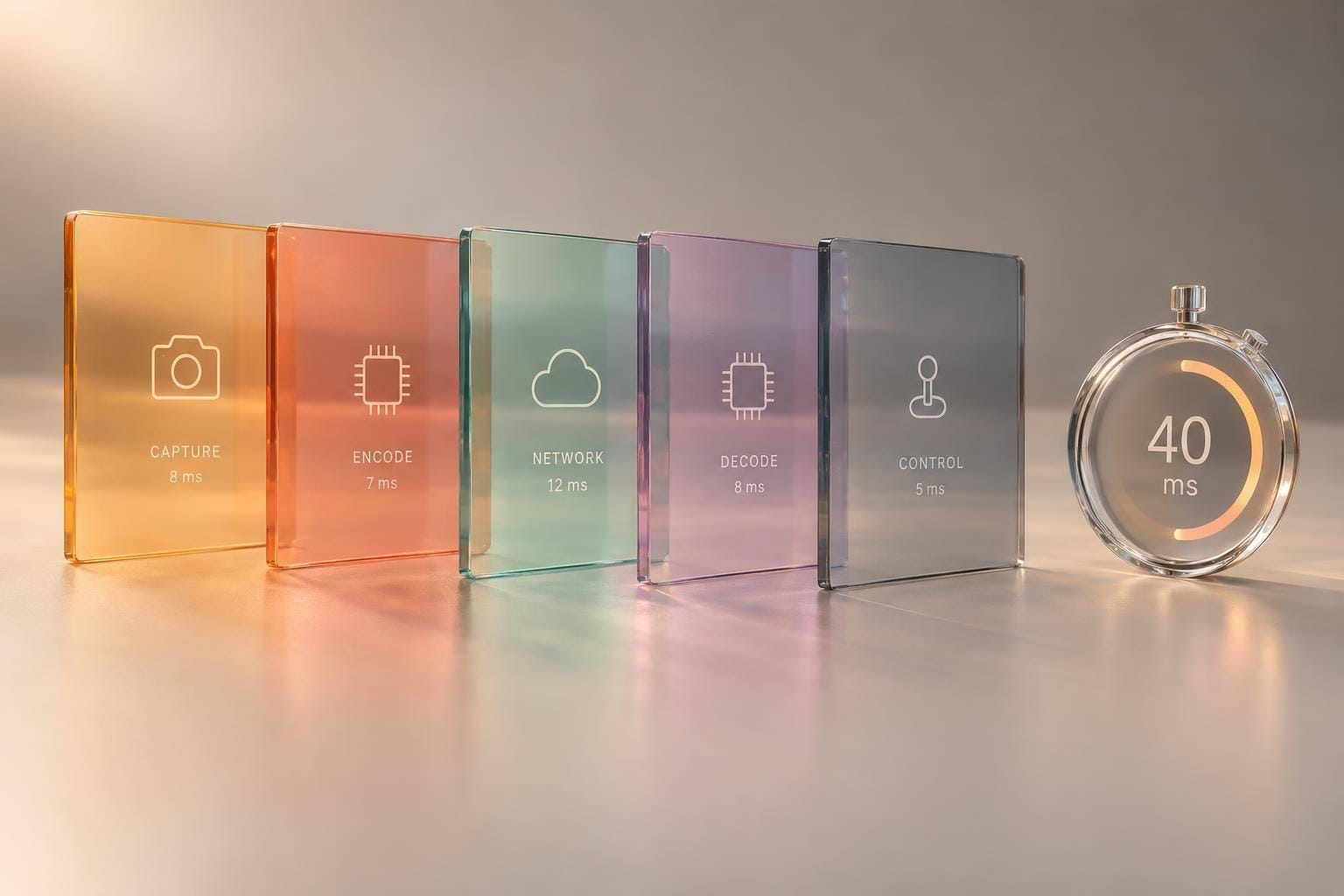
A 40 ms video feed does not mean a 40 ms response loop. I start by measuring from operator input to pixels showing the robot’s response - not just network travel. At 60 fps, a single frame period is about 16.7 ms, or roughly 42% of that budget.
Here’s how I would check where the time goes:
- Separate the paths: Measure command delivery, controller timing, physical response, and return video.
- Check the spikes: Use timestamps and camera tests to track median, p95, and p99 delays - not just averages.
- Fix measured bottlenecks: Cut queued frames, protect command traffic, and test camera, codec, network, and display settings one change at a time.
- Verify before deployment: Retest under fleet load, roaming, and link loss, with documented stop and recovery behavior.
My rule: <u>set the budget around the task</u>. Treat 40 ms as a tuning target, never a safety limit.
Build an Example 40 ms Feedback Budget
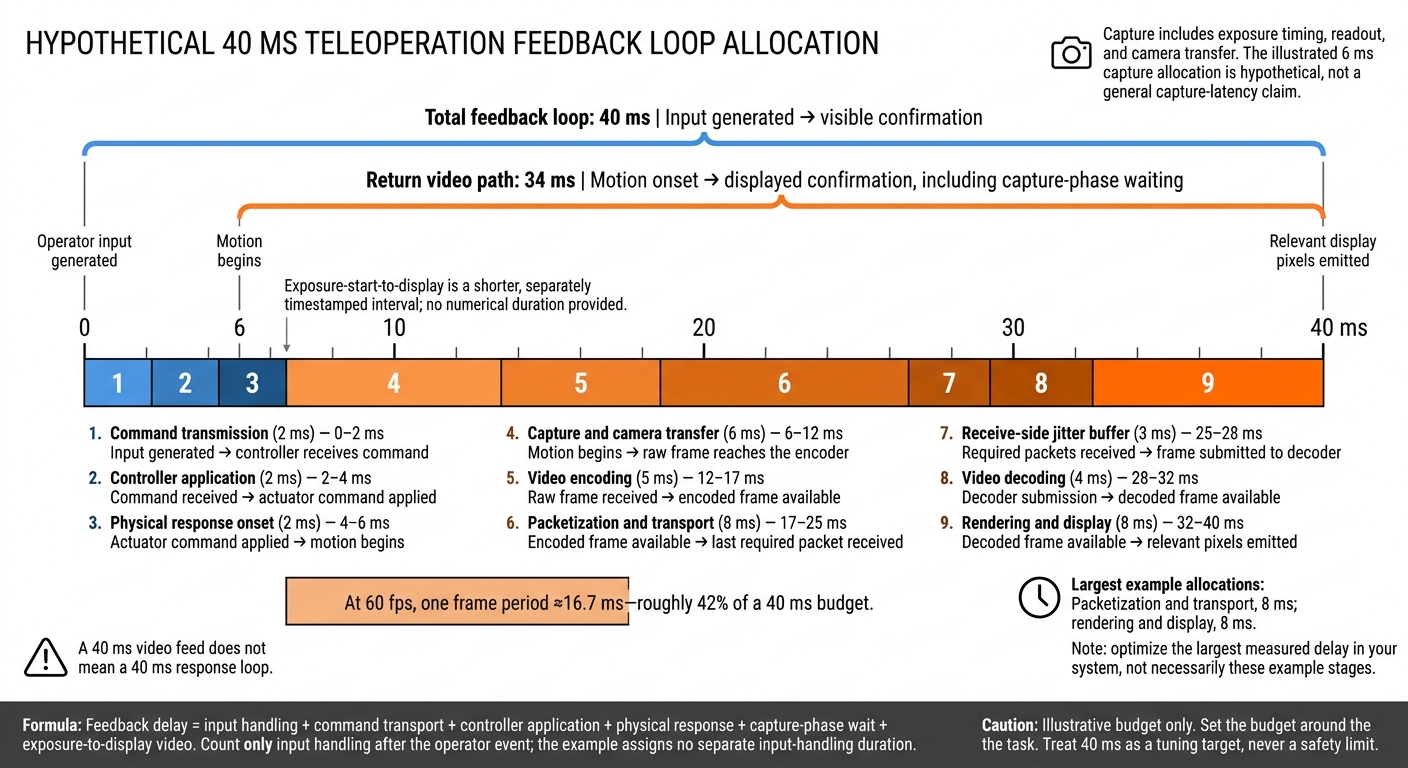
Teleoperation Latency: Where 40 ms Goes
This example separates the full feedback loop from one-way video latency.
Trace Each Millisecond From Input to Display
Start the clock when the operator input is generated. Stop when the display emits pixels showing the resulting motion - not when the command arrives or the frame finishes decoding.
Here’s how a hypothetical 40 ms loop breaks down:
Stage Allocation Cumulative interval Measurement boundary Command transmission 2 ms 0–2 ms Input generated → controller receives command Controller application 2 ms 2–4 ms Command received → actuator command applied Physical response onset 2 ms 4–6 ms Actuator command applied → motion begins Capture and camera transfer 6 ms 6–12 ms Motion begins → raw frame reaches the encoder Video encoding 5 ms 12–17 ms Raw frame received → encoded frame available Packetization and transport 8 ms 17–25 ms Encoded frame available → last required packet received Receive-side jitter buffer 3 ms 25–28 ms Required packets received → frame submitted to decoder Video decoding 4 ms 28–32 ms Decoder submission → decoded frame available Rendering and display 8 ms 32–40 ms Decoded frame available → relevant pixels emitted Total feedback loop 40 ms 0–40 ms Input generated → visible confirmation
The capture row includes exposure timing, readout, and camera transfer. At 60 fps, one frame period is about 16.7 ms, so capture timing alone can use most of the budget.
Next, identify which row accounts for the largest share of your system’s delay.
Separate Video Delay From the Full Loop
The return video path takes 34 ms from motion onset to displayed confirmation, including capture-phase waiting. Exposure-start-to-display latency covers a shorter interval and needs separate timestamps.
Feedback delay = input handling + command transport + controller application + physical response + capture-phase wait + exposure-to-display video.
Count only input handling that happens after the operator event. Anything before that timestamp falls outside the measurement.
A “40 ms video stream” does not establish a 40 ms feedback loop. You still need to account for command delivery, controller timing, motion onset, and possibly capture-phase waiting. Separating these delays shows which part of the loop needs attention.
Find Delay Within the Video Pipeline
Once you’ve measured the loop, map each delay spike to its source.
| Stage | Typical symptom | First optimization lever |
|---|---|---|
| Exposure/readout and driver queues | Consistently old image | Reduce camera/driver buffering; select a lower-latency capture mode |
| Encoding and keyframes | Spikes during complex scenes or keyframes | Disable unnecessary look-ahead or B-frame reordering |
| Packetization, routing, and network queues | Spikes during competing traffic | Shorten the path; protect commands from video congestion |
| Jitter buffering and recovery | Delay jumps or freezes | Lower the buffer target only if packet timing supports it |
| Decoding | Uneven frame delivery | Use hardware decoding; reduce unnecessary reordering |
| Compositor, refresh, and scan-out | Frame-period jumps in delay | Reduce compositor buffering; tune the presentation path |
Frame rate, resolution, and codec settings change the load on capture, encoding, transport, and decoding. Buffering, codec choice, and display timing trade image recency for stability. Verify when the relevant pixels are emitted, rather than stopping at render submission.
Use these symptoms to choose where to add measurements next.
Measure Each Stage and Find Latency Spikes
Use the symptom table above to decide what to measure first. Record a baseline before changing settings: hardware and firmware versions; camera exposure, resolution, and frame rate; codec, bitrate, and keyframe interval; display refresh rate and rendering mode; network path; and controller cycle.
Warm up the system, define the start and end events for each measurement, and save raw timestamps and synchronized video. Then separate whole-loop delay into display-path delay and command-path delay.
Test Camera-to-Display and Input-to-Confirmation Delay
Use a high-speed camera to record both a fast-changing LED in the robot-camera scene and the operator display. This checks the displayed portion of the feedback loop.
Next, run a safe motion test with a visible input trigger. Measure input-to-motion onset to check the command and controller portions, and input-to-displayed-confirmation to check the full loop.
At 240 fps, each frame spans about 4.17 ms. Report frame-count resolution, exposure effects, and trigger uncertainty rather than implying more precision than the test supports. Repeat the test 30–100 times for an initial baseline. Where practical, compare source light with display emission using photodiodes and an oscilloscope.
Timestamp Pipeline Stages and Report Tail Latency
Timestamp these stages: camera acquisition, encoder input/output, packet transmission/reception, decoder output, render submission, display emission, command transmission/reception, command application, and motion onset. Specify whether acquisition begins at exposure start, exposure end, or frame readout.
Use local monotonic clocks. Compare devices only through a shared timebase, PTP, or calibrated clock offsets. Report the remaining synchronization uncertainty: PTP support alone does not establish measurement accuracy.
Test at the intended video bitrate - not just with ping. For both end-to-end and stage measurements, report median, p95, p99, observed maximum, sample count, test duration, dropped-frame rate, packet loss, and packet reordering.
Small samples don't support p99 claims, so collect longer traces for tail analysis. The observed maximum is a sample, not a hard limit. For WebRTC, track jitter-buffer residence separately from RTP arrival jitter. Where available, divide jitterBufferDelay by jitterBufferEmittedCount.
Link Symptoms to Measured Causes
Use the timestamps to pinpoint delay from buffering, congestion, encoding load, or controller timing - and see where the illustrative 40 ms budget is spent.
Plot frame age, command age, queue depth, CPU/GPU utilization, and stage durations on the same time axis. At the measurement point, calculate frame age from capture and command age from input generation.
Change only one factor per run: bitrate, scene motion, keyframe interval, facility traffic, wireless distance, access-point handoffs, packet loss, or robot workload.
| Observed pattern | Evidence to check | Likely cause |
|---|---|---|
| Persistent delay | Consistently occupied capture, codec, or display queues | Fixed buffering |
| Intermittent spikes | Queue growth aligned with utilization, loss, or handoffs | Contention, retransmission, congestion, or scheduling |
| Smooth but stale video | High frame age and jitter-buffer residence | Excessive buffering |
| Scene-dependent delay | Encoder duration aligned with motion or keyframes | Encoding load |
| Prompt command receipt, late motion | Command receipt and application timestamps, controller-cycle timing, actuator current or encoder data | Controller scheduling, safety interlocks, trajectory generation, or actuator response |
Prioritize Changes by Measured Impact
Use your measurements to find the bottleneck that adds the most tail latency across camera capture, encoding, transport, decode, display, command transmission, and controller response. Fix the largest measured critical-path delay first, weighing p95/p99 gains against effort and risk. Try reversible settings before redesigning infrastructure, and pilot each change on one robot and one operator station.
Track camera-to-display savings separately from full-loop gains. Faster video doesn't prove faster command response. Use the same timestamps to verify the improvement.
Remove Stale Frames and Limit Buffering
Reduce queue depth across capture, encode, decode, and application stages. Where appropriate, use a bounded single-slot latest-frame queue for operator video - not indiscriminate command dropping.
Compare 1-, 2-, and 3-frame jitter buffers under the same load. Track freezes, late drops, visual continuity, and p95/p99 camera-to-display latency, then choose the smallest buffer that preserves continuity. Before cutting resolution or frame rate the operator needs for manipulation, test dedicated hardware codecs, low-delay settings, and disabled look-ahead or B-frame reordering.
Shorten Network Paths and Prioritize Command Traffic
If packet delay or queueing dominates, remove unnecessary relay and transcoding hops. Move control and media compute closer to the endpoints to reduce network travel. Use wired Ethernet for fixed segments where practical, and plan mobile coverage, capacity, roaming, and traffic priority along the robot's actual routes.
Separate command traffic from bulk video using priority or reserved bandwidth. Then verify command delivery while video traffic saturates the bottleneck. Keep command sequencing and freshness checks in place. Software tuning can't remove distance-based propagation delay.
Tune Display and Controller Timing, Then Retest
Where measurements show delays, adjust display refresh timing, compositor and middleware queue depths, controller cycles, or CPU/GPU contention. Retest the affected stages after each adjustment. Render the newest available frame rather than queued history, and tune command processing without disabling watchdogs, collision checks, safety limits, or controlled stop behavior.
After each change, repeat the same route, task, network load, and test duration. Reject lower averages if p95/p99, continuity, command reliability, or task success get worse.
Use those same test conditions in deployment planning. Define stale-command handling, heartbeat timeouts, video-loss warnings, recovery steps, and escalation paths. Treat 40 ms as a tuning target, not a safety limit; safety responses still come from the hazard analysis.
Conclusion: Use a Measured, Task-Specific Budget
After measurement and tuning, set the budget for the task - not the headline number. Define the endpoints of your 40 ms budget across input, command transport, controller application, physical response, and return video. Base acceptance on the task’s latency and jitter limits, successful task performance, and tested failure behavior. Use the measured loop to set deployment gates.
Check Readiness Before Deployment
Before approval, record named endpoints, per-stage allocations, clock synchronization or quantified uncertainty, and measured end-to-end results. Include camera, codec, display, controller, and network settings so others can repeat the tests. For evlo.ai teleoperation and fleet-monitoring deployments, require timestamp visibility, fleet-wide percentile reporting, and degraded-mode drills before making any performance claim.
Set separate median, p95, and p99 targets for video, command application, physical response, and visual confirmation. Track frame age, packet loss, and recovery time, too. Test these measures under peak fleet load, compute load, roaming, and reconnects. Document approved responses to stale video, delayed commands, and link loss, along with drill results.
FAQs
How do I set a latency budget for my robot’s task?
Set task-specific limits based on your robot’s speed and geometry requirements - not universal thresholds. Document those limits before collecting data. Use a shared time base and verify synchronization throughout each session.
Automate checks for latency, frame loss, and drift. Test under actual network conditions, report p50 and p95 rather than averages, and simulate jitter and packet loss. Flag or reject sessions that exceed your defined limits.
Can a 60 fps camera support a 40 ms feedback loop?
Yes, but there’s little room for delays. At 60 fps, a new frame arrives every 16.67 ms. Allowing one frame interval for capture leaves 23.33 ms for video encoding, network transport, decoding and display, command transmission, and the robot’s controller response.
Queuing, jitter, or processing delays at either the operator station or the robot can easily push the full feedback loop - not just one-way video latency - past the 40 ms budget.
How do I balance low latency with video stability?
Prioritize the feedback loop over video resolution. Favor lower-resolution video that maintains a high, steady frame rate. Use capture-side timestamps to tell network jitter apart from robot motion.
Set latency and jitter limits for each task, and end sessions automatically when either limit is exceeded. Use a watchdog to put the robot in a predefined safe state if commands stop arriving. Keep speed limits and collision avoidance running independently on the robot.