How Much Does 1,000 Hours of Egocentric Video Cost to Collect?

Leela Yanamaddi
October 22, 2026
I’d budget for 1,000 accepted hours - not just 1,000 recorded hours. The article’s starting estimates range from $29,500 to $280,000, excluding optional annotation. Its higher-staffing scenarios reach $66,000–$344,000, so I’d confirm the scope before choosing a budget.
Here’s how I’d compare the three options:
- Remote/simple: Lowest starting cost, with light oversight and participant-led recording.
- Managed/everyday: More spending on scheduling, equipment shipping, support, and review.
- Industrial/specialized: Added costs for trained workers, site access, safety, and privacy checks.
Quick Comparison
| Model | Starting budget | Cost per accepted hour |
|---|---|---|
| Remote/simple | $29,500–$64,000 | $29.50–$64 |
| Managed/everyday | $65,000–$133,000 | $65–$133 |
| Industrial/specialized | $128,000–$280,000 | $128–$280 |
These are illustrative U.S. planning figures, not quotes. The article also uses higher budgets for some scopes.
My first step would be a 20–50-hour pilot. At 20% rejection, you need 1,250 recorded hours to deliver 1,000 accepted hours. I’d price participant pay, equipment, coordination, consent, storage, and quality checks against that recording target - then budget annotation separately.
The rule I’d use: <u>compare total cost per accepted hour, not recording pay alone.</u>
AoE: Always-on Egocentric Human Video Collection for Embodied AI (Feb 2026)
1. Remote Collection for Simple Tasks
This model costs the least because tasks are simple, oversight is light, and little site access is needed.
Participant and Equipment Costs
Published guidance puts remote capture at roughly $10–$30 per recorded hour for participant pay and equipment amortization.
At an 80% acceptance rate, 1,000 accepted hours require 1,250 recorded hours, or $12,500–$37,500 before recruitment and operations.
Costs depend on incentives, video bitrate, equipment ownership, support needs, and rejection rate. Participant pay should cover recording time, setup, privacy burden, and compliance - not just time spent pressing “record.”
Budget onboarding separately: 120 participants at $25 each adds $3,000; recruitment or panel markup often adds 10%–30% of participant incentives.
The equipment budget should include camera rental or depreciation, mounts, batteries, memory cards, charging gear, protective cases, shipping, replacements, returns, and 5%–10% spares.
Coordination and Compliance
Plan for a project coordinator, a participant-support channel, a consent workflow, and an escalation process. Allow a quarter to half of one coordinator’s time for 6–8 weeks, plus 5–10 hours of technical support per week.
Before recording starts, explain camera placement, charging, uploads, prohibited locations, withdrawal, and deletion. Consent should address recording boundaries, household privacy, bystanders, minors, sensitive locations, retention, and deletion rights. Anyone likely to appear in a recording should go through a valid consent process. Massachusetts guidance says helpers should sign the same form when they are recorded or their data is stored.
Rejection-Adjusted Cost
At 80% acceptance, a $20 recorded-hour capture allowance becomes $25 per accepted hour before overhead.
Track why footage gets rejected so support can address problems early. Common issues include an incorrect viewpoint, missing audio or video, privacy violations, corrupted files, and missed task instructions. Higher incentives and stricter quality rules can improve completion, but they also increase the cost of every raw hour.
Data Handling and Quality Control
At 10 Mbps, 1,250 raw hours require about 5.6 TB before duplicate copies, proxies, and backups.
Budget for primary storage, a second backup copy, temporary processing space, upload monitoring, and any egress charges from reviewer downloads. Amazon S3 does not charge for inbound transfers; storage and outbound downloads cost extra. S3 Standard in U.S. East costs about $0.023 per GB-month. Downloads beyond the first 100 GB per month commonly cost about $0.09 per GB.
Quality control should focus on accepted hours, not just recorded hours. Allow 5–10 minutes of review per recorded hour.
At eight review minutes per hour, 1,250 raw hours require about 167 staff hours, or approximately $5,000–$8,300 at $30–$50 per hour.
Automate checks for file integrity, duration, frame rate, resolution, audio, timestamp continuity, camera orientation, duplicates, and upload completeness. Then sample each participant’s footage and review flagged failures. Labeling, transcription, and action segmentation are separate annotation costs. As tasks become more structured or harder to supervise, costs move into the managed-collection range.
2. Managed Collection for Everyday Tasks
This model falls between low-touch remote capture and site-heavy industrial collection.
Participant and Equipment Costs
Managed collection involves scheduled sessions, more logistics, and stricter quality control. Budget roughly $85,000–$160,000 for 1,000 accepted hours, excluding annotation. These figures are illustrative U.S. planning allowances, not quotes. With a 15% rejection rate, plan to record about 1,180 hours.
Pay participants for scheduled sessions, not just recording time. Explain payment rules for incomplete submissions upfront.
| Collection expense | Planning allowance |
|---|---|
| Participant compensation, including paid onboarding | $45,000–$75,000 |
| Screening and onboarding staff labor | $5,000–$10,000 |
| Cameras and accessories | $10,000–$20,000 |
| Shipping, returns, cleaning, and maintenance | $8,000–$15,000 |
| Collection management and compliance | $8,000–$18,000 |
| Manual quality review | $7,000–$14,000 |
| Transfer, storage, and backup | $2,000–$8,000 |
| Collection-only total | $85,000–$160,000 |
Rent cameras for a one-time collection. For repeated projects, consider buying them, but factor in depreciation and inventory management. Base device count on simultaneously active participants, not total enrollment.
The logistics allowance should cover prepaid returns, inspection, cleaning, firmware updates, replacement shipments, and reserves for lost equipment.
Coordination and Compliance
Track coordination costs per participant session.
For 120 participants completing two sessions each, 20 minutes of coordination per session means 80 staff hours, or $4,000–$6,800 at $50–$85 per hour, before adding project oversight and compliance work.
Assign responsibility for screening, eligibility checks, scheduling, reminders, rescheduling, device tracking, technical support, missing-file follow-up, and payment administration.
Keep screening labor separate from session support so you don't count it twice. State prorated payment rules for approved withdrawal or early termination.
Rejection-Adjusted Cost
Using a $100,000 budget within the table’s range and 1,180 raw hours, rejection rates of 5%, 15%, and 25% yield 1,121, 1,003, and 885 accepted hours, or $89.21, $99.70, and $112.99 per accepted hour; at 25% rejection, reaching 1,000 accepted hours requires about 1,334 raw hours, plus additional capture and review budget.
Data Handling and Quality Control
Allow 10–20 review minutes per raw hour for tighter acceptance checks.
At 15 minutes, 1,180 hours require 295 reviewer hours, costing $7,375–$13,275 at $25–$45 per hour.
Before accepting files, check completeness, orientation, task coverage, privacy compliance, and metadata consistency. Return recoverable files for correction.
At 20 Mbps, 1,000 accepted hours require about 9 TB before duplicates and backups; 1,180 raw hours require more.
Set a retention period and limit repeat downloads. Greater site control and stricter safety requirements push costs into the industrial range.
3. Industrial Collection for Specialized Tasks
Participant and Equipment Costs
Plan for 1,000 accepted hours across 10–20 workers. An 8-hour shift typically yields about 6–7 usable hours per worker after breaks, setup, battery changes, blocked areas, and failed recordings.
For one controlled warehouse or light-manufacturing site, budget $150,000–$250,000, excluding annotation. Multi-site projects may cost $250,000–$450,000, while highly restricted work can exceed $450,000–$750,000. These are planning ranges, not quotes.
At 20% rejection, you'll need 1,250 raw hours. Skilled participant pay alone comes to $43,750–$75,000 at $35–$60 per raw hour. That excludes paid onboarding, safety training, waiting, and retakes.
Budget $500–$2,000 per camera kit, plus 15%–25% for spares and consumables, including protected mounts, batteries, chargers, and memory cards.
Coordination and Compliance
Separate direct collection costs from site and compliance costs. Get written approval for recording zones and mounts before buying equipment.
OSHA guidance requires employers to identify hazards, provide suitable PPE, maintain it, and train workers to use it. Cameras must not interfere with required PPE, visibility, mobility, or safety procedures.
| Budget category | Illustrative allowance |
|---|---|
| Collection coordination and trained field supervision | $15,000–$40,000 |
| Site assessment, approvals, and safety administration | $5,000–$15,000 |
| Participant onboarding and access processing | $100–$500 per worker |
| Project-specific PPE | $200–$1,000 per worker |
| Worker and bystander privacy planning and review | $10,000–$30,000 |
| Overall contingency for delays, failures, and incidents | 10%–20% of the scoped subtotal |
Rejection-Adjusted Cost
Downtime and rejection are separate losses. If you pay for an 8-hour shift but get only 6 recording hours, labor cost per recorded hour increases by about 33% - before any footage is rejected.
To reach 1,000 accepted hours, you'll need approximately 1,111 raw hours at 10% rejection, 1,250 at 20%, or 1,429 at 30%. Charge waiting time for restricted areas to the site budget. When footage fails acceptance, add the cost of replacement recording and supervision.
Data Handling and Quality Control
Budget $20–$60 per raw hour for secure ingest, storage, and review. For 1,250 hours, that's $25,000–$75,000.
Before release, check safety compliance, restricted-zone exposure, and consent status. Use encrypted transfers, checksum verification, access logs, and quarantined storage for flagged files.
Set clear responsibilities for pausing recording, reviewing incidents, and approving deletion or redaction. Include privacy corrections required for acceptance in collection costs, but keep optional task labels and other model-training annotation outside the total.
How Rejection Rates Change Cost per Accepted Hour
How Video Rejection Rates Increase Collection Costs
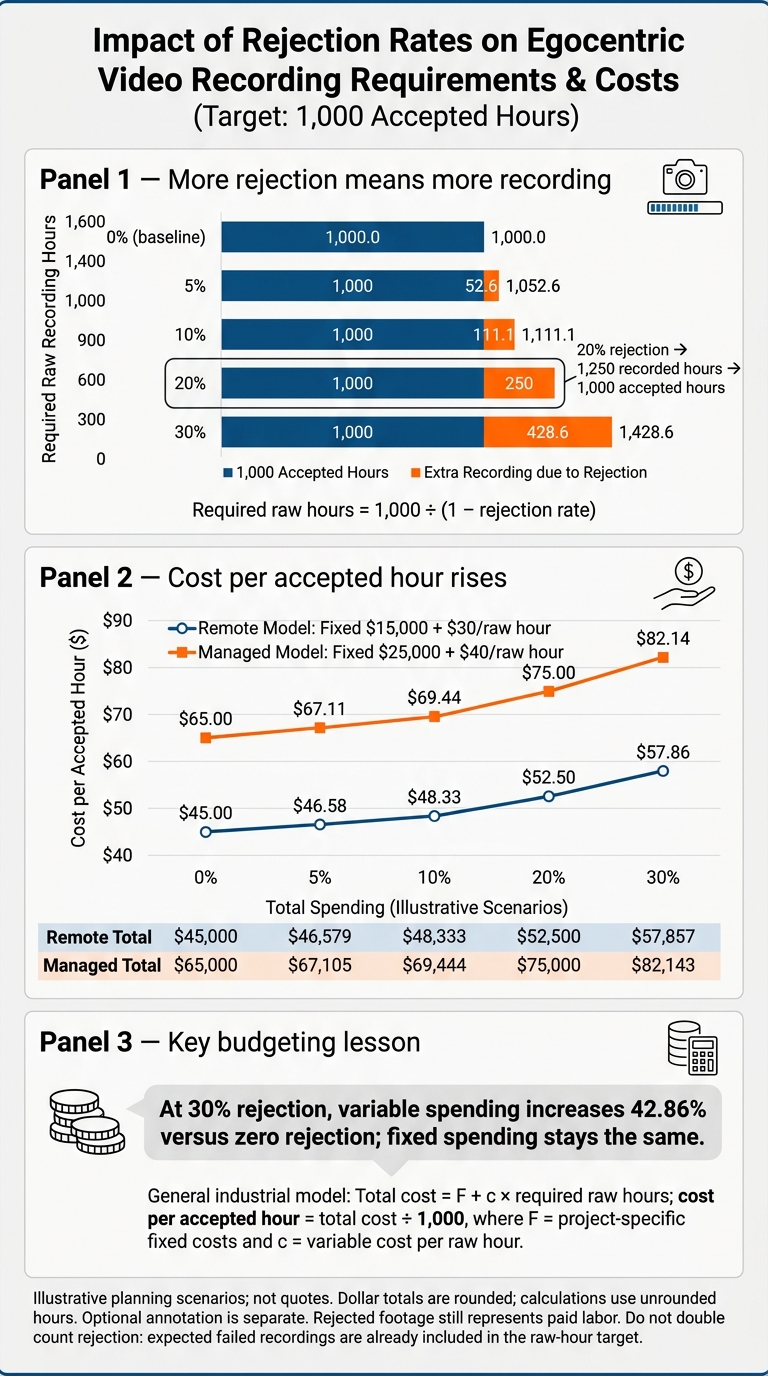
Test all three collection models against higher rejection rates before setting a budget. Use the raw-hour formula to translate rejection rates into the recording volume you’ll need.
The table below shows the budget impact for 1,000 accepted hours, assuming remote: $15,000 fixed + $30/raw hour; managed: $25,000 fixed + $40/raw hour. For industrial collection, define project-specific fixed costs (F) and variable cost per raw hour (c) before calculating totals. Higher rejection means more recording time - and more ingest, storage, and review work.
| Rejection rate | Required raw hours | Remote: total / accepted hour | Managed: total / accepted hour | Industrial: total / accepted hour |
|---|---|---|---|---|
| 0% baseline | 1,000.0 | $45,000 / $45.00 | $65,000 / $65.00 | ($F + 1,000c) / ($F/1,000 + c) |
| 5% | 1,052.6 | $46,579 / $46.58 | $67,105 / $67.11 | ($F + 1,052.6c) / ($F/1,000 + 1.0526c) |
| 10% | 1,111.1 | $48,333 / $48.33 | $69,444 / $69.44 | ($F + 1,111.1c) / ($F/1,000 + 1.1111c) |
| 20% | 1,250.0 | $52,500 / $52.50 | $75,000 / $75.00 | ($F + 1,250c) / ($F/1,000 + 1.25c) |
| 30% | 1,428.6 | $57,857 / $57.86 | $82,143 / $82.14 | ($F + 1,428.6c) / ($F/1,000 + 1.4286c) |
Dollar totals are rounded; calculations use unrounded hours. In each cost column, the slash separates total spending from cost per accepted hour.
Use 10% for remote, 20% for managed, and 30% for industrial as sample planning assumptions - not measured quality rankings. At 30% rejection, variable spending increases 42.86% compared with zero rejection; fixed spending stays the same. Define acceptance rules in a structured protocol before production, then test them during a pilot. Checks can include framing, task completion, synchronization, metadata, technical integrity, and protocol compliance.
Rejected footage still represents paid labor. Follow the approved compensation plan to pay for submitted recording time, setup, travel, and required tasks - even when footage is later rejected through no fault of the participant.
Don’t double count rejection. The raw-hour target already accounts for expected failed recordings. Add contingency only for recruitment gaps or higher-than-planned rejection. Use these raw-hour totals to calculate transfer, storage, and review costs.
Data Handling, Annotation, and Collection Trade-Offs
Price storage using the full data specification: resolution, frame rate, codec, bitrate, audio, clip length, retention, copy count, and monthly downloads. Use GB = raw hours × Mbps × 0.45 for decimal GB, then divide by 1,000 for decimal TB. Calculate master copies, backups, staging space, and processing space separately, using each one’s retention period. These file requirements determine whether storage stays a small expense or becomes a major budget item.
Price storage by storage class, transfer path, and request volume. For Amazon S3, check the region, storage class, object count, and current charges for storage, requests, retrieval, replication, and transfer. Specify whether downloads stay within AWS, cross regions, or go to the public internet. Infrequent-access and archive classes can cut storage charges, but may add retrieval fees, minimum-storage periods, or restore delays.
Acceptance checks belong in collection costs - not annotation. Budget for checksums, upload-completion checks, codec validation, duplicate detection, inspection, metadata cleanup, and required privacy review or redaction. Link consent records, too.
Maintain a file manifest that links each object key to its size, duration, checksum, pseudonymous participant/session IDs, consent status, and final disposition. Store direct identity records separately with access controls. Log rejection reasons and deletion dates, and keep rejected files through the approved retention or dispute period.
Optional annotation falls outside the collection budget. Price it separately from capture, storage, and review. For each annotation line item, track coverage, review depth, throughput, hourly rate, total cost, and cost per accepted hour.
Calculate labor cost as units ÷ units per labor-hour × hourly rate, then add review labor separately. Divide each optional annotation total by 1,000 accepted hours, not just the annotated subset. Measure throughput during the pilot: tracking and expert review need their own rates, rather than a simple clip-labeling rate.
| Optional annotation | Billable unit | Coverage and review scope to specify |
|---|---|---|
| Frame or clip labels | Frames or clips | Percentage labeled; percentage independently checked |
| Temporal segmentation | Accepted video hours | Selected hours; boundary-review depth |
| Object/person tracking | Tracks or clips | Selected objects and clips; correction coverage |
| Natural-language descriptions | Clips | Description coverage; editorial review |
| Task success/failure | Task attempts | Attempts labeled; ambiguous cases escalated |
| Additional redaction labels | Segments | Optional downstream labels only; required privacy work stays in collection |
| Expert classifications | Cases or video hours | Selected cases; expert review |
Choose a handling model based on connectivity, privacy, review load, retention, and annotation access. Lower bitrate cuts storage and transfer volume, but it can hide details needed for action recognition or privacy checks. Proxies speed up review, but they don’t replace accepted masters.
Once file handling is defined, choose the pipeline that fits the project. Savings on storage or transfers may mean spending more on staffing, review, or synchronization.
| Handling model | Advantages | Disadvantages | Best fit |
|---|---|---|---|
| Cloud-first | Centralized files and shared review access | Depends on reliable uploads; repeated downloads add transfer costs | Distributed collection with reliable connectivity |
| Local-first | Fewer repeated downloads; tighter on-site control of sensitive footage | Requires hardware, staff, and disciplined backups | Weak connectivity or intensive on-site review |
| Hybrid | Local integrity/privacy checks; cloud access to accepted masters and backups | More synchronization work and pipeline complexity | Sensitive collections needing distributed review or annotation |
Final Budget Comparison and Evlo.ai Scoping Checklist
These are illustrative U.S. planning budgets, not Evlo.ai quotations. Based on the raw-hour assumptions above, the table shows how rejection rates affect full project budgets. Each scenario targets 1,000 accepted hours. Participant compensation pays for time spent, not just usable footage.
| Budget item | Remote/simple | Managed/everyday | Industrial/specialized |
|---|---|---|---|
| Location | Participants’ homes | Several U.S. sites | Controlled workplaces |
| Task complexity | Scripted actions | Everyday routines | Trained-operator workflows |
| Raw recorded hours | ≈1,111 | 1,250 | ≈1,333 |
| Expected rejection | 10% | 20% | 25% |
| Accepted hours | 1,000 | 1,000 | 1,000 |
| Recruitment | $5,000 | $10,000 | $18,000 |
| Participant compensation | $30,000 | $60,000 | $150,000 |
| Equipment | $3,000 | $12,000 | $30,000 |
| Logistics | $2,000 | $15,000 | $35,000 |
| Coordination | $8,000 | $22,000 | $40,000 |
| Consent/compliance | $3,000 | $8,000 | $20,000 |
| Transfer/storage | $2,000 | $4,000 | $6,000 |
| Quality control | $8,000 | $15,000 | $25,000 |
| Re-recording contingency | $5,000 | $12,000 | $20,000 |
| Total collection cost | $66,000 | $158,000 | $344,000 |
| Cost per accepted hour | $66 | $158 | $344 |
These totals are higher than the earlier ranges because they allow more for staffing and logistics. They also include a re-recording contingency beyond expected rejection. Use them for scoping, not as quotes.
Totals cover every listed collection expense but exclude optional annotation. Cost per accepted hour equals the total divided by 1,000 accepted hours; raw-hour figures are rounded.
Choose remote collection for scripted actions, managed collection for household and retail routines, and industrial collection for trained-operator work at controlled sites.
Before pricing annotation, use the Evlo.ai scoping checklist to define your project:
- Define tasks, participant qualifications, locations, and acceptance criteria.
- Specify camera and audio needs, accepted-hour targets, and rejection-adjusted raw hours.
- Budget for staffing, equipment, consent, compliance, and re-recording contingency.
- Assign data handling, retention, and quality control responsibilities.
- Set annotation coverage, labeling units, and review requirements separately.
Evlo.ai can use these requirements to build a project-specific scope.
FAQs
How can I use a pilot to refine my budget?
Run a pilot with 20 to 50 hours or 30 to 50 episodes per task variant. Check the results against acceptance rules set in advance. Track usable-hour yield, reasons for rejection, synchronization errors, and the effort needed for quality control.
Ask annotation leads to review samples early so they can spot labeling problems. Use the pilot results to build a budget from the individual cost items and calculate cost per usable hour. Keep optional annotation costs separate from collection costs.
How do I balance participant diversity with cost?
Recruit for task skills and work settings, not demographic numbers alone. Match contributor profiles to your training goals, accounting for physical demands, expertise, and familiarity with the surroundings. Involve 20–50 contributors per core task to reduce overfitting to any one person’s motion style.
To control costs, keep protocol design and quality acceptance standards in-house. Use outside recruitment support to bring in the geographic or demographic diversity you need at scale.
How can I reduce rejection without lowering quality?
Focus on prevention, not just filtering. Run a 20- to 50-hour pilot, log why footage fails, and update task briefs with examples of footage to accept or reject.
Standardize camera settings, mounting angles, and pre-flight checklists to cut framing-related rejections by 30% to 60%. Use histogram analysis to automate exposure checks and Laplacian variance to check for blur. These checks flag low-quality footage before it reaches human reviewers.