Consent Logs, Provenance, and C2PA: Building an Audit-Ready Data Pipeline

Leela Yanamaddi
November 24, 2026

An audit-ready data pipeline needs three separate checks: permission, data history, and C2PA verification. Link each recording to its consent record, processing steps, dataset releases, and training runs through stable IDs. A valid C2PA credential verifies signed provenance - not consent, ownership, or legal compliance.
The workflow covers five tasks:
- Check permissions before collection, ingestion, and release. Quarantine data with missing or unclear rights.
- Track changes with hashes, linked records, and signed C2PA manifests.
- Save release decisions with the permissions, policies, and approvals used.
- Trace withdrawals through files, derivatives, and models. Deleting footage does not erase its effect on a trained model.
- Keep audit records ready through restricted access, nightly record checks, and quarterly recovery tests.
The goal: show what data was used, which permissions applied, and how each release decision was made.
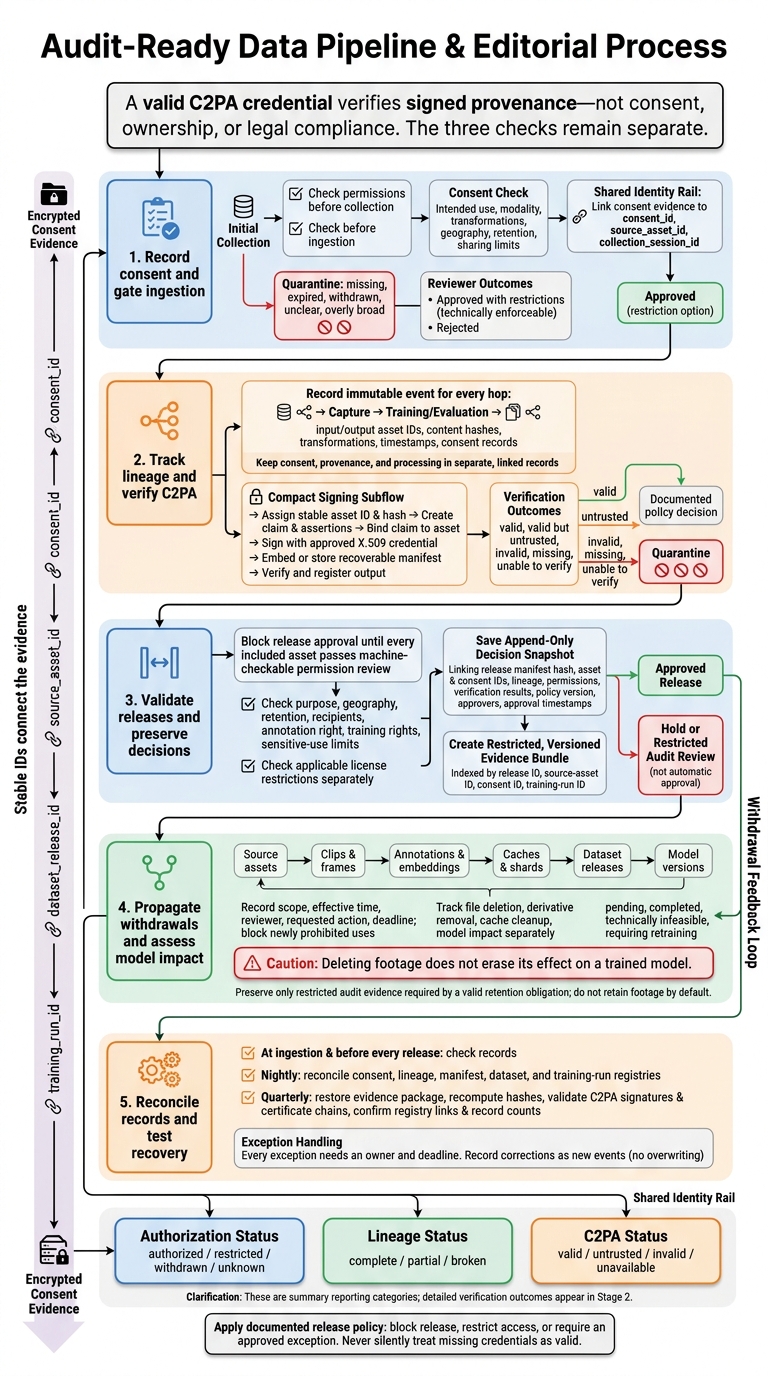
Audit-Ready Data Pipeline: Consent, Lineage, and C2PA
DEMO: C2PA Content Provenance specification in action
Step 1: Record Consent and Check Ingestion Permissions
Check permissions before collection and again before ingestion. Collection teams must document permission for egocentric video, task demonstrations, audio, and sensor streams. Privacy or legal reviewers - not field staff - must resolve unclear rights.
Define Consent Record Fields
Use structured fields that a permission gate can check. Keep purposes, modalities, transformations, and sharing conditions separate. Permission to record a demonstration does not automatically permit voice analysis or commercial use.
| Field group | Required information |
|---|---|
| Identity and collection | consent_id, contributor or rights-holder ID, source_asset_id, collection_session_id; collection time, location, setting, and activity context |
| Disclosure and verification | Verification method and status; consent-text version, language, delivery time, and acceptance method |
| Authorized scope | Research, training, evaluation, and commercial-use permissions; allowed modalities, transformations, recipients, and prohibited uses |
| Limits and lifecycle | Geographic scope, effective date, expiration, retention and deletion deadlines, compensation, withdrawal method, and treatment of existing derivatives |
| Evidence and decisions | Evidence reference and digest; restrictions, third-party rights status, reviewer, decision, policy version, and last-updated timestamp |
Store timestamps in UTC ISO 8601 format, such as
2026-11-24T15:00:00Z. Record compensation in USD, displayed as$50.00.
Expiration and retention are separate. Permission for new uses can end before the deadline for deleting retained evidence.
Store Consent Evidence and Track Changes
Require specific, informed, current permission for each intended use. Store signed forms, verification material, and payment records in an encrypted evidence store. Restrict access and log retrievals. These records serve as the authorization source for downstream lineage checks.
The working record should contain an evidence ID and cryptographic digest, not unnecessary identity data. Link the evidence ID to consent_id, source_asset_id, and collection_session_id, and keep sensitive references out of public C2PA credentials.
Append amendments and withdrawals rather than overwriting prior decisions. Include received and effective timestamps, affected scope, reviewer, and required remediation. NIST recommends documented authorization, revocation, and recordkeeping.
Block Collection and Ingestion Without Permission
Before recording, confirm worker, bystander, facility, audio, and third-party permissions separately. Stop or isolate the affected recording if rights are uncertain.
At ingestion, check evidence integrity and authorization at both collection and ingestion. Also check the intended use, modality, transformations, geography, retention, and sharing limits. Quarantine assets with missing, expired, withdrawn, unclear, or overly broad permissions. Keep them inaccessible to annotation and training jobs.
Before releasing an asset from quarantine, require a recorded reviewer decision: approved, approved with restrictions, or rejected. Include the rationale, timestamp, and policy version. Write the quarantine decision back to the same consent_id, source_asset_id, and collection_session_id records. Any restrictions must be technically enforceable.
For U.S. collection, record the state or states involved. Route recording-consent, biometric, employment, and children’s-data questions to qualified privacy or legal reviewers before ingestion. General consent must not silently permit face recognition, voice analysis, or employee monitoring. Pass approved assets into lineage tracking and C2PA signing in Step 2.
Step 2: Build Data Lineage and Verify C2PA Credentials
Approved assets from Step 1 move into lineage tracking and signing.
Trace Data From Collection to Training
Record an immutable lineage event for every hop from capture to training or evaluation. Include the event ID, input/output asset IDs, content hashes, transform type, tool version, operator or service identity, UTC timestamp, parameters or policy version, environment digest, review status, and consent links.
After recording lineage, issue a new manifest for each derived asset.
Keep lineage, consent, and processing in separate, linked records. For synchronized video and robot telemetry, save synchronization markers and calibration offsets in the processing records. For rejected or withdrawn media, store only the decision ID, reason code, and timestamps; do not keep the media beyond legal retention limits.
Hypothetical warehouse demonstration:
capture_2025_0142links toconsent_7781; redaction underredaction_policy_v3.2changes the raw hash fromH1toH2, and annotation producesH3. After quality approval, the asset enters shardS17, releasewarehouse-nav-1.4.0, and training runrun_2025_06_18.
Evidence class Separate record contents Link Provenance Source, derivative hashes, ingredient relationships, manifest ID Capture and asset IDs Consent Robotics navigation training scope, restrictions, withdrawal status consent_7781and pseudonymous subject tokenProcessing Redaction policy, annotation output, quality approval Transformation ID and input/output hashes
Create and Sign C2PA Manifests
Record the new action and contributing ingredients. Register each dataset release or snapshot with its dataset ID, release number, UTC creation time, manifest or asset list hash, shard hashes, selection rule, consent-policy version, transformation-policy version, inclusion and exclusion counts, and linked training or evaluation run IDs.
Follow this signing sequence:
- Assign a stable asset ID, hash the asset, and create the claim and assertion store. Add only accurate, permitted assertions, and link contributing assets through ingredient references.
- Bind the claim to the asset using the applicable C2PA hash or hard binding.
- Sign the claim with an approved X.509 credential and protected private key.
- Embed the manifest or store a recoverable detached manifest.
- Verify the output. Then register the final asset hash, manifest ID, certificate ID, signing time, tool version, and storage location.
Verify C2PA Credentials and Secure Signing Keys
Locate the active manifest. Check asset binding, claim/assertion hashes, signature, certificate chain, validity, revocation, trust lists, required Extended Key Usage (EKU), assertion consistency, and available ingredient references.
Record one status: valid, valid but untrusted, invalid, missing, or unable to verify. When provenance is required, quarantine assets marked invalid, missing, or unable to verify. Hold assets from untrusted signers for a documented policy decision.
Keep signing keys in managed or hardware-backed storage. Allow only approved services to sign, and log each operation. Document ownership, rotation, expiry, revocation, key recovery, trust lists, and EKU requirements. Retain a trusted timestamp record for later validation. Check consent separately against the planned use.
Use the verified lineage, manifest IDs, and consent links to validate dataset releases.
Step 3: Check Dataset Releases and Retrieve Evidence
Use the verified lineage, manifest IDs, and consent links from Step 2 to decide whether each release can ship.
Check Release Uses Against Permissions
Block release approval until every included asset passes a machine-checkable permission review. Check the planned purpose, geography, retention, recipients, annotation rights, training rights, and sensitive-use limits against the permissions on record. For custom collection, check participant permissions, capture notices, and bystander restrictions against the planned release. For licensed datasets, verify the license version, derivative-use rights, sublicensing, attribution, and expiration. Apply every relevant restriction: neither consent nor a license covers every required right. Put missing, expired, unclear, or conflicting permissions on hold for review.
Save an append-only decision snapshot for each release. Link the release manifest hash to asset and consent IDs, lineage records, license references, exclusions, withdrawal results, transformation and annotation versions, C2PA manifest IDs and verification results, policy version, approver identities, and UTC approval timestamps. Keep the referenced record hashes so reviewers can reconstruct the evidence used for approval.
If approval fails, package those same records for restricted audit review.
Prepare Evidence for Restricted Auditor Access
Build a versioned evidence bundle indexed by release ID, source-asset ID, consent ID, and training-run ID. Include release snapshots and manifests, lineage records, permission references, withdrawal decisions, verification output, policy versions, approvals, exceptions, and access logs. These records should let reviewers retrieve proof for a specific release decision.
Add an “as of” timestamp and a machine-readable index with record_type, record_hash, effective_at, retention_until, and classification. Give reviewers read-only metadata and redacted records by default. Access to raw footage or identity-linked evidence requires separate, time-limited approval, multifactor authentication, export limits, and access logs.
Apply Withdrawals Across Assets and Training Runs
Record each withdrawal or permission change as a durable event, including its scope, effective time, reviewer, requested action, and deadline. Trace affected data through clips, frames, annotations, embeddings, caches, shards, releases, training runs, and model versions. Block newly prohibited uses. Record downstream notices with delivery and acknowledgment timestamps, and preserve historical release evidence while marking affected releases unavailable for further use.
Mark each affected object pending, completed, technically infeasible, or requiring retraining. Track file deletion, derivative removal, cache cleanup, and model impact separately. Deleting a video does not remove its influence from a trained model. If a valid retention obligation prevents complete deletion, keep only the restricted audit evidence needed to meet that obligation. Document the basis and duration; do not retain the footage by default. Give unresolved work an owner, a deadline, and a documented limitation.
Conclusion: Keep Audit Evidence Current
Schedule Record Checks and Recovery Tests
Keep consent, provenance, and C2PA records in sync after release decisions. Check records at ingestion and before every release. Each night, reconcile the consent, lineage, manifest, dataset, and training-run registries.
Flag expired permissions, missing links, orphaned derivatives, hash mismatches, unverified credentials, missing approvals, and training inputs that are restricted, superseded, or withdrawn. Give every exception an owner and a deadline.
Keep append-only records for every pipeline event, and log corrections as new events rather than changing earlier records. Test recovery quarterly by restoring an evidence package, recomputing hashes, validating C2PA signatures and certificate chains, and confirming registry links, link counts, and record counts. Record the recovery time, failures, and corrective actions.
Report Control Statuses and Check Release Records
Use these checks to create one stable status record per asset or release. Report three dimensions:
- Authorization: authorized, restricted, withdrawn, or unknown.
- Lineage: complete, partial, or broken.
- C2PA status: valid, untrusted, invalid, or unavailable.
Link all three to the same consent_id, asset ID, dataset release ID, and training run ID. Retain verification reasons, timestamps, the validator version, and the trust-list version. Treat C2PA as provenance verification only.
For each asset, use a release checklist that includes the applicable consent or license reference, source hash, transformation history, dataset version, recorded C2PA status, approval, and retrievable evidence. Keep unavailable credentials, failed checks, and their reasons visible.
Apply the documented release policy: block release, restrict access, or require an approved exception. Never silently treat missing credentials as valid.
FAQs
How can I automate permission checks for mixed-source datasets?
Use a fail-closed release gate: release assets only when every check passes. Give each asset and collection event its own ID. Link those IDs to consent records, provenance, processing history, and a permissions register that tracks scope, restrictions, and expiration.
Before release, check permissions against each asset’s lineage and C2PA manifest. Automatically block export and flag the record for review if any check fails or permissions are missing, expired, or withdrawn.
What if processing strips a video's C2PA credentials?
If processing removes a video’s C2PA credentials, the asset fails the release gate. It no longer carries the verified lineage and signature needed to confirm the release snapshot’s integrity and provenance.
Block the release and send the asset to the team responsible for investigating. Check the lineage records to pinpoint where processing removed the provenance data.
When does a consent withdrawal require model retraining?
Withdrawing consent does not automatically mean a model must be retrained. Deleting source files does not prove the model has unlearned the data. Removing or retraining the model requires a separate, documented decision.
Immediately quarantine or remove the affected dataset files and record the withdrawal. For audit purposes, log the action taken and the removal date. Before future training, release a new, versioned dataset that excludes the withdrawn content and meets updated requirements.