UMI Handheld Grippers Explained: When Cheap Capture Beats Real Robot Episodes

Leela Yanamaddi
October 10, 2026
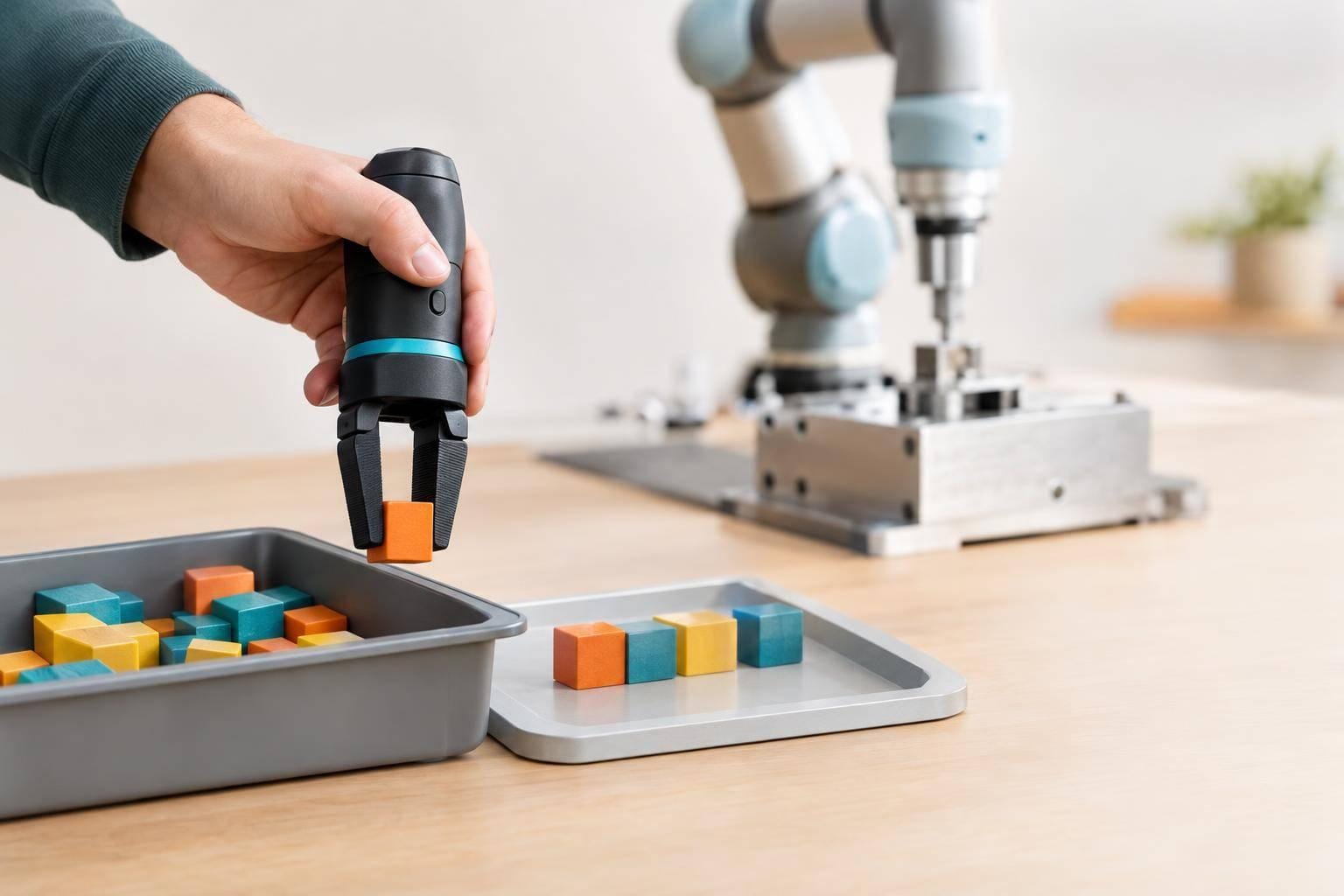
I’d use UMI for varied pick-and-place data and robot episodes when force, timing, or tight clearances decide success. For mixed tasks, I’d collect variation with UMI, then test transfer and record failures on the target robot.
UMI lets people record demonstrations with a handheld gripper - no robot needed during collection. One reported experiment collected 1,400 demonstrations across 30 locations in 12 person-hours. That’s collection volume, though - not a count of accepted, robot-ready episodes.
Here’s how I’d compare the options:
Quick Comparison
| Criterion | UMI demonstrations | Real robot episodes |
|---|---|---|
| Cost | Less robot time; processing and transfer work still count | Robot access, labor, maintenance, and downtime |
| Throughput | Depends on resets, tracking, and review | Depends on resets, safety checks, and recovery |
| Setting variety | Portable across locations and object layouts | Requires a suitable robot workspace |
| Deployment fit | Handheld motion needs robot testing | Records the robot’s execution limits |
| Sensing | Images, motion estimates, and gripper state | Robot state and commands; force or touch if equipped |
| Transfer | Needs matched views, actions, and calibration | Still needs held-out testing |
| Failure coverage | Human errors and scene challenges | Robot slips, delays, and contact failures |
| Collection risks | Tracking loss, dropped objects, and privacy | Collisions, pinch points, and equipment damage |
My baseline is <u>total cost per accepted episode</u>, including review and robot validation - not recording cost alone. I’d use robot-first collection for insertion, wiping, and slip recovery, and test handoff timing on the robot.
Before scaling, I’d set success and safety rules, keep evaluation cases separate, and require calibration records, data rights, and intervention logs from any collection partner. Report trial counts with success percentages: a large dataset alone doesn’t prove reliable robot performance.
What UMI and Real Robot Episodes Record
UMI: Human Demonstrations Without a Robot
Cost matters, but the bigger difference is what each method records. The original UMI setup used a trigger-activated, 3D-printed handheld parallel-jaw gripper with a wrist-mounted GoPro. First-person RGB video and visual-inertial tracking recover the gripper’s 6-DoF motion. Synchronizing that motion with the gripper’s open/close state turns the footage into action-labeled demonstration data.
These recordings provide visual cues, motion paths, and grasp-and-release timing. UMI variants may add depth, external tracking, or tactile sensing. The available signals depend on the hardware pipeline - not the UMI label alone.
Robot Episodes: Demonstrations and Policy Rollouts
Teleoperated demos record a human driving the robot. Policy rollouts record the learned policy driving it. Both log images, joint states, end-effector poses, commands, gripper status, and outcomes. Force/torque and tactile readings are available only if the platform has those sensors.
Robot episodes show execution constraints that handheld trajectories cannot directly record: reach limits, collision geometry, controller latency, and compliance. Rollouts also expose compounding errors and unstable grasps that demonstrations may hide. Comparing commands with measured motion helps separate unsuitable commands from limits in the robot’s execution.
Transfer Needs Matching Observations and Actions
Define the deployment interface first. Match gripper geometry, camera view, workspace reach, frames, units, control rate, and action limits. Check image–pose–gripper synchronization, flag tracking loss, and test transfer on the target robot.
Basic UMI recordings do not automatically include force or tactile feedback. Plain first-person video also lacks the synchronized poses and gripper states needed for action supervision. A successful demonstration does not prove that it will transfer to a robot.
Those signal differences drive the cost and throughput tradeoff in the next section.
Universal Manipulation Interface: In-The-Wild Robot Teaching Without In-The-Wild Robots
UMI Versus Robot Episodes: Cost, Throughput, and Quality
The comparison goes beyond what each method records. Which one produces usable data faster and at a lower cost for the task?
| Criterion | UMI capture | Real robot episodes | Task-dependent trade-offs |
|---|---|---|---|
| Collection cost | No robot needed during collection; processing and review still required. | Requires robot access, supervision, maintenance, and downtime. | Compare total cost, including adaptation - not equipment prices alone. |
| Accepted episodes per operator-hour | Depends on resets, tracking quality, and trajectory acceptance. | Depends on resets, safety checks, recovery, and hardware availability. | Use the same task and acceptance rules for both. |
| Environment diversity | Portable across locations, lighting conditions, and object layouts. | Requires suitable robot workspaces and setup at each site. | Favor breadth when changes in appearance and surroundings drive errors. |
| Deployment fidelity | Uses handheld-gripper execution. | Uses robot execution. | Favor fidelity when dynamics or tight clearances determine success. |
| Sensing | Typically includes visual observations, motion estimates, and gripper state. | Can include proprioception, force, tactile data, and controller events. | Collect the signals needed for training and failure analysis. |
| Transfer | Requires action conversion and robot validation. | Matches the collection hardware. | Include validation costs for either source. |
| Failure coverage | Records human mistakes and challenges in the surroundings. | Reveals deployment-specific slips, delays, and contact failures. | Keep useful failures, not just successes. |
| Collection hazards | Tracking loss, dropped objects, privacy risks, and operator inconsistency. | Collision, pinch, equipment damage, and downtime risks. | Weigh collection safety against finding transfer problems late. |
Use these metrics to weigh UMI’s breadth against robot fidelity. Start with full cost per usable episode, not capture cost alone.
Compare Cost per Usable Episode
Divide the full project cost by the number of accepted episodes. Count hardware, labor, resets, supervision, annotation, processing, storage, and rejected episodes. Record actual expenses in USD rather than relying on published hardware estimates.
Account for downstream adaptation, too: pose reconstruction, action conversion, perception adjustments, robot-specific fine-tuning, and validation. Report collection-only costs and costs including adaptation separately. This shows what usable training data costs through deployment validation.
Compare Throughput After Quality Checks
Accepted episodes per operator-hour = accepted episodes / total operator-hours.
Check image quality, pose reconstruction, timestamp alignment, gripper state, task-completion labels, and robot-executable trajectories. Label failures separately and keep those that teach useful failure modes.
The reported UMI cup-arrangement experiment collected 1,400 demonstrations across 30 locations in 12 person-hours. Those figures describe that collection effort - not a standardized rate of accepted, deployment-ready episodes.
In a pilot, log attempts, acceptances, rejection reasons, and operator-hours under the same review rules. Include setup, resets, breaks, and rejected attempts in the time count. Track results by task and location, not just overall.
Coverage across more settings helps pick-and-place tasks. Object handoffs and other contact-heavy tasks can justify slower robot collection to obtain force and failure data. Use those task-level differences to compare UMI-first collection with robot-first collection.
Choose the Data Source by Task
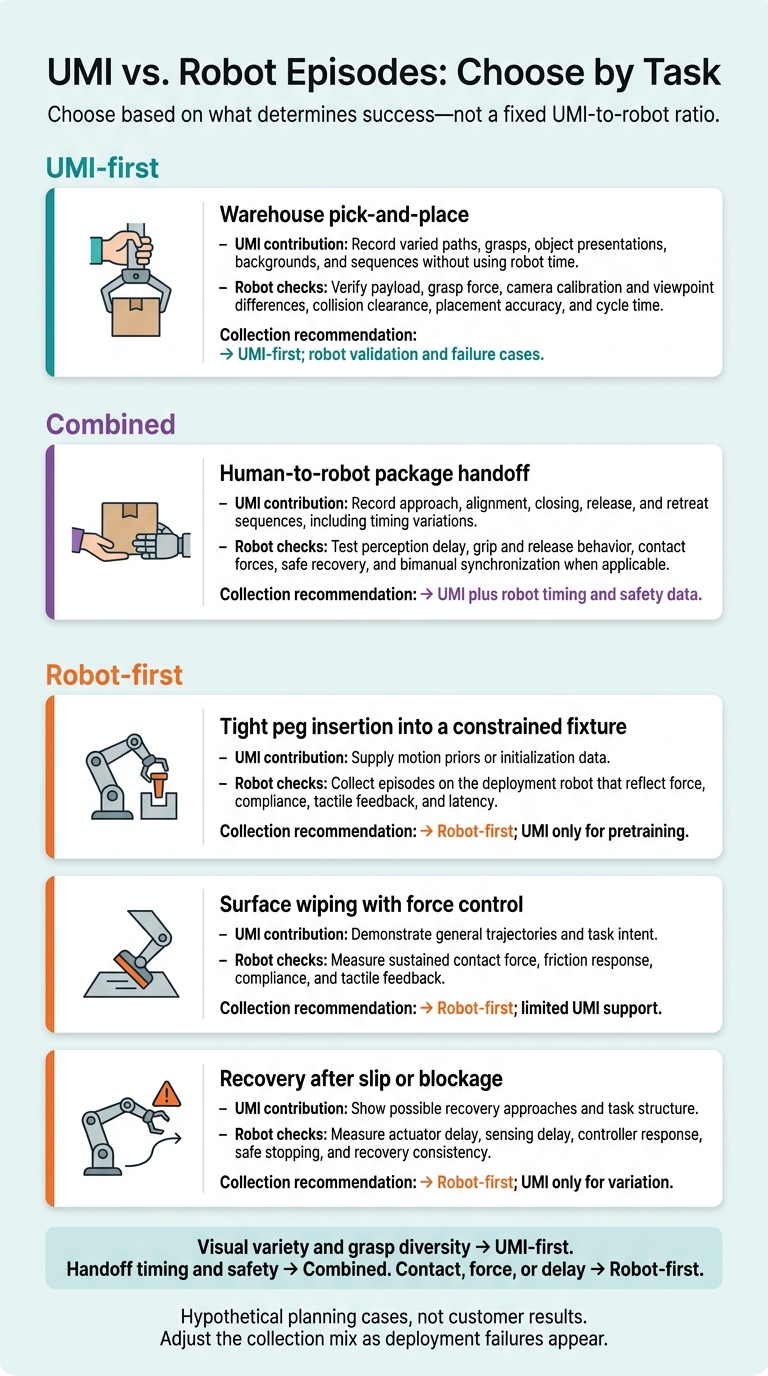
UMI vs. Robot Episodes: Choose by Task
Choose based on what determines success - not a fixed UMI-to-robot ratio. Match each task’s failure mode to the lowest-cost data source that can expose it. The scenarios below are hypothetical planning cases, not customer results. Adjust the collection mix as failures appear during deployment.
| Task | Value of UMI demonstrations | Required robot checks | Fastest path to usable training signal |
|---|---|---|---|
| Warehouse pick-and-place | Record varied paths, grasps, object presentations, backgrounds, and sequences without using robot time | Verify payload, grasp force, camera calibration and viewpoint differences, collision clearance, placement accuracy, and cycle time | UMI-first; robot validation and failure cases |
| Human-to-robot package handoff | Record approach, alignment, closing, release, and retreat sequences, including timing variations | Test perception delay, grip and release behavior, contact forces, safe recovery, and bimanual synchronization when applicable | UMI plus robot timing and safety data |
| Tight peg insertion into a constrained fixture | Supply motion priors or initialization data | Collect episodes on the deployment robot that reflect force, compliance, tactile feedback, and latency | Robot-first; UMI only for pretraining |
| Surface wiping with force control | Demonstrate general trajectories and task intent | Measure sustained contact force, friction response, compliance, and tactile feedback | Robot-first; limited UMI support |
| Recovery after slip or blockage | Show possible recovery approaches and task structure | Measure actuator delay, sensing delay, controller response, safe stopping, and recovery consistency | Robot-first; UMI only for variation |
Use UMI First for Variable Pick-and-Place
When visual variety and grasp diversity drive success, UMI provides fast, low-cost coverage of varied pick-and-place paths without using robot time. Save robot time for calibration and validation: check payload, grasp force, camera viewpoint, clearance, placement accuracy, and cycle time. Reject handheld paths that require poses the robot can’t reach or leave too little gripper clearance.
Validate Handoff Timing on the Robot
For handoffs, timing and release must be safe on the target robot. UMI records sequence variations, but robot delays or grip behavior can leave an object unsecured when the person lets go.
Validate timing and safety on the robot under its deployment safety controls. Check perception-to-actuation delay, contact forces, recovery after a missed grasp, and bimanual synchronization when applicable.
Use Robot Data First for Contact-Sensitive Tasks
When contact, force, or delay determines success, collect robot episodes first. UMI can teach approach paths or task intent, but it doesn’t supply the deployment robot’s force response, compliance, tactile feedback, or latency. Focus robot collection on episodes where force, compliance, or delay decides the outcome.
Conclusion: Build a Task-Based Data Plan
UMI reduces collection costs; robot episodes record hardware-specific behavior. Neither alone proves deployment reliability. Use cost per accepted episode as your baseline metric to decide whether UMI, robot episodes, or both should lead collection.
Start With UMI, Then Address Transfer Failures
For tasks that fit UMI, collect data across operators, objects, placements, grasps, speeds, and recoveries. Match policy inputs and actions to the target robot. Keep training objects and layouts separate from evaluation cases, and validate on the target robot before scaling collection.
Label transfer failures by category. Add targeted robot episodes to address robot-specific contact dynamics, sensing limits, actuator delays, and recovery behavior. Use failed transfer cases to shape the next robot trials.
Measure Reliability and Use Failures to Guide Collection
Define success metrics before testing. Track success rate, cycle time, recoveries, drops, collisions, and interventions under representative conditions. Report trial counts alongside percentages.
Keep episode provenance, calibration files, sensor settings, policy versions, and failure labels. Use failures and human corrections to guide collection. These metrics set the requirements for what a data-collection partner must deliver.
Define an Evlo.ai Data Collection Partnership
Build the partnership around the data source you need, the robot you’ll deploy on, and the validation rules that prove transfer. Specify task coverage, capture compatibility, quality checks, required sensors, acceptance criteria, licensing, and validation responsibilities. Limit the scope to current data-collection needs.
Use this checklist:
- Choose UMI-first for broad variation with reliably retargetable actions.
- Choose robot-first when force, tactile feedback, timing, narrow tolerances, safety, or hardware-specific dynamics dominate.
- Choose combined when UMI supplies variation and robot episodes address calibration, contact transitions, recovery, or sensing gaps.
Every plan needs held-out evaluation cases, safety and success criteria, calibration records, data rights, and intervention logs. Test on the target robot before deployment.
FAQs
How can I tell if UMI data will transfer to my robot?
Before training, check that UMI motions mapped to your robot’s joint space and coordinate frame stay within its reach, joint limits, and velocity constraints, and match its contact mechanics.
Treat these retargeted motions as unproven until you test them in closed-loop execution on the robot you’ll deploy. Jittery control or failure to recover from mistakes may point to a mismatch with the robot’s physical capabilities - or too little robot-specific action supervision.
How many robot trials do I need to validate UMI data?
Start with 30 to 50 episodes to set a baseline for your VLA training before scaling up. Confidence comes from data quality and repeatability - not a fixed number of trials. Use your first successful run as the quality benchmark, then check later runs against it for consistency.
When you scale to hundreds of episodes, keep recording standards strict. Include full sensor logs, intervention markers, and recovery behaviors.
When do transfer costs outweigh UMI’s capture savings?
UMI’s collection savings disappear when transferring handheld motion to a robot costs more than those savings. Inverse kinematics, calibration drift, embodiment mismatches, and retargeting errors add technical overhead.
For tasks that need precise control, contact forces, or complex recovery behaviors, fixing transfer failures can erase the savings. Direct teleoperation collects data within the robot’s native control loop, so it can be more cost-effective in these cases.